Advanced Tables
Supercharge your Filament tables with powerful features like user customizable views, enhanced filter tabs, reorderable columns, convenient view management, and more. Compatible with Resource Panel Tables, Relation Managers, Table Widgets, and Table Builder!
README
Advanced Tables v5

Introduction
Advanced Tables is a premium plugin for Filament that supercharges your tables with powerful features like user-customizable views, quick filters, multi-column sorting, advanced table searching, convenient view management, and more.
Video
Check out a short video of some of the powerful features included in Advanced Tables

Demo
See all the functionality that Advanced Tables has to offer in an interactive demo. It also includes a Configuration Playground so you can see many of the configuration options you can use to adapt the plugin to your needs.
About
At its core, Advanced Tables allows you to combine filters, grouping, toggled columns, and more into custom views that are just one click away. Users no longer have to rebuild their views each time they need to focus on a certain subset of their data. Advanced Tables gives your users fast access to the information they need.
With Advanced Tables, views can be set up in advance by the developer or they can be created on-the-fly by your end-users using Quick Save. And with Advanced Table’s View Manager, your users will be able to conveniently create, apply, edit, share, and sort their views right from the resource or table.
Best of all, Advanced Tables works with all of your Filament tables including Resource Tables, Relation Managers, Table Widgets, and standalone Table Builder.
Features
- Allow your users to save their filters, toggled columns, grouping, and more in customizable User Views
- Developers can create Preset Views in code and deploy them for their clients
- Preset Views can also include filters, grouping, toggled columns, and column order
- The Quick Save button means saving custom views is just one click away
- (NEW) Managed Default Views
- Create powerful queries with Advanced Filter Builder
- Choose from six different themes
- (NEW) Table loading skeleton overlay
- (NEW) Sort by multiple table columns with Multi Sort
- (NEW) Quickly access your filters with Quick Filters
- (BETA) Powerful search with constraints and column selection using Advanced Search
- Supports Multi-tenancy
- Includes a User Views Resource so your admins can manage all user views
- Admins can create global favorite views that will appear for all users
- Powerful policy integration gives you complete control
- Includes an approval system for User Views
- More than 60 configuration options to completely customize Advanced Tables to your needs
- Supports Panel Resource Tables, Relation Managers, Table Widgets, and Standalone Table Builder
Screenshots
Favorites Bar

View Manager
Quick Save

User Views Resource with Approval System

View Manager in Table Toolbar

Dark mode

Themes
Github theme (New)
Filament theme (New)

Links theme

Links Simple theme

Tabs theme

Tabs Simple theme

Installation
Thank you for purchasing Advanced Tables!
Below you'll find extensive documentation on installing and using this plugin. Of course, if you have any questions, find a bug, need support, or have a feature request, please don't hesitate to reach out to me at [email protected].
Requirements
Advanced Tables requires PHP 8.2+, MySQL 5.7.8+, Postgres, or SQL Server 2017+, Filament 5.0.0+, and Laravel 11.28+.
Note on SQL Server: SQL Server support requires the
pdo_sqlsrvPHP extension and Microsoft ODBC Driver 18. SQL Server 2016 SP1 may work (it introduced the requiredJSON_VALUEfunction), but only 2017+ is supported, matching Laravel's own minimum. Because SQL Server disallows multiple cascade paths, thefilament_filter_set_usertable'suser_idforeign key is created withoutON DELETE CASCADEon SQL Server, so delete a user'sfilament_filter_set_userrows before deleting the user. Note that Filament itself officially tests against MySQL, Postgres, and SQLite only, so SQL Server support for Filament's own table features is on a best-effort basis.
New Installation
Purchasing a license
Advanced Tables has partnered with Privato to handle payment, licensing, and distribution. After purchase, you will receive an email from Privato with your license key.
Installing with Composer
To install Advanced Tables you'll need to add the package to your composer.json file:
composer config repositories.archilex composer https://advancedtables.privato.pub/composer
or
{
    "repositories": [
        {
            "type": "composer",
            "url": "https://advancedtables.privato.pub/composer"
        }
    ],
}
Then configure authentication:
composer config --auth http-basic.advancedtables.privato.pub "[license-email]" "[license-key]"
Finally, install the package
composer require archilex/filament-filter-sets
Advanced Tables ships its Tailwind stylesheet as source so it can compile against your application's Filament theme and color configuration. The package does not register a precompiled CSS file, so both Panel Builder and standalone Table Builder installations must import resources/css/plugin.css and compile their application assets as described below.
Setting up Advanced Tables in Filament Panels (including Relation Managers, Table Widgets, and Panel Pages)
If using Filament's standalone Table Builder, please refer to the Filament Table Builder setup instructions
-
Publish and run the migrations
Important: If you are using a User class other than Laravel's default
User::classor a user's table other than Laravel's defaultusersyou should update these configurations before migrating.php artisan vendor:publish --tag="advanced-tables-migrations" php artisan migrate -
Publish the language files
Optionally, you may publish the language files:
php artisan vendor:publish --tag="advanced-tables-translations" -
Add Advanced Tables to your Filament Panel
Add Advanced Tables to a panel by instantiating the plugin class and passing it to the
plugin()method of the configuration:use Archilex\AdvancedTables\Plugin\AdvancedTablesPlugin; public function panel(Panel $panel): Panel { return $panel ->plugins([ AdvancedTablesPlugin::make() ]) } -
Add the
HasViewstrait to yourUser::classuse Archilex\AdvancedTables\Concerns\HasViews; class User { use HasViews; } -
Integrate Advanced Table's Tailwind and css files
IMPORTANT: Filament v5 requires you create a custom theme to support a plugin's additional Tailwind classes. Be sure to follow those instructions before continuing with this step.
After you have created your custom theme, add Advanced Tables' views to your new theme's
theme.cssfile usually located inresources/css/filament/admin/theme.css:@import '../../../../vendor/filament/filament/resources/css/theme.css'; @import '../../../../vendor/archilex/filament-filter-sets/resources/css/plugin.css'; // Add @source '../../../../app/Filament'; @source '../../../../resources/views/filament'; @source '../../../../vendor/archilex/filament-filter-sets'; // Add -
Compile
Next, compile your theme:
npm run buildFinally, run the Filament upgrade command:
php artisan filament:upgrade -
Setting up tenancy
If you are installing Advanced Tables into a multi-tenancy application, please refer to the separate instructions to set up multi-tenancy.
After you've successfully installed Advanced Tables, you may review the Getting Started guide to learn how to add Advanced Tables to your resources, relation managers, pages, and/or table widgets.
Setting up Advanced Tables in Filament Table Builder
If using Filament Panels, please refer to the Filament Panels setup instructions.
Important: Beyond the normal requirements, using Advanced Tables with Filament Table Builder requires you have some type of user authentication system such as Laravel Breeze since each view belongs to the currently authenticated user.
-
Publish the config files
While optional, it is recommended you publish the config file to be able to fully customize Advanced Table. However, If you are using a User class other than Laravel's default
User::classor a user's table other than Laravel's defaultusersyou should publish the config file and update these configurations before migrating.php artisan vendor:publish --tag="advanced-tables-config" -
Publish the language files
Optionally, publish the language files:
php artisan vendor:publish --tag="advanced-tables-translations" -
Publish and run the migrations
php artisan vendor:publish --tag="advanced-tables-migrations" php artisan migrate -
Add the
HasViewstrait to yourUser::classuse Archilex\AdvancedTables\Concerns\HasViews; class User { use HasViews; } -
Integrate Advanced Tables's custom css file
Add the following line to the top of your
app.cssfile:@import '../../vendor/archilex/filament-filter-sets/resources/css/plugin.css'; // Add @source '../../vendor/archilex/filament-filter-sets'; // Add -
Compile
Next, compile your theme:
npm run buildFinally, run the Filament upgrade command:
php artisan filament:upgrade -
Setting up tenancy
If you are installing Advanced Tables into a multi-tenancy application, please refer to the separate instructions to set up multi-tenancy.
After you've successfully installed Advanced Tables, you may review the Getting Started guide to learn how to add Advanced Tables to your tables.
Deploying
When deploying, it is not advised to store your `auth.json`` file inside your project's version control repository. To store your credentials on your deployment server you may create a Composer auth.json file in your project directory using the following command:
composer config http-basic.advancedtables.privato.pub "[license-email]" "[license-key]"
Tip: Make sure the
auth.jsonfile is in.gitignoreto avoid leaking credentials into your git history.
If you are using Laravel Forge, you don't need to create the auth.json file manually. Instead, you can set the credentials on the Composer Package Authentication screen of your server.
Fixing deployment errors
-
The most common mistake when deploying, is not adding the colon (:) followed by the domain you registered.
license_key:domain. Please review the instructions above. -
If you have set up everything correctly and are getting the error:
../advanced-tables-for-filament-3.7.29.zip' URL required authentication (HTTP 401). You must be using the interactive console to authenticateerror, you may need to ssh into your server and clear your composer global cache withcomposer clear-cache
Upgrading to v5
Before upgrading to Advanced Tables v5, first be sure you are familiar with Filament's upgrade guide and know what changes will be needed along the way.
-
Update the dependency
Before running Filament's upgrade script, you'll want to update your
composer.jsonfile:"archilex/filament-filter-sets": "^5.0",Then proceed with running Filament's upgrade script.
Note: If you are upgrading from Filament v4 then you may stop here. However, if you are updating from Filament v3 directly to v5, then you should continue with the steps below. You should also be familiar with Filament's v4 upgrade guide.
-
Integrate Filter Set's Tailwind and css files
Follow Filament's instructions to upgrade your custom theme and add Advanced Tables' css to your theme:
@import '../../../../vendor/filament/filament/resources/css/theme.css'; @import '../../../../vendor/archilex/filament-filter-sets/resources/css/plugin.css'; // Add @source '../../../../app/Filament'; @source '../../../../resources/views/filament'; @source '../../../../vendor/archilex/filament-filter-sets'; // Add -
Publish and run the migrations
Filament v4 has significant changes to the table columns structure to support reorderable columns and your current user views need to be upgraded to support the new structure. Publish and run the migration to update your user views to support this new structure.
IMPORTANT: Backup your user views database table called
filament_filter_setBEFORE proceeding.php artisan vendor:publish --tag="advanced-tables-migrations" php artisan migrate -
Compile
Next, compile your theme:
npm run buildand run the Filament upgrade command:
php artisan filament:upgrade
Important Changes
Listed below are changes that have occurred in v4 that may require attention by the developer.
Advanced Indicators
Advanced Indicators has been renamed to Quick Filters. If you are using this feature from v3, you will need to update your plugin config from advancedIndicatorsEnabled() to quickFiltersEnabled().
Default View
In v3, the default view was an html button that was added to the front of the favorites bar. In v4 this has been replaced with a default Preset View. This allows the default view to appear in the View Manager and, if enabled, allows the user to select a different default view.
If you have a Preset View with the key default and also want to display the internal default view, then you will need to rename your default key to something different as your preset view will override the internal default view.
If, per previous recommendations for Managed Default Views, you had disabled the default view and created a Preset View with the key default, this is no longer needed. You can re-enable default views, and remove the default Preset View you created. You can customize the default view using the existing internal methods
Reorderable Columns
To support the broader community, I've ported Advanced Table's reorderable columns feature to Filament! You can enable reorderable columns by adding ->reorderableColumns() to your table:
    return $table
        ->reorderableColumns()
Getting started
Adding Advanced Tables to your table
To use Advanced Tables you will need to add the AdvancedTables trait to the appropriate class depending on whether you intend to use it on a Resource Table, Simple Resource Table, Table Widget, or Panel Page.
Important: For standalone Table Builder users, please refer to the documentation for using Advanced Tables with Table Builder.
Resource tables
To add Advanced Tables to a normal Resource table, add the AdvancedTables trait to the List page of your Resource:
use Archilex\AdvancedTables\AdvancedTables;

class ListProducts extends ListRecords
{
    use AdvancedTables;
Simple (modal) resource tables
To add Advanced Tables to a Simple (modal) resource table, add the AdvancedTables trait to the Manage page:
use Archilex\AdvancedTables\AdvancedTables;

class ManagesCustomers extends ListRecords
{
    use AdvancedTables;
Table Widgets
To add Advanced Tables to a Table Widget, add the AdvancedTables trait to the Table widget:
use Archilex\AdvancedTables\AdvancedTables;

class LatestOrders extends BaseWidget
{
    use AdvancedTables;
Panel Pages
To add Advanced Tables to a Custom Resource Page or Custom Page, you need to add the AdvancedTables trait to your component. However, as Advanced Tables overrides multiple methods in Filament's InteractsWithTables trait, adding the AdvancedTables trait to the table will cause a conflict.
For convenience, Advanced Tables includes a PanelPage and CustomPage class which you can use to quickly get up and running. Of course, there are multiple ways to prevent the trait conflict. The important part is to ensure that the AdvancedTables trait is used on a class that extends another class which contains Filament's InteractsWithTables trait.
Custom Resource Page
For Custom Resource Page you should extend the PanelPage class:
use Archilex\AdvancedTables\AdvancedTables;
use Archilex\AdvancedTables\Livewire\PanelPage;

class MyCustomResourcePage extends PanelPage
{
    use AdvancedTables;

    ...
Custom Page
For Custom Page you should extend the CustomPage class:
use Archilex\AdvancedTables\AdvancedTables;
use Archilex\AdvancedTables\Livewire\CustomPage;

class MyCustomPage extends CustomPage
{
    use AdvancedTables;

    ...
Adding the view component to your blade file
You also need to add the Favorites Bar component to your panel page's blade file:
<div class="flex flex-col gap-6">
    <x-advanced-tables::favorites-bar />

    {{ $this->table }}
</div>
The Favorites Bar expects a space of 24px to properly display it's links. This can easily be achieved with Tailwind's space-y-6 class as shown above.
Core Concept: User Views vs Preset Views
Advanced Tables supports both User Views and Preset Views. Understanding the difference is important to choosing if one or both is appropriate for your application.
User Views are created by your end-users using your application's UI. An end-user chooses the appropriate filters, toggled columns, column order, column sort, table grouping, etc. to build the view they need. Then they use Advanced Tables to save that view so they have easy access to it in the future. Since each user has different needs, this allows for infinite customization within your application. (And less work for developers!)
Preset Views are views that you the developer write in code and are then available to all your users, (or the users you authorize). Preset Views exposes a query() api which allows you to modify the underlying eloquent query. This means you can "filter" a table's data without needing to have that filter on your table.
However, while being able to modify the underlying eloquent query is powerful, and in some cases might be the only way to filter a table, Advanced Tables provides a filters() api which allows you to apply values to your existing table filters. This, in turn, offers a better UX for your end-users as they will then see filter indicators in the table and will better understand how a Preset View is modifying the data.
Whether used independently or together, User Views and Preset Views give your end-users quick access to the data they need.
User Views
User Views are views created by your end-users using your application's UI. An end-user chooses the appropriate filters, toggled columns, column order, column sort, table grouping, etc. to build the view they need. Then they use Advanced Tables to save that view so they have easy access to it in the future. Since each user has different needs, this allows for infinite customization within your application. (And less work for developers!)
Saving the current table configuration into a User View
To save a User View:
- On your table, apply any combination of filters, toggled columns, sort order, grouping, etc.
- After customizing your table, click the
+in the top right corner of the table. - Choose a name, icon, and color for the view.
- Choose if you want the view to be added to your favorite views, made public for other users, or be a global favorite.
- Save the view
When creating a user view the following configurations will be saved:
- current filters,
- table search query,
- column search queries (if enabled)
- column sort order
- toggled columns
- column order
- grouping
After creation, the View Manager allows a user to sort, edit, replace, or delete a User View.
User View configurations
Advanced Tables offers multiple ways to customize User Views. Unless specified otherwise, these options can be configured directly on the AdvancedTablesPlugin object inside your PanelProvider:
public function panel(Panel $panel): Panel
{
    return $panel
        ->plugins([
            AdvancedTablesPlugin::make()
                ->userViewsEnabled(false)
        ])
Disable User Views
User Views are enabled by default. However, if you are not going to use User Views, you should disable them to prevent unnecessary database queries:
AdvancedTablesPlugin::make()
    ->userViewsEnabled(false)
Configuring the User View model
The UserView model is responsable for storing all the configuration settings for each User View. If you need to extend this class, you may pass your custom class to userView():
AdvancedTablesPlugin::make()
    ->userView(MyCustomUserView::class)
Configuring the Managed User View class
The ManagedUserView model is responsable for managing the visibility and sort order between a User and a UserView. If you need to extend this class, you may pass your custom class to managedUserView():
AdvancedTablesPlugin::make()
    ->managedUserView(myCustomManagedUserView::class)
Disabling the icon picker
You may disable the icon picker in the Save View/Edit View slideOver by passing false to the quickSaveIconSelect() method:
AdvancedTablesPlugin::make()
    ->quickSaveIconSelect(false)
You may also use policies to configure who can use the icon picker.
Excluding solid or outline icons
By default the icon picker loads all of heroicons solid and outline icons. You may exclude either solid or outline icons by passing false to either the quickSaveIncludeOutlineIcons() or quickSaveIncludeSolidIcons() methods:
AdvancedTablesPlugin::make()
    ->quickSaveIncludeSolidIcons(false)
Important: Since icons are cached, after updating you will need to clear your cache to see the change with
php artisan cache:clear.
Configuring the color picker colors (New)
By default, the color picker will include Filament's default colors, primary, success, info, warning, danger, gray. To configure the available colors, pass an array of colors to ->quickSaveColors():
AdvancedTablesPlugin::make()
    ->quickSaveColors([
        'primary',
        'warning',
        'gray',
    ])
You may also include any extra colors you have previously registered in Filament:
AdvancedTablesPlugin::make()
    ->quickSaveColors([
        'primary',
        'success',
        'indigo',
        'pink',
        'zinc',
    ])
Disabling the color picker
You may disable the color picker in the Save View/Edit View slideOver by passing false to the ->quickSaveColorPicker() method:
AdvancedTablesPlugin::make()
    ->quickSaveColorPicker(false)
You may also use policies to configure who can use the color picker.
Disabling making a User View favorite
By default, when creating/editing a view, users can favorite their views by toggling on Add to favorites. Favorite views are added to the Favorites Bar and appear above the table. You may disable the ability to make a User View favorite by passing false to the ->quickSaveMakeFavorite() method:
AdvancedTablesPlugin::make()
    ->quickSaveMakeFavorite(false)
You may also use policies to configure who can make views favorite.
Disabling making a User View public
By default, when creating/editing views, users can share their views with other users by toggling on make public. Public views will appear in other user's View Manager where they can then be added to their favorites if they wish.
Advanced Tables also has an approval system so admins can approve public views before they are visible to other users.
You may disable the ability to make a User View public using the ->quickSaveMakePublic() method:
AdvancedTablesPlugin::make()
    ->quickSaveMakePublic(false)
You may also use policies to configure who can make views public.
Enabling making a User View a global favorite
Making a User View a global favorite automatically adds it to every user's Favorites Bar. As this is an action usually reserved for admin users, this functionality is turned off by default. You may enable the ability to make a User View a global public using the ->quickSaveMakeGlobalFavorite() method:
AdvancedTablesPlugin::make()
    ->quickSaveMakeGlobalFavorite()
After enabling, you may use policies to further configure who can make views global favorites.
Advanced Tables also has an approval system so admins can approve global favorite views before they are visible to other users.
Disabling management of global favorite views
As previously mentioned, when an admin or user creates a global favorite view, that view is added to all user's Favorites Bar. By default, these global views can then be managed (ie. sort and favorite/un-favorite) independently by each user. If you need to disable management of global User View you may do so by passing false to the ->globalUserViewsManageable() method:
AdvancedTablesPlugin::make()
    ->globalUserViewsManageable(false)
By disabling globalUserViewsManageable, global favorites will be not be able to be sorted nor removed from a user's Favorites Bar.
Configuring new global user view's sort position
When global favorite management is disabled, all global favorites are added before any User Views that a user has favorited. However, when global view management is enabled, a user is then free to reorder them, placing global views before, after, or in between their own user-favorited views. Now, when a new global view is created by an admin, a decision needs to be made as to whether this new global view should be placed before or after the user's previously ordered favorite views. By default new global views are positioned before a user's favorited views, however this can be configured using the newGlobalUserViewSortPosition() method:
AdvancedTablesPlugin::make()
    ->newGlobalUserViewSortPosition('after')
Showing/hiding helper text
When creating/editing User Views you may show/hide helper text to help guide your end-users during the process. By default, helper text is only displayed for the Favorite, Public, and Global Favorite toggles.
AdvancedTablesPlugin::make()
    ->quickSaveNameHelperText(false)
    ->quickSaveFiltersHelperText(false)
    ->quickSavePublicHelperText(false)
    ->quickSaveFavoriteHelperText(false)
    ->quickSaveGlobalFavoriteHelperText(false)
You may configure the wording of each helper text by modifying the language file.
Approving public and global favorite User Views
Advanced Tables includes a simple approval mechanism to allow admins to approve/reject public and global favorites before they are made available to other users.
Advanced Tables uses Filament's enum to define the Status constants:
enum Status: string implements HasLabel, HasColor
{
    case Approved = 'approved';
    case Pending = 'pending';
    case Rejected = 'rejected';
To use the approval system, first, set the User View's initialStatus() to either Status::Approved, Status::Pending, or Status::Rejected. By default, each User View has an initial status of Status::Pending:
AdvancedTablesPlugin::make()
    ->initialStatus(Archilex\AdvancedTables\Enums\Status::Rejected)
Then, set the minimumStatusForDisplay() to either Status::Approved, Status::Pending, or Status::Rejected. By default, the minimal status is Status::Pending:
AdvancedTablesPlugin::make()
    ->minimumStatusForDisplay(Archilex\AdvancedTables\Enums\Status::Approved)
When a User View's status is the equal or greater than the minimumStatusForDisplay(), it will be displayed to other users.
Advanced Tables default setting of Pending for both Status and minimumStatusForDisplay means that all public and global User Views will automatically be displayed to other users, effectively bypassing the approval system. Changes only need to be made if you would like to enable the approval system.
To update the status of a User View, admin should use the User Views Resource.
Of course, Laravel's Observers can be implemented on the UserView model to further expand the approval system with database or email notifications.
Persisting the active User View to Session
Persisting the active User View to the session allows a user to navigate away from the table and then return to the table with the same view selected. You may enable this by using the ->persistActiveViewInSession() method:
AdvancedTablesPlugin::make()
    ->persistActiveViewInSession()
Preset Views
In addition to User Views, developers can also programmatically create Preset Views in code that can be deployed to all users. Preset Views exposes a query() api which allows you to modify the underlying eloquent query. This means you can "filter" a table's data without needing to have that filter on your table.
However, while being able to modify the underlying eloquent query is powerful, and in some cases might be the only way to filter a table, Advanced Tables provides a defaultFilters() api which allows you to apply values to your table filters. This, in turn, offers a better UX for your end-users as they will then see filter indicators in the table and will better understand how a Preset View is modifying the data.
For more information on the difference between User Views and Preset Views please refer to Core Concept: User Views vs Preset Views
Filament Filter Tabs
Filament v3 introduced Filter Tabs which also allows developers to programmatically filter their data in tabs. While similar, Advanced Tables' Preset Views offers multiple additional features:
- Allow users to hide, favorite, and/or reorder Preset Views (New)
- Combine with User Views for one consistent UI
- Relation manager support
- Table builder support
- Multiple themes
- Include filters
- Include toggled columns
- Include sorting column and direction
- Include reordered columns
- Persist the active Preset View to the session
- Color options
- Visibility options
Creating a Preset View
To create a Preset View, add the getPresetView() method to your List*, Manage*, or table widget class.
use Archilex\AdvancedTables\Components\PresetView;
use Archilex\AdvancedTables\AdvancedTables;

class ListOrders extends ListRecords
{
    use AdvancedTables;

    public function getPresetViews(): array
    {
        return [
            'processing' => PresetView::make()
                ->modifyQueryUsing(fn ($query) => $query->where('status', 'processing')),
            'delivered' => PresetView::make()
                ->modifyQueryUsing(fn ($query) => $query->where('status', 'delivered')),
        ];
    }
}
The Preset View modifyQueryUsing() method modifies your original eloquent query by applying the scopes and conditions you configure.
Customizing the Preset View label
By default the array keys will be used as the labels for each Preset View. This may be configured by passing a label into the make() method:
'processing' => PresetView::make('Processing orders')
    ->modifyQueryUsing(fn ($query) => $query->where('status', 'processing'))
    ->favorite(),
If you prefer, you may also use the label() method:
'processing' => PresetView::make()
    ->label('Processing orders')
    ->modifyQueryUsing(fn ($query) => $query->where('status', 'processing'))
    ->favorite(),
Adding a Preset View to the Favorites Bar
By default, Preset Views are added to the View Manager in the Preset View section. To add a Preset View to the Favorites Bar use the favorite() method:
'processing' => PresetView::make()
    ->modifyQueryUsing(fn ($query) => $query->where('status', 'processing'))
    ->favorite(),
Due to the fundamental difference between User Views and Preset Views, favorited Preset Views always appear before a User Views in the Favorites Bar.
Adding an icon
Similar to User Views, Preset Views may have icons:
'processing' => PresetView::make()
    ->modifyQueryUsing(fn ($query) => $query->where('status', 'processing'))
    ->icon('heroicon-o-refresh'),
By default the icon will be displayed before the name. This can be configured in the Favorites Bar settings.
Display the Preset View with a color
Similar to User Views, Preset Views may be displayed in a color.
'processing' => PresetView::make()
    ->modifyQueryUsing(fn ($query) => $query->where('status', 'processing'))
    ->color('warning'),
You may choose any of Filament's default colors, primary, success, info, warning, danger, gray.
You may also include any extra colors you have previously registered in Filament:
Adding a badge
Preset Views can display a badge after the label by passing a string into the badge() method:
'processing' => PresetView::make()
    ->badge(Order::query()->where('status', 'processing')->count())
Changing the badge color
The color of a badge may be changed using the badgeColor() method:
'processing' => PresetView::make()
    ->badge(Order::query()->where('status', 'processing')->count())
    ->badgeColor('warning')
Tip: If you want to display multiple badges, you should generate one query separately and then use Laravel collections to filter and count them.
Adding a tooltip
Preset Views can display a tooltip when hovered over in the Favorites Bar by passing a string into the tooltip() method.:
'lowStock' => PresetView::make()
    ->modifyQueryUsing(Product::query()->where('price', '>', 1000)->where('qty', '<', 5))
    ->tooltip('High price products with low stock')
Showing or hiding
You may conditionally show or hide Preset Views for certain users using either the visible() or hidden() methods, passing a closure:
'processing' => PresetView::make()
    ->visible(fn (): bool => auth()->isAdmin())
You can also use a Laravel policy to manage visibility:
'processing' => PresetView::make()
    ->visible(fn (Order $record): bool => auth()->user()->can('viewProcessing', $record)),
And then in OrderPolicy:
public function viewProcessing(User $user)
{
    return $user->isAdmin();
}
Tip: If your policy is not working, be sure to register it in
AuthServiceProvideras sometimes Laravel does not successfully auto-register policies.
Applying filters
You can apply values to your table filters from your Preset Views with the defaultFilters() method:
'new_this_quarter' => PresetView::make()
    ->defaultFilters([
        'status' => [
            'value' => 'new',
        ],
        'created_at' => [
            'range' => 'this_quarter',
        ],
    ])
Using the defaultFilters() api gives your users a better understanding of how a Preset View is filtering the data by turning on Filament's filter indicators.
Tip: The easiest way to know how to properly form your filter array is to apply the desired filter to your table and then
dd($this->tableFilters)at the top of thegetPresetViews()method.
Applying filters with Filter Builder
If you are using Advanced Filter Builder, you should use the following syntax to define your default filters:
'follow_up' => PresetView::make()
    ->defaultFilters([
        'advanced_filter_builder' => [
            [ // filter group 1
                'status' => [
                    'value' => 'new'
                ],
                'created_at' => [
                    'range' => 'this_month',
                ],
            ],
            [ // filter group 2 (ie: "or")
                'status' => [
                    'value' => 'cancelled'
                ],
                'created_at' => [
                    'range' => 'last_month',
                ],
            ],
        ],
    ])
If the example above, this will create the following query scope: new orders made this month OR cancelled orders made last month.
Tip: The easiest way to know how to properly form your filter array is to apply the desired filter to your table and then
dd($this->tableFilters)at the top of thegetPresetViews()method.
If you are using the builder's Column Filters, then you will need to add the applicable values. For example:
'this_quarter' => PresetView::make()
    ->defaultFilters([
        'advanced_filter_builder' => [
            [ // filter group 1
                'created_at' => [
                    'column' => 'created_at',
                    'operator' => 'in_the_last',
                    'value' => 1,
                    'unit' => 'quarters',
                ],
            ],
        ],
    ])
Tip: Many of the column filters have multiple
keyssuch asdate_start,date_end, etc. You only need to add the values that you are setting for the filter.
Applying default grouping
You can apply one of your table groupings to your Preset View with the defaultGrouping() method:
'new_this_quarter' => PresetView::make()
    ->defaultGrouping('created_at', 'desc')
Toggling and reordering columns
Preset Views can toggle and reorder columns as well using the defaultColumns() method:
'processing' => PresetView::make()
    ->defaultColumns(['id', 'status', 'customer.name', 'created_at'])
Columns will be saved in the following ways:
- If Reorderable Columns are enabled, Advanced Tables will sort the columns in the order they are included in the
defaultColumns()array. - If a column is not included in the array and is
toggleable(), it will be hidden. - If a column is not included in the array and is not
toggleable(), it will be added to the end of the table.
Setting a default table sort
If a column is sortable, you may choose it as the default sort column for your table using the defaultSort() method:
'processing' => PresetView::make()
    ->defaultSort('total_price')
By default, sorting is ascending, but you may choose descending as well ->defaultSort('total_price', 'desc').
Tip: While it is possible to add
orderBy()to your query to sort your table, usingdefaultSort()is recommended as it will correctly show the sorting indicator on the table column.
Setting a default table multi-sort (New)
If Multi-Sort is enabled, you may multi-sort your preset views through the same defaultSort() method. Just pass an array of columns and their sort direction to defaultSort():
'processing' => PresetView::make()
    ->defaultSort([
        'is_visible' => 'desc',
        'price' => 'asc'
    ])
Loading a default Preset View
You may choose one of your Preset Views as the default view when loading the page by using the default() method:
'processing' => PresetView::make()
    ->default()
default() can take a callback which can allow you to dynamically choose which Preset View is the default based on the conditions you choose. The first Preset View that returns true will be the view that is loaded by default.
Preserving user selected filters, toggled columns, sort column, and sort direction
By default, when an end-users clicks a Preset View, the filters, toggled columns, sort column, and sort direction that a user has already applied to a table will be removed in favor of the Preset View's configuration. This is usually the desired behavior as Preset Views are meant to be customized views into data. However in some instances, you may wish to preserve the user's selected filters, columns, etc. To do this you may use preserveAll().
'processing' => PresetView::make()
    ->preserveAll()
If you need more fine-grained control you may use the individual methods:
'processing' => PresetView::make()
    ->preserveFilters()
    ->preserveToggledColumns()
    ->preserveSort()
Note: By preserving a user's selection you are in turn removing the option for a Preset View to always take a user to that view's predefined configuration as that view is now affected by the user.
Preset Views configurations
Advanced Tables offers multiple ways to customize Preset Views. Unless specified otherwise, these options can be configured directly on the AdvancedTablesPlugin object inside your PanelProvider:
public function panel(Panel $panel): Panel
{
    return $panel
        ->plugins([
            AdvancedTablesPlugin::make()
                ->createUsingPresetView(false)
        ])
Configuring the Managed Preset View class
The ManagedPresetView class is responsable for storing the visibility and sorting configurations between a User and a PresetView If you need to extend this class, you may pass your custom class to managedPresetView():
AdvancedTablesPlugin::make()
    ->managedPresetView(myCustomManagedPresetView::class)
Disabling Preset View management
By default, Preset Views will be sorted in the order they are added to the getPresetViews() array. Similarly, any Preset View that has the favorite() method will be displayed by default in the end-user's Favorites Bar, and any Preset View without favorite() will be displayed in the View Manager.
By default, users can sort Preset Views as well as add/remove them from the Favorites Bar. If you need to disable Preset View management you may do so by passing false to the ->globalUserViewsManageable() method:
AdvancedTablesPlugin::make()
    ->presetViewsManageable(false)
By disabling presetViewsManageable, Preset Views will be not be able to be sorted nor added/removed from a user's Favorites Bar.
Configuring new Preset Views sort position
When Preset View management is enabled, a user is free to reorder, add or remove them from their Favorites Bar. Now, when a new Preset View is added in code and then deployed to the user, a decision needs to be made as to whether this new Preset View should be placed before or after the user's previously ordered Preset Views. By default new Preset Views are positioned before a user's current Preset View ordering, however this can be configured using the newPresetViewSortPosition() method:
AdvancedTablesPlugin::make()
    ->newPresetViewSortPosition('after')
Persisting the active Preset View to Session
Persisting the active Preset View to the session allows a user to navigate away from the table and then return to the table with the same view selected. You may enable this by using the ->persistActiveViewInSession() method in your Panel Provider:
AdvancedTablesPlugin::make()
    ->persistActiveViewInSession()
Distinguishing between Preset Views and Users Views
Enabling both Preset Views and User Views has the potential of causing confusion with end-users if they create a User View on top of a Preset View. This is because a Preset View can "filter" the table using the query() method which doesn't correspond to any filter on the table. This means that when a user builds a User View using a Preset View as its base, there's no way for the user to "turn off" the filter scope.
While Advanced Tables has multiple options you can use to mitigate these potential issues, the easiest way around this issue is to not use the query() method and instead use the defaultFilters() method. This way, even when a user creates a User View based on a Preset View, they are in full control of data.
However, if you still need, or prefer, to use the query() method to filter your data, you can use these options to help avoid confusion. These configurations should be applied to the AdvancedTablesPlugin in your Panel Provider.
Disable User View creation
You can disable the creation of User Views all together when a Preset View is selected. If disabled, when a user clicks the Quick Save Button, a Filament notification will be displayed explaining that this action is not possible. The text of the notification can be configured in the language file.
AdvancedTablesPlugin::make()
    ->createUsingPresetView(false)
Display a divider line
You can optionally display a divider line between Preset Views and User Views to help visually distinguish between the two.
AdvancedTablesPlugin::make()
    ->favoritesBarDivider()
Display a lock icon
You can optionally display an icon next to a Preset View to help visually distinguish between the two.
AdvancedTablesPlugin::make()
    ->presetViewLockIcon()
By default heroicon-o-lock-closed will be used, however you may pass any heroicon icon to the method:
AdvancedTablesPlugin::make()
    ->presetViewLockIcon('heroicon-o-star')
Display a query indicator in the Save View slideOver or modal
Another option to help a user know how a Preset View is modifying the query is to use the ->indicator() method on the Preset View:
'honor_roll_students' => PresetView::make()
    ->modifyQueryUsing(fn ($query) =>
        $query->perfectAttendance()
            ->perfectGrades()
            ->withoutBehaviorReports()
    )
    ->indicator('students with perfect attendance, grades, and behavior')
By adding a string of text to the indicator() method, a new badge with the selected text will be displayed in the View Summary when creating a new view.
Display helper text in the Save View slideOver or modal
Finally, you can display helper text in the slideOver or modal that explains that the user has chosen a Preset View as the base for their User View and that the filtering applied in the Preset View set cannot be removed. This text can be configured in the language file.
AdvancedTablesPlugin::make()
    ->quickSaveActivePresetViewHelperText()
Favorites Bar
The Favorites Bar is home to all of a user's favorite views as well as Quick Save and View Manager. The Favorites Bar can be customized in a variety of ways to match the needs of your application.
Favorites Bar configuration
Unless specified otherwise, these customizations can be configured directly on the AdvancedTablesPlugin object inside your PanelProvider.
Themes
Advanced Tables includes six different themes for the Favorites Bar:
- Links
- Simple links
- Branded tabs
- Tabs
- Github (New, default)
- Filament
You can change the theme with the 'favoritesBarTheme()` method:
use Archilex\AdvancedTables\Enums\FavoritesBarTheme;

AdvancedTablesPlugin::make()
    ->favoritesBarTheme(FavoritesBarTheme::Filament)
Note: Since
links-simpleonly has color to visually distinguish between active and in-active states, it is recommended you disable the ability to select a color for their User Views since it becomes difficult to know which link is active.
Size
You may change the size of the Favorites Bar links to allow more links to be shown with the favoritesBarSize() method:
use Filament\Support\Enums\ActionSize;

AdvancedTablesPlugin::make()
    ->favoritesBarSize(ActionSize::Small)
Available sizes are: ActionSize::Small and ActionSize::Medium.
Icon position
You may change the position of a view's icon in the Favorites Bar using the favoritesBarIconPosition() method:
use Filament\Support\Enums\IconPosition;

AdvancedTablesPlugin::make()
    ->favoritesBarIconPosition(IconPosition::Before)
Disabling the Default View
By default, the Favorites Bar includes a Default View. Clicking this will completely reset the table back to its default settings. You may disable the Default View using the favoritesBarDefaultView() method:
AdvancedTablesPlugin::make()
    ->favoritesBarDefaultView(false)
You may also disable the Default View per resource by overriding the hasDefaultView() method in the class where you have added the AdvancedTables trait:
public function hasDefaultView(): bool
{
    return false;
}
Modifying the Default View
Behind the scenes, the default view is an internal Preset View that is injected at the front of the views. This means it is easy to modify the default view per resource by creating a Preset View with the key default:
public function getPresetViews(): array
{
    return [
        'default' => PresetView::make()
            ->modifyQueryUsing(fn (Builder $query) => $query->active())
            ->icon(Heroicon::Check)
            ->default()
            ->favorite()
    ];
}
Default View name
You may change the name of the Default View in the language file.
Default View icon
You may change the icon used for the Default View using the favoritesBarDefaultIcon() method:
AdvancedTablesPlugin::make()
    ->favoritesBarDefaultIcon('heroicon-o-home')
To remove the Default View icon, don't pass anything to the method: favoritesBarDefaultIcon()
Divider
If using both Preset Views and User Views, it may be helpful to have a divider line to help users visually distinguish between the two. You may use the favoritesBarDivider() method to enable this:
AdvancedTablesPlugin::make()
    ->favoritesBarDivider()
For more ways to distinguish between Preset Views and Users Views, please read the section Distinguishing between Preset Views and Users Views
Loading Indicator
You may show a loading indicator when switching between views by using the favoritesBarLoadingIndicator() method:
AdvancedTablesPlugin::make()
    ->favoritesBarLoadingIndicator()
Disabling the Favorites Bar
You can disable the Favorites Bar globally (helpful if you only want to use reorderable columns) by passing false to the favoritesBarEnabled() method:
AdvancedTablesPlugin::make()
    ->favoritesBarEnabled(false)
You may also configure this per table by overriding the favoritesBarIsEnabled() method on your List page:
class ListOrders extends ListRecords
{
    use AdvancedTables;

    public static function favoritesBarIsEnabled(): bool
    {
        return false;
    }
    ...
You may also disable Quick Save or the View Manager if needed.
Quick Save
Advanced Tables offers a quick way for end-users to save User Views with the Quick Save button. Quick Save can be customized in a variety of ways to match the needs of your application.
Quick Save configurations
Advanced Tables offers multiple ways to customize Quick Save. Unless specified otherwise, these options can be configured directly on the AdvancedTablesPlugin object inside your PanelProvider.
Disabling Quick Save
You may disable Quick Save globally by passing false to the quickSaveEnabled() method:
AdvancedTablesPlugin::make()
    ->quickSaveEnabled(false)
You may also configure this per table by overriding the quickSaveIsEnabled() method on your List page:
class ListOrders extends ListRecords
{
    use AdvancedTables;

    public static function quickSaveIsEnabled(): bool
    {
        return false;
    }
    ...
If you wish to just hide the Quick Save button for certain users, you can also use policies.
You may also disable the Favorites Bar or the View Manager if needed.
Changing the icon
You may change the icon of the Quick Save button using the icon argument of the quickSaveInFavoritesBar() method:
AdvancedTablesPlugin::make()
    ->quickSaveInFavoritesBar(icon: 'heroicon-o-bookmark')
Note: The Quick Save icon only applies when the button is in the Favorites Bar.
Changing the position in the Favorites Bar
By default, Quick Save is at the end of the Favorites Bar. You may position it at the start of the Favorites Bar using the quickSaveInFavoritesBar() method:
AdvancedTablesPlugin::make()
    ->quickSaveInFavoritesBar(position: 'start')
Displaying in the table toolbar
By default, Quick Save is displayed in the Favorites Bar. You may display it in the toolbar by passing false to the quickSaveInFavoritesBar() method and adding the quickSaveInTable() method:
AdvancedTablesPlugin::make()
    ->quickSaveInFavoritesBar(false)
    ->quickSaveInTable()
Displaying as a modal
By default, Quick Save will open it's form in a slideOver. You may display the form in a modal by passing false to the quickSaveSlideOver() method:
AdvancedTablesPlugin::make()
    ->quickSaveSlideOver(false)
Disabling the search shortcuts
The search shortcuts can get in the way when your users search for values that start with one of the shortcuts, like $500 or -250. You may disable them using advancedSearchConstraintSyntaxEnabled(). Users can still select a constraint from the dropdown:
AdvancedTablesPlugin::make()
    ->advancedSearchConstraintSyntaxEnabled(false)
Limiting the number of words
Each word in a "contains" search is searched for in every searchable column. You may limit the number of words that are searched using advancedSearchMaxWords(). Any additional words are ignored:
AdvancedTablesPlugin::make()
    ->advancedSearchMaxWords(5)
Customizing the trigger action
You can customize the Quick Save trigger button using quickSaveTriggerAction(), following the same pattern as Filament's trigger action customization:
use Filament\Actions\Action;
use Filament\Support\Icons\Heroicon;

AdvancedTablesPlugin::make()
    ->quickSaveTriggerAction(function (Action $action) {
        return $action
            ->button()
            ->label('Save')
            ->icon(Heroicon::OutlinedStar)
            ->color('primary');
    })
View Manager
Advanced Tables' View Manager is an easy and convenient way for your end-users to manage all of the views available for the table. Users can quickly search, apply, sort, edit, delete, add to favorites, and more, all from the View Manager. The View Manager can be customized in a variety of ways to match the needs of your application.
Using the View Manager
The View Manager allows end-users to access, apply, edit, sort, and manage all the available table views, including Preset Views, public views, and global favorites. Depending on which views are enabled, the view manager can display up to five different sections:
- User favorites (includes: favorited Preset Views, favorited User Views, and global favorite views)
- User views (non-favorited User Views)
- Preset views (non-favorited Preset Views)
- Public views (other user's public views)
- Global views (global favorites that have been removed from the user's favorites)
Action button
Next to each view is an action button that gives the user several options depending on the type of view:
- Apply view
- Set as default/Remove as default (NEW!)
- Add to favorites/Remove from favorites
- Edit view (only displayed for the User Views created by the user)
- Delete view (only displayed for the User Views created by the user)
Sorting views
User favorites, User views, and Preset views can be sorted by clicking the up/down arrows and then dragging/dropping the view to the desired location. Each view will be confined to it's section.
Important: If the User Favorites section contains both Preset Views and User Views, Preset Views will always come first, followed by User Views. These two types of views can only be sorted within their respective groupings. In other words, Preset Views can only be sorted among other Preset Views, and User Views can only be sorted among other User Views.
View Manager configurations
Advanced Tables offers multiple ways to customize the View Manager. Unless specified otherwise, these options can be configured directly on the AdvancedTablesPlugin object inside your PanelProvider.
Changing the position in the Favorites Bar
By default, View Manager is displayed at the end of the Favorites Bar. You may position it at the start of the Favorites Bar using the viewManagerInFavoritesBar() method:
AdvancedTablesPlugin::make()
    ->viewManagerInFavoritesBar(position: 'start')
Displaying in the table toolbar
By default, View Manager is displayed in the Favorites Bar. You may display it in the toolbar by passing false to the viewManagerInFavoritesBar() method and adding the viewManagerInTable() method:
AdvancedTablesPlugin::make()
    ->viewManagerInFavoritesBar(false)
    ->viewManagerInTable()
Changing the position in the table toolbar
By default, View Manager is displayed after the search field. You may display at any of the tooldbar positions available via Filament's toolbar renderhooks by passing the renderhook to the position property in the viewManagerInTable() method:
AdvancedTablesPlugin::make()
    ->viewManagerInTable(position: 'tables::toolbar.toggle-column-trigger.before')
Customizing the trigger action
You can customize the View Manager trigger button using viewManagerTriggerAction(), following the same pattern as Filament's trigger action customization:
use Filament\Actions\Action;
use Filament\Support\Icons\Heroicon;

AdvancedTablesPlugin::make()
    ->viewManagerTriggerAction(function (Action $action) {
        return $action
            ->button()
            ->label('Views')
            ->icon(Heroicon::OutlinedSquares2x2)
            ->color('primary');
    })
Displaying as a SlideOver
By default, View Manager is displayed as a dropdown. You may display it as a slideOver by adding the viewManagerSlideOver() method:
AdvancedTablesPlugin::make()
    ->viewManagerSlideOver()
Dropdown vs slideOver internally
Internally, when displaying View Manager as a slideOver, Advanced Tables only has to query and select from the database the user's favorite views as they are the only views show in the table. Since Filament only processes the content in slideOvers when they are triggered by an action button, the remaining views aren't queried until the View Manager is triggered. This helps reduce unnecessary memory usage by selecting a smaller dataset from the database.
However, this also means that when opening a slideOver there is a slight delay as Filament has to then query the database.
On the flip side, when displaying the View Manager as a dropdown, Advanced Tables has to query and select all the available views from the database. This is because dropdowns already load all the data and are simply hidden and shown in Alpine.
This in turn means that there is additional memory usage as all of the table's views are queried from the database and loaded into memory. However, it also means that opening the dropdown is instant as opposed to having a delay with the slideOver.
In most situations, the additional memory usage of the dropdown is worth the tradeoff to have the View Manager instantly available, but knowing how this works internally will help you decide which is best for your application.
Disabling the View Manager
You may disable the View Manager globally by passing false to the viewManagerEnabled() method:
AdvancedTablesPlugin::make()
    ->viewManagerEnabled(false)
You may also configure this per table by overriding the viewManagerIsEnabled() method on your List page:
class ListOrders extends ListRecords
{
    use AdvancedTables;

    public static function viewManagerIsEnabled(): bool
    {
        return false;
    }
    ...
You may also disable the Favorites Bar or Quick Save if needed.
Hiding the search field
By default the View Manager includes a search field to quickly search for views. You may disable the search field by passing false to the viewManagerSearch() method:
AdvancedTablesPlugin::make()
    ->viewManagerSearch(false)
Displaying a Save View link
You may include a Save View link inside the View Manager with the viewManagerSaveView() method:
AdvancedTablesPlugin::make()
    ->viewManagerSaveView()
This also allows you to hide the Quick Save button from the Favorites Bar to maximize the space available in the Favorites Bar:
AdvancedTablesPlugin::make()
    ->quickSaveInFavoritesBar(false)
    ->viewManagerInFavoritesBar(false)
    ->viewManagerInTable()
    ->viewManagerSaveView()
Note: This option is only available when the View Manager is displayed as a dropdown. When displaying the View Manager as a slideOver,
viewManagerSaveView()has no effect.
Displaying a Reset link
You may include a Reset link inside the View Manager that functions the same as clicking the Default View button with the viewManagerResetView() method:
AdvancedTablesPlugin::make()
    ->viewManagerResetView()
This also allows you to hide Default View button from the Favorites Bar to maximize the space available in the Favorites Bar.
Disabling Click to Apply
By default a user may click on any of the Views in the View Manager to apply that view's configuration to the table. You may disable this by passing false to the viewManagerClickToApply() method:
AdvancedTablesPlugin::make()
    ->viewManagerClickToApply(false)
Hiding the Apply button
By default a View's action button includes an Apply View button to apply that view's configuration to the table. You may hide this by passing false to the viewManagerApplyButton() method:
AdvancedTablesPlugin::make()
    ->viewManagerApplyButton(false)
Hiding the Active View Indicator
By default the View Manager will display an indicator next to the currently active view. You may hide this by passing false to the viewManagerActiveViewIndicator() method:
AdvancedTablesPlugin::make()
    ->viewManagerActiveViewIndicator(false)
Displaying the Active View indicator a badge
By default the View Manager will display the active view indicator as a small green dot next to the current active view. You may change this to be a badge with the viewManagerActiveViewBadge() method:
AdvancedTablesPlugin::make()
    ->viewManagerActiveViewBadge()
The name of the badge can be modified in the language file.
Hiding the view type icons
Since different types of views have different available options, by default the View Manager will display view type icons next to each view. If you wish to hide these icons you can pass false to the viewManagerViewTypeIcons() method:
AdvancedTablesPlugin::make()
    ->viewManagerViewTypeIcons(false)
Displaying view types as badges
If you prefer to display view types as badges instead of icons you can use the viewManagerViewTypeBadges() method:
AdvancedTablesPlugin::make()
    ->viewManagerViewTypeBadges()
Displaying both public and global view type indicators
By default, when a view is both public and a global favorite, the View Manager will only show the global favorite indicator, be it the icon or the badge. This helps reduce visual clutter as global favorites are already public. However, if you wish to display both you may do so with the viewManagerPublicIndicatorWhenGlobal() method:
AdvancedTablesPlugin::make()
    ->viewManagerPublicIndicatorWhenGlobal()
Hiding the user icon
By default the View Manager will display the chosen icon for User Views and Preset Views in the View Manager. You may hide this icon in the View Manager with the viewIcon() method:
AdvancedTablesPlugin::make()
    ->viewIcon(false)
Changing the default view icon
If there is no icon associated with the User View or Preset View, a default icon will be shown in the View Manager. You may change which icon is displayed with the defaultViewIcon() method:
AdvancedTablesPlugin::make()
    ->defaultViewIcon('heroicon-o-queue-list')
Managed Default Views (New)
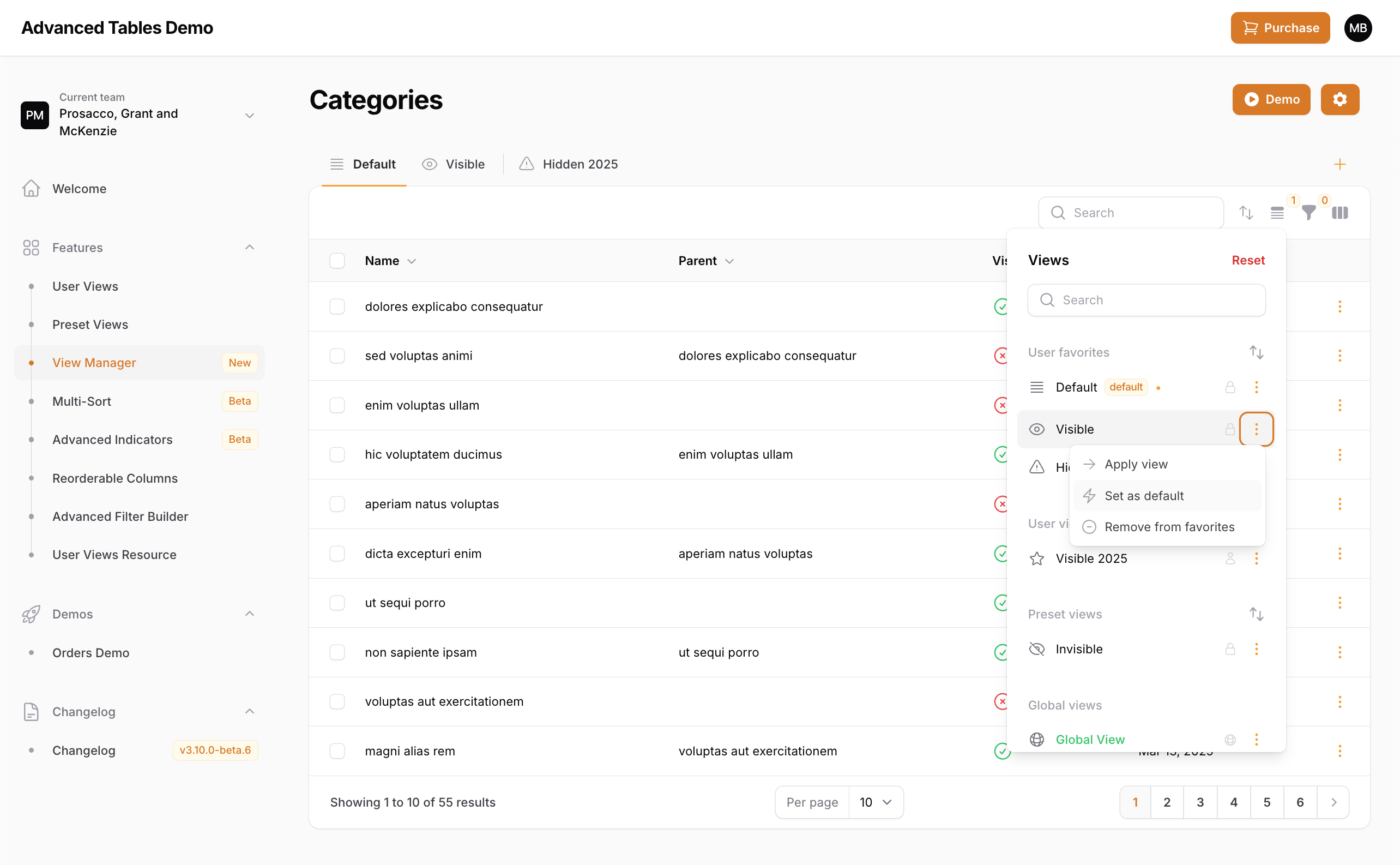
Advanced Tables now allows your users to manage which view they would like to be their default view for each table. When a view is a default it will be automatically loaded when the resource/table is first opened after logging in.
Enable Managed Default Views
Managed Default Views are disabled by default. To enable, add `managedDefaultViewsEnabled()` to your panel provider:

```php
AdvancedTablesPlugin::make()
    ->managedDefaultViewsEnabled()
```
Multi-Sort (New)
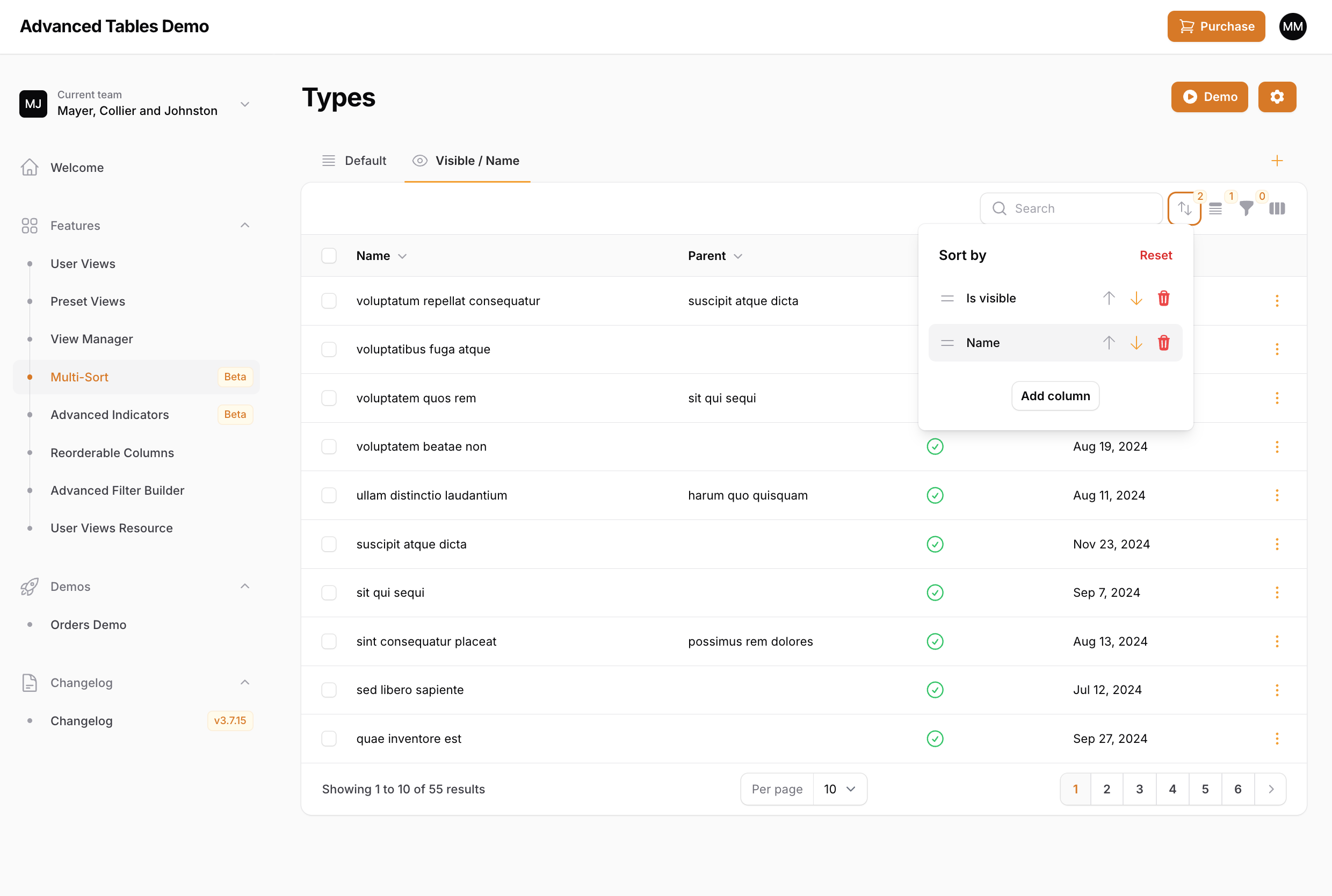
Advanced Tables now allows your users to sort their tables by multiple columns. Using the new Multi-Sort dropdown, users can add additional columns to sort by, easily change sort direction, and even reorder the columns. And Multi-Sort is completely integrated with Preset Views and User Views.
Note: The multi-sort button will only be displayed when there is at least one sortable column.
Using with Preset Views
You can apply multi-sorting in your Preset Views through the defaultSort() method:
'processing' => PresetView::make()
    ->defaultSort([
        'is_visible' => 'desc',
        'price' => 'asc'
    ])
Multi-Sort configurations
Advanced Tables offers multiple ways to customize Multi-Sort. Unless specified otherwise, these options can be configured directly on the AdvancedTablesPlugin object inside your PanelProvider.
Disabling Multi-Sort
Advanced Tables enables multi-sorting by default. You may disable this globally by passing false to the multiSortEnabled() method:
AdvancedTablesPlugin::make()
    ->multiSortEnabled(false)
You may also configure this per table by overriding the multiSortIsEnabled() method on your List page:
class ListOrders extends ListRecords
{
    use AdvancedTables;

    public static function multiSortIsEnabled(): bool
    {
        return false;
    }
    ...
Customizing the trigger action
You can customize the Multi-Sort trigger button using multiSortTriggerAction(), following the same pattern as Filament's trigger action customization:
use Filament\Actions\Action;

AdvancedTablesPlugin::make()
    ->multiSortTriggerAction(function (Action $action) {
        return $action
            ->icon('heroicon-s-chevron-up-down')
            ->tooltip('Sort by multiple columns')
            ->color('primary');
    })
Customizing the buttons and labels
You may customize Multi-Sort buttons, labels in the language file.
Quick Filters (New)
Important: Quick Filters is one of the biggest additions to Advanced Tables since it's initial launch and I'm very excited to be able to bring this functionality to Filament. However, since additional configuration is needed, there are still outstanding features to be implemented, known limitations exist, and there may be custom Filament implementations that haven't been accounted for, this feature is disabled by default. Please read all the instructions fully to know what is currently supported, what is under development, and what may not be supported. If you do find an issue, please reach out to me on discord our through email.
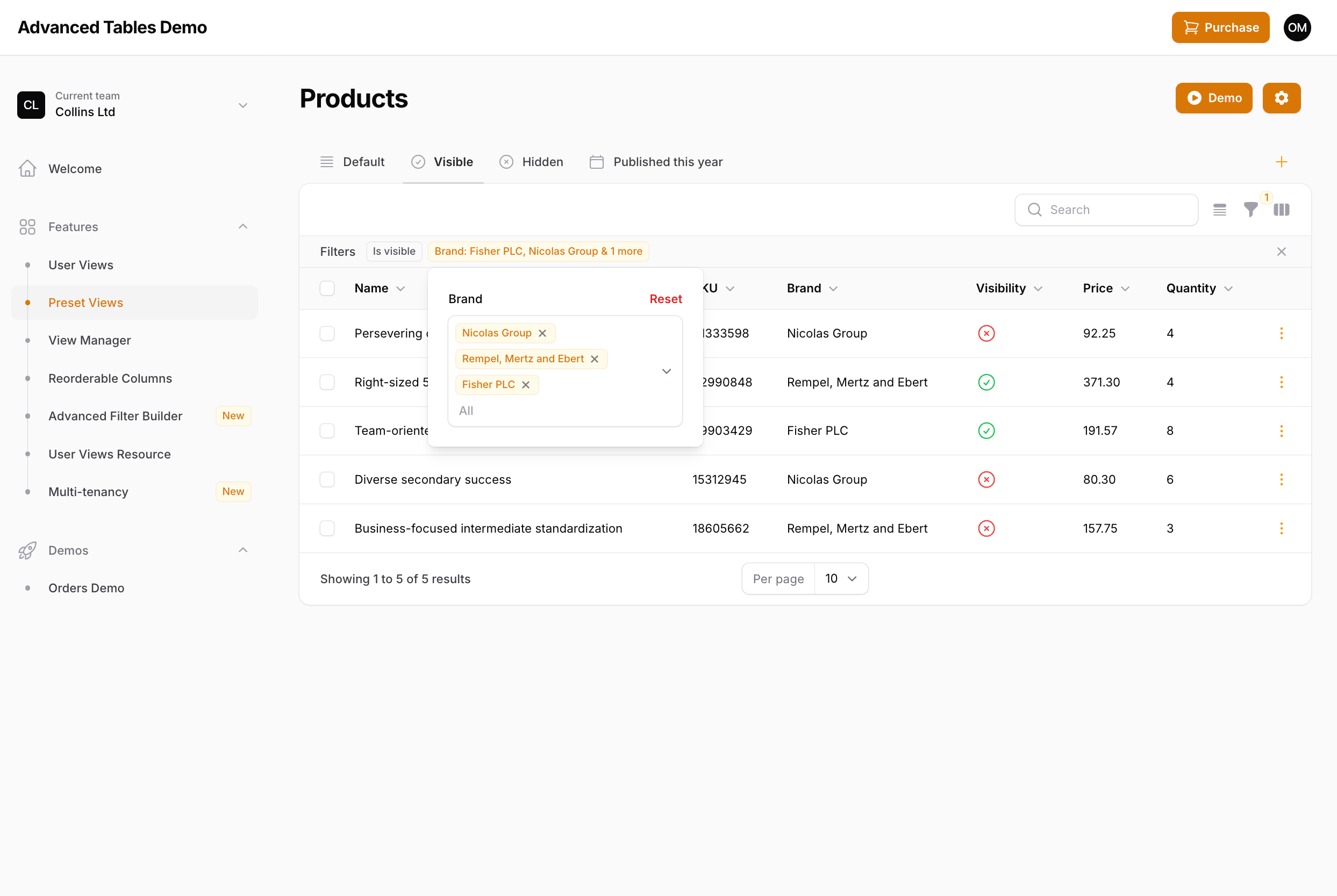
Quick Filters gives your users quick access to their filters through Filament's indicator system. When enabled, each indicator can be clicked on to access that filter's settings. In addition, filters can be favorited and "pinned" so they always appear, even when not active.
Enabling Quick Filters
-
Enable Quick Filters
Quick Filters is disabled by default. To enable, add
quickFiltersEnabled()to your panel provider:AdvancedFilter::make() ->quickFiltersEnabled() -
Compile assets
After enabling be sure to run
npm run buildandphp artisan filament:upgrade. -
Update Custom Filter Classes
Quick Filters automatically overrides any default Filament filters you have included in your resource or page. However, any custom filter classes that you have created that extends a Filament filter will need to be updated to use Advanced Table's versions. This can be easily accomplished by just updating your imported class with the plugins equivalent:
- use Filament\Tables\Filters\Filter
+ use Archilex\AdvancedTables\Filament\Filter

- use Filament\Tables\Filters\SelectFilter
+ use Archilex\AdvancedTables\Filament\SelectFilter

- use Filament\Tables\Filters\TernaryFilter
+ use Archilex\AdvancedTables\Filament\TernaryFilter

- use Filament\Tables\Filters\TrashedFilter
+ use Archilex\AdvancedTables\Filament\TrashedFilter
Remember, you only need to override custom filter classes you have created. Filters used within Filament's resources and pages will be overridden automatically.
-
Add the AdvancedTables trait
If you haven't already, add the AdvancedTables trait to your table.
Using Quick Filters
Once enabled, Quick Filters should work right out the box with minimal configuration. Just click on any indicator to see the form field(s) associated with that filter. Any adjustments to that filter will be immediately reflected in the table and synced to filament's filter form.
Custom Filters with Multiple Form Fields
When implementing custom filters with multiple form fields in Filament, there are two main ways to display the indicator(s). You could display a single indicator that adapts according to the fields that are set, or you could have individual indicators for each field. As an example, take the following date filter examples which have two date fields, but display the indicator differently.
Example 1 - Display as a single indicator:
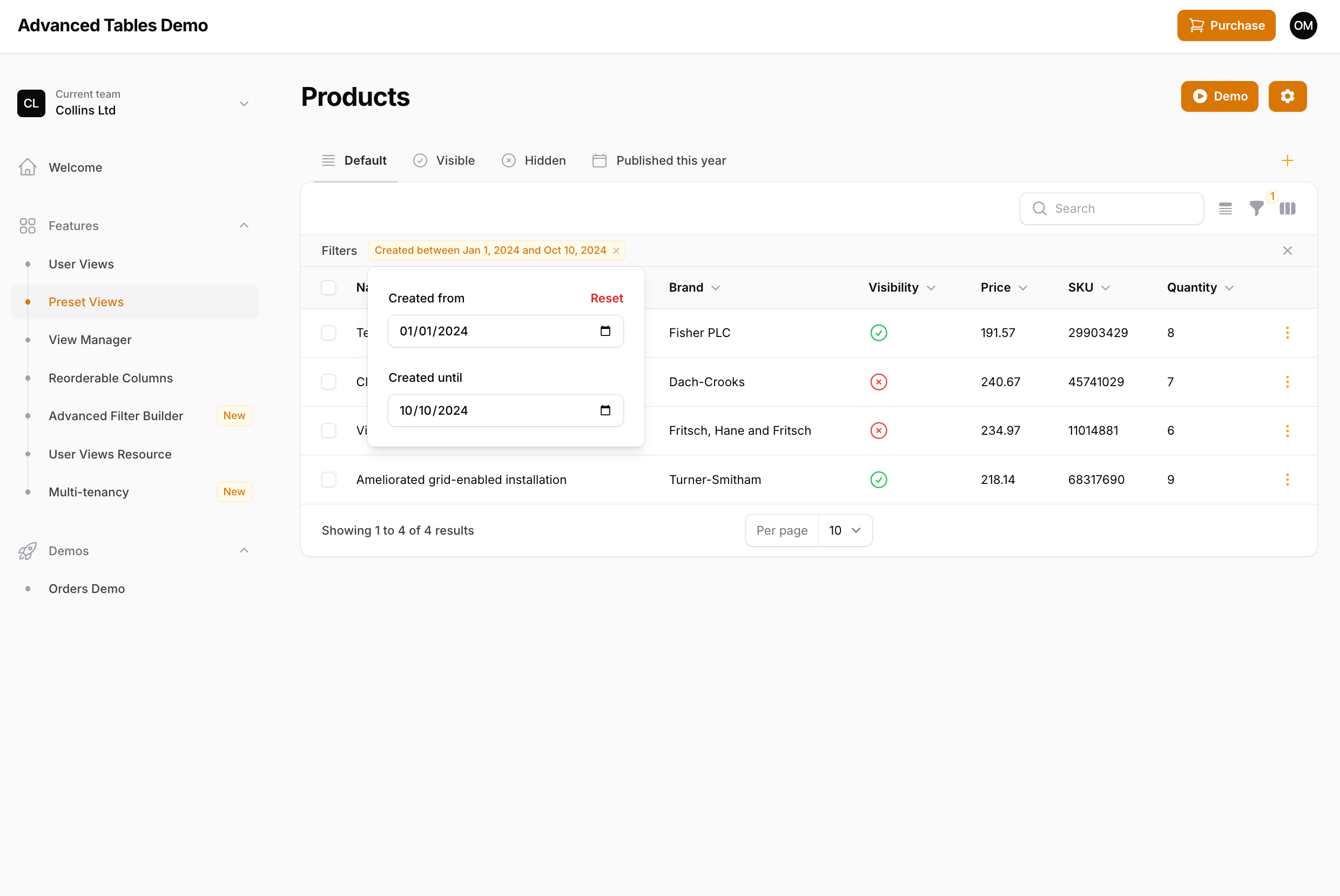
Filter::make('created_at')
    ->form([
        DatePicker::make('created_from'),
        DatePicker::make('created_until'),
    ])
    ->query(function (Builder $query, array $data): Builder {
        ...
    })
    ->indicateUsing(function (array $data): ?Indicator {
        if (($data['created_from'] ?? null) && (! ($data['created_until'] ?? null))) {
            return Indicator::make('Created from ' . Carbon::parse($data['created_from'])->toFormattedDateString());
        }

        if ((! ($data['created_from'] ?? null)) && ($data['created_until'] ?? null)) {
            return Indicator::make('Created until ' . Carbon::parse($data['created_until'])->toFormattedDateString());
        }

        if (($data['created_from'] ?? null) && ($data['created_until'] ?? null)) {
            return Indicator::make('Created between ' . Carbon::parse($data['created_from'])->toFormattedDateString() . ' and ' . Carbon::parse($data['created_until'])->toFormattedDateString());
        }

        return null;
    })
Example 2 - Display as multiple indicators:
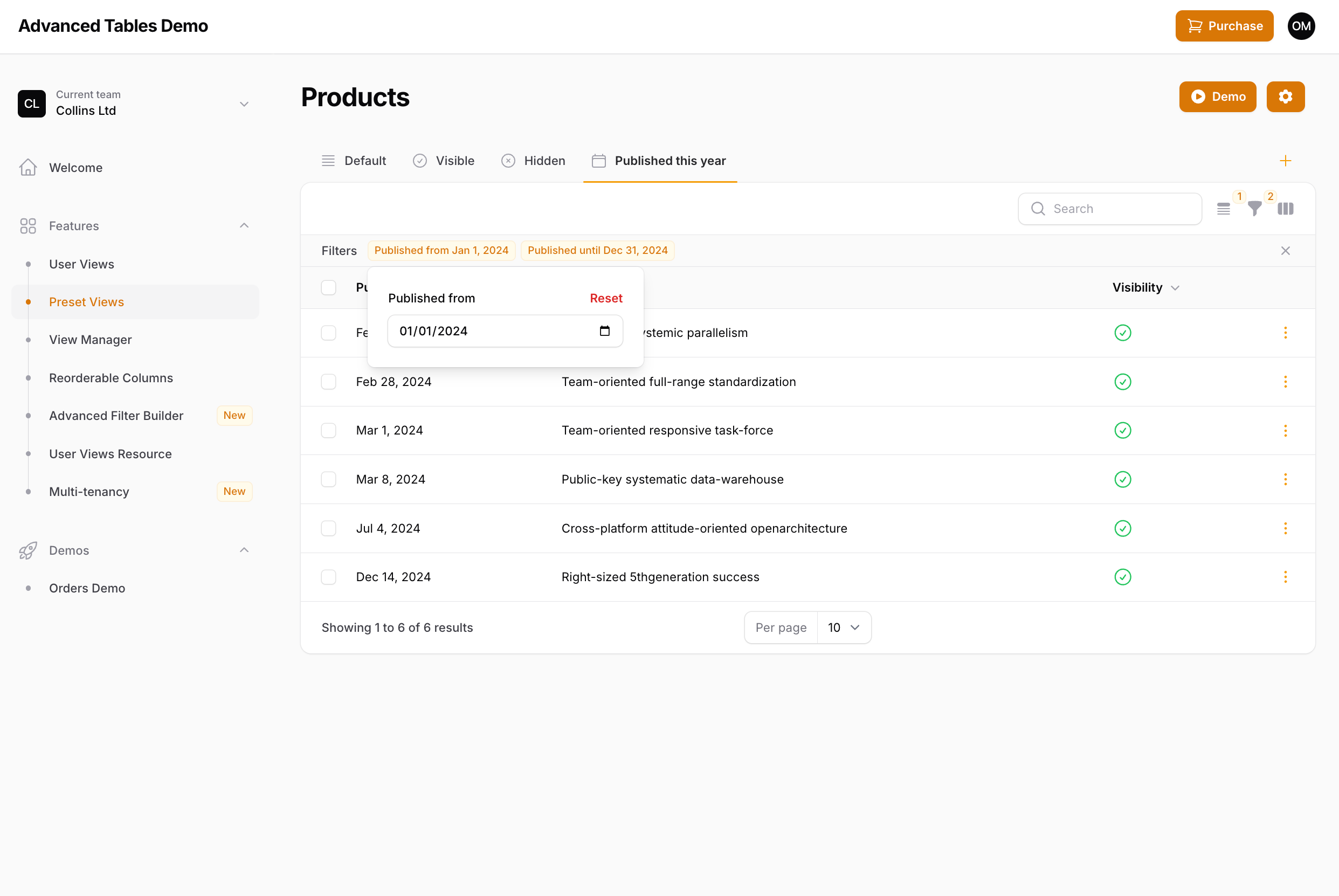
Filter::make('published_at')
    ->form([
        DatePicker::make('published_from'),
        DatePicker::make('published_until'),
    ])
    ->query(function (Builder $query, array $data): Builder {
        ...
    })
    ->indicateUsing(function (array $data): array {
        $indicators = [];

        if ($data['published_from'] ?? null) {
            $indicators[] = Indicator::make('Published from ' . Carbon::parse($data['published_from'])->toFormattedDateString())
                ->removeField('published_from');
        }

        if ($data['published_until'] ?? null) {
            $indicators[] = Indicator::make('Published until ' . Carbon::parse($data['published_until'])->toFormattedDateString())
                ->removeField('published_until');
        }

        return $indicators;
    }),
Quick Filters supports both of these use cases. In the first example, only one indicator will be shown, but the form will include both fields. In the second, only the indicator's respective field will be displayed.
If you are using return types (and you should be) then Quick Filters will automatically detect how the indicators should be displayed. If you are not using return types, then you will need to be explicit about how Quick Filters should display your form fields using the ->multipleIndicators() method:
Example 1 - Display as a single indicator:
Filter::make('created_at')
    ->multipleIndicators(false)
Example 2 - Display as multiple indicators:
Filter::make('created_at')`
    ->multipleIndicators()
Note: Displaying indicators outside of these two examples (ie. a single indicator for all form fields, or a one-to-one field/indicator setup), is not currently supported. If you have a filter set up like this, please contact me.
Favorite Filters
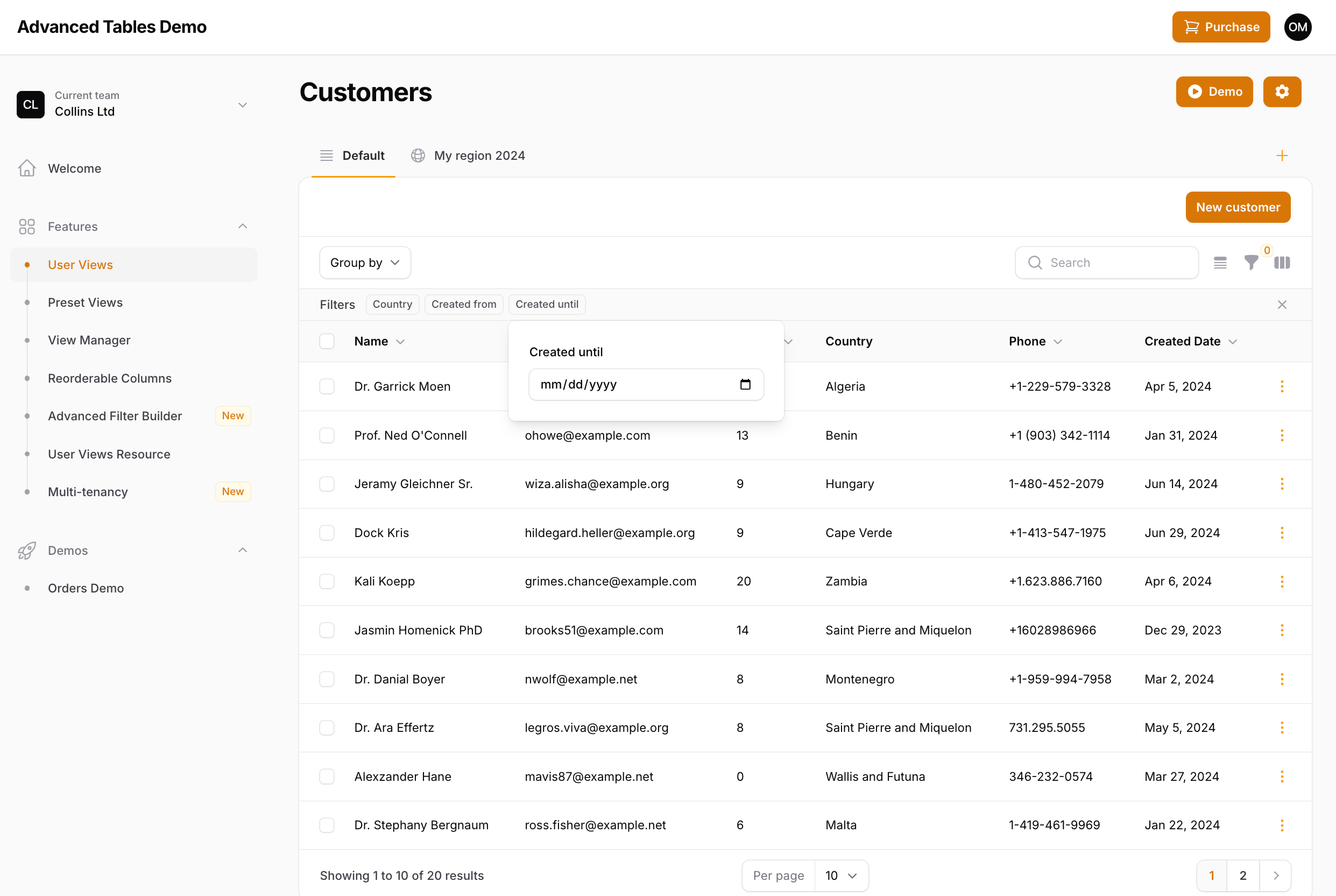
Quick Filters not only gives you quick access to applied filters, but also allows you to specify "favorite" filters which will always be displayed in the indicator bar, even when the filter is not active. You can make a filter a favorite by using the ->favorite() method:
SelectFilter::make('brand')
    ->favorite()
Note: Support for Filament's
->columns()method on filters is coming soon.
Limiting the Indicator labels
Quick Filters also introduces the ability to limit the number of labels that are shown on a Select Filter. Since you now have easy access to filters through the indicator, it may not be necessary to pollute the indicator bar with an excessively long indicator. To limit the indicator labels you may use the ->limitIndicatorLabels() method:
SelectFilter::make('brand')
    ->limitIndicatorLabels(3)
By default, once the limit is reached Filament's localized version of & 3 more will be displayed. However, you may change this by publishing and updating the plugin's language files and updating the more_indicator_labels value in the advanced-tables.php language file:
'indicators' => [
    'more_indicator_labels' => '+ :count', // display as "+ 4"
],
Specifying Favorite Filters in Preset Views
If you are using Preset Views you may configure which filters should be displayed as favorites using the ->defaultFavoriteFilters() method:
'recentlyCreated' => PresetView::make()
    ->favorite()
    ->defaultFavoriteFilters(['created_at'])
    ->defaultFilters([
        'created_at' => [
            'created_from' => now()->startOfWeek()->toDateString(),
            'created_until' => now()->endOfWeek()->toDateString(),
        ],
    ])
Note: When defining default favorite filters, the order of the filters will be determined by the order they are in listed in Filament's ->filters() array. Support for ordering by the order of the ->defaultFavoriteFilters() array is coming.
Specifying Favorite Filters with User Views (Under Development)
User-specified favorite filters is currently under development and should be released soon. When released, your users will be able to favorite, rearrange, and even hide filters according to their needs and then save that configuration as a User View.
Deferring Quick Filters
The current implementation of Quick Filters is for each indicator form to be live even if you are using Filament's filter deferring. Since each indicator is a subset of all the filters, deferring a single filter doesn't seem necessary.
However, if there is sufficient demand/need for it, I will look into bringing deferring to Quick Filters in the future. If implemented, each indicator dropdown would have it's own "Apply" button. Please contact me if this is a feature you need.
Disabling Quick Filters
You may disable Quick Filters per table by overriding the quickFiltersAreEnabled() method on your List page:
class ListOrders extends ListRecords
{
    use AdvancedTables;

    public static function quickFiltersAreEnabled(): bool
    {
        return false;
    }
    ...
Current Limitations and Unknowns
While Quick Filters should work for the majority of implementations, there are currently a few limitations and unknowns:
- Custom filters may not be fully supported, but the goal is to support any implementation with Filament's filters. If something is not working as expected please contact me.
- Third-party filter plugins have not been tested. If a filter plugin is not working, please contact me. Please note, that full support may require the plugin developer to update their filter.
- Filament's Query Builder Filter is not currently supported.
Advanced Search (Beta)
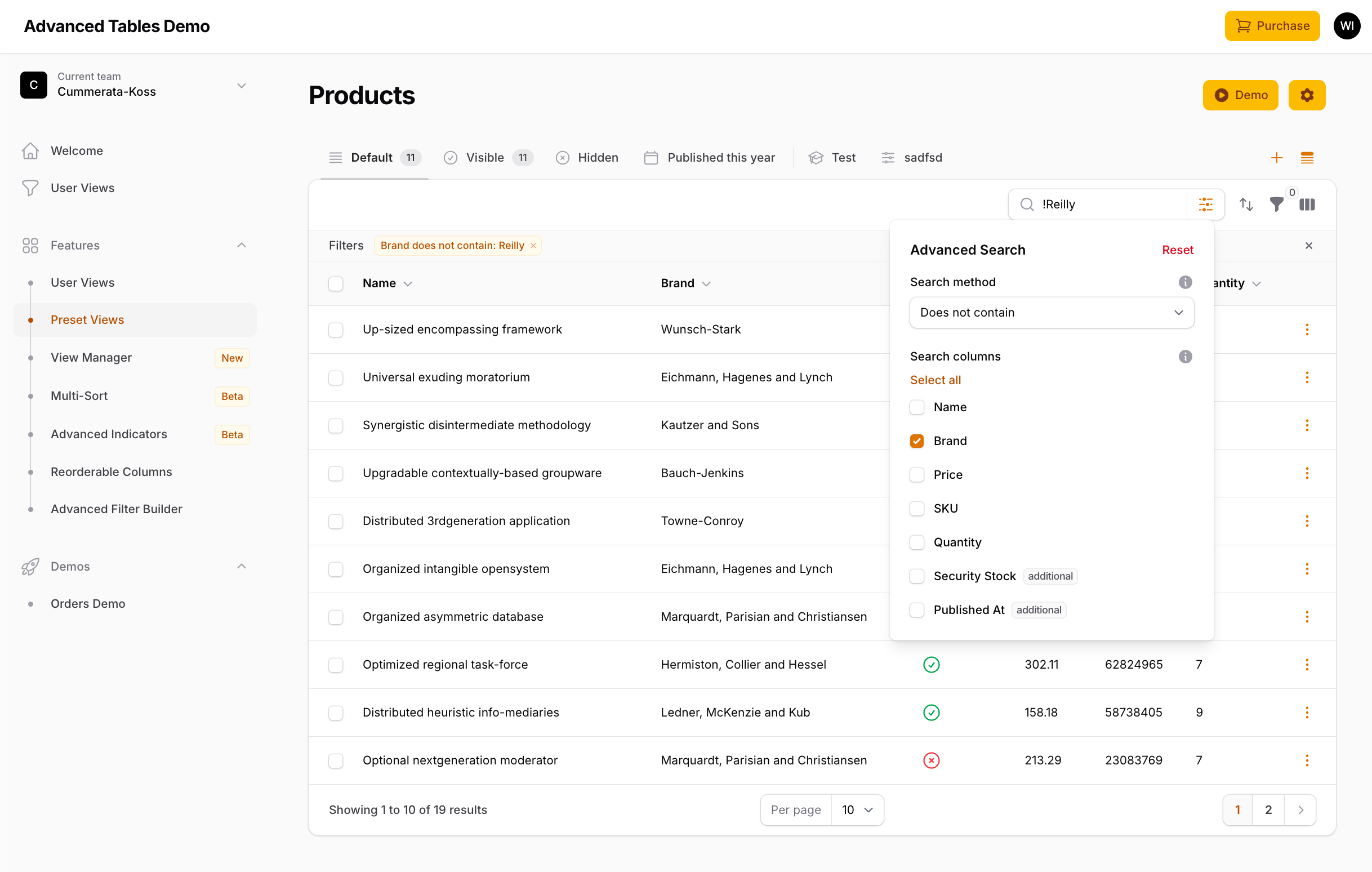
Advanced Search replaces Filament table's search field with powerful search constraints and column selection. In addition to the default "contains" search, your users can now search using eight different constraints like "starts with", "equals", "ends with", and more. Users can also select which columns to search, and even use keyboard syntax shortcuts to quickly change the search behavior directly from the search input. Advanced Search is fully integrated with Preset Views, User Views, and Quick Filters.
Enabling Advanced Search
Advanced Search is currently in beta, so its behavior may still change between releases.
Advanced Search is disabled by default. To enable, add advancedSearchEnabled() to your panel provider:
AdvancedTablesPlugin::make()
    ->advancedSearchEnabled()
Note: Advanced Search is automatically disabled on tables that use Filament's
->searchUsing()callback.
After enabling, be sure to run npm run build and php artisan filament:upgrade.
Using Advanced Search
Once enabled, the search field will display a settings button (gear icon) next to the search input. Clicking this button opens a dropdown with the following options:
- Search method - A dropdown to select the search constraint (e.g., Contains, Starts with, Equals).
- Search columns - Checkboxes to select which columns to include in the search. Only displayed when there are two or more searchable columns.
An information icon next to the search method dropdown displays a tooltip with all available search shortcuts.
Search Constraints
Advanced Search includes eight search constraints:
| Constraint | Description |
|---|---|
| Contains | Matches records containing every word of the search term |
| Does not contain | Matches every record that "Contains" does not |
| Equals | Matches records where a column is exactly the search term |
| Does not equal | Matches every record that "Equals" does not |
| Starts with | Matches records where a column starts with the search term |
| Does not start with | Matches every record that "Starts with" does not |
| Ends with | Matches records where a column ends with the search term |
| Does not end with | Matches every record that "Ends with" does not |
A "does not" constraint always returns the exact opposite of its positive constraint. This means that:
- A record with an empty value is included, since an empty value does not contain the search term.
- For a relationship column, a record is included when none of its related records match, including when it has no related records at all.
- "Does not contain" with several words returns the records that are missing at least one of the words. Wrap the words in quotes to exclude an exact phrase instead.
Words and phrases
"Contains" and "Does not contain" split the search term into words, just like Filament's search. If your table uses splitSearchTerms(false) the search term is kept as a single phrase.
"Equals", "Starts with", "Ends with", and their opposites always treat the search term as a single phrase, so "Starts with: city of" matches "City of Gold".
Date and number columns
"Equals" and "Does not equal" compare date and number columns by their value instead of as text:
- A date such as
2025-01-15matches the whole day, so it also finds records that were stored with a time. Dates can be typed as2025-01-15,2025/01/15,2025.01.15, or in the format set with your table'sdefaultDateDisplayFormat()anddefaultDateTimeDisplayFormat()methods. Month and day names are read in the locale of your application. Adding a time, like2025-01-15 10:30:00, matches that second. - A number such as
5matches5,5.0, and5.00. - A search term that is not a date or a number is never compared to a date or number column.
Note: Dates are compared as they are stored in the database. If you display dates in a different timezone, use a date filter instead.
Custom search queries
Columns that use a custom search query, like ->searchable(query: ...), are searched as "contains" regardless of the selected constraint, as Advanced Tables cannot know how your query should be changed. The "does not" constraints exclude the records that your query matches.
To support every constraint, accept the $constraint parameter in your query. It is always the positive constraint, since Advanced Tables takes care of the "does not" constraints for you:
use Illuminate\Database\Eloquent\Builder;

TextColumn::make('full_name')
    ->searchable(query: function (Builder $query, string $search, $constraint = null) {
        [$operator, $value] = $constraint?->getOperatorAndValue($search) ?? ['like', "%{$search}%"];

        $query->whereRaw("concat(first_name, ' ', last_name) {$operator} ?", [$value]);
    })
Note: Do not add a type to
$constraintand give it a default value ofnull. Filament also runs your query when Advanced Search is not used, such as for individual column searches, where$constraintis not available.
The same applies to columns translated with a translatable content driver and to closures passed to your table's ->searchable([...]) method. Since those closures do not have a name, they are only searched when the user is searching all columns.
Search Shortcuts
Instead of using the dropdown, users can type a syntax prefix directly in the search field to quickly change the search constraint:
| Shortcut | Constraint | Example |
|---|---|---|
| (none) | Contains | order |
- |
Does not contain | -order |
= |
Equals | =order |
-= |
Does not equal | -=order |
^ |
Starts with | ^order |
-^ |
Does not start with | -^order |
$ |
Ends with | $order |
-$ |
Does not end with | -$order |
Tip: The information icon next to the search method dropdown displays all available shortcuts for quick reference.
Exact Phrase Search
Wrap your search term in quotes to match the full phrase. For example, "John Doe" will match records containing the exact phrase "John Doe" rather than matching "John" and "Doe" separately.
Using with Filament's search
When Advanced Search is enabled it replaces Filament's search, but everything that sets Filament's search keeps working and is treated as a "contains" search across all columns:
- Links to a List page with a
?search=query string. - The
searchTable()testing helper. - User Views that were saved before Advanced Search was enabled.
Advanced Search is kept in the URL on List pages and Manage Related Records pages. Relation managers and table widgets can share a page, so their search is not kept in the URL. You may change this by overriding the shouldBindAdvancedSearchToUrl() method on your Livewire component:
protected function shouldBindAdvancedSearchToUrl(): bool
{
    return true;
}
If your widgets read the page's table using Filament's ExposesTableToWidgets and InteractsWithPageTable traits, use Advanced Tables' Archilex\AdvancedTables\Widgets\Concerns\ExposesTableToWidgets and Archilex\AdvancedTables\Widgets\Concerns\InteractsWithPageTable traits instead so the search is applied to your widgets as well.
Using with Preset Views
You can apply default search settings to your Preset Views using the defaultSearch() method:
'active_orders' => PresetView::make('Active Orders')
    ->defaultSearch('pending')
You may also specify a search constraint and specific columns:
'active_orders' => PresetView::make('Active Orders')
    ->defaultSearch('pending', TextConstraint::StartsWith, ['status', 'name'])
The defaultSearch() method accepts the following parameters:
| Parameter | Type | Description |
|---|---|---|
$search |
string | Closure | null |
The search term |
$constraint |
string | TextConstraint | Closure | null |
The search constraint (e.g., 'starts_with', TextConstraint::StartsWith) |
$columns |
array | Closure | null |
An array of column names to search |
Using with User Views
Advanced Search settings are automatically saved and restored with User Views. When a user saves a User View, the active search term, search constraint, and selected columns are included. When the User View is loaded, all search settings are restored.
Advanced Search configurations
Advanced Tables offers multiple ways to customize Advanced Search. Unless specified otherwise, these options can be configured directly on the AdvancedTablesPlugin object inside your PanelProvider.
Disabling Advanced Search
Advanced Search is disabled by default and must be enabled in your panel provider. If you have enabled it globally but want to disable it for a specific table, you may override the advancedSearchIsEnabled() method on your List page:
class ListOrders extends ListRecords
{
    use AdvancedTables;

    public static function advancedSearchIsEnabled(): bool
    {
        return false;
    }
    ...
Customizing the trigger action
You can customize the Advanced Search trigger button using advancedSearchTriggerAction(), following the same pattern as Filament's trigger action customization:
use Filament\Actions\Action;

AdvancedTablesPlugin::make()
    ->advancedSearchTriggerAction(function (Action $action) {
        return $action
            ->icon('heroicon-s-magnifying-glass')
            ->tooltip('Search options')
            ->color('primary');
    })
Customizing the buttons and labels
You may customize Advanced Search labels in the language file. Publish the language files and update the advanced_search section in the advanced-tables.php language file.
Advanced Filter Builder

Advanced Filter Builder is a custom filtering system that gives your users a simple, yet powerful way to quickly build custom queries. Each filter inside the builder can be used multiple times and grouped into or groups, allowing your users to drill down and find the data they need. Advanced Filter Builder was designed to make filtering easy for your users with a simple UI and natural filtering language.
For developers, Advanced Filter Builder couldn't be easier to implement. Advanced Filter Builder can automatically generates text, numeric, date, boolean, and select filters from your table columns! You can also seamlessly integrate your existing filters or override the auto-generated ones allowing you to fully customize the filtering experience.
Important: Adding AdvancedTables to your table is required for Advanced Filter Builder to properly work.
Using Advanced Filter Builder
To enable the Advanced Filter Builder, add AdvancedFilterBuilder to your table's ->filter() method:
return $table
    ->columns([
        ...
    ])
    ->filters([
        AdvancedFilter::make(),
    ])
Enabling Column Filters

To automatically generate Column Filters for each of your table columns, you may use the ->includeColumns() method. This will automatically map your table's compatible columns to the appropriate Column Filter and make them available in Advanced Filter Builder's picker:
AdvancedFilter::make()
    ->includeColumns()
Tip: If you wish to only use some Column Filters, you may use either include or exclude columns.
Column Filter types
Advanced Filter Builder includes multiple different custom Column Filters, each with it's own set of operators:
Text Filter
The TextFilter allows you to filter text strings with operators like is, is not, starts with, does not end with, contains, etc.

When appropriate, the TextFilter can also transform the is and is not operators into a multiple select dropdown:

Numeric Filter
The NumericFilter allows you to filter numbers with operators like equal to, greater than, less than or equal to, between, positive, etc.

Date Filter
The DateFilter allows you to filter dates combining operators like yesterday, in the next, before, between, etc. with units like day, week, months ago, years from now, etc.

Select Filter
Advanced Table's custom SelectFilter combines Filament's SelectFilter with operators is, is not, is empty, is not empty.

Automatic column mapping
Advanced Filter Builder will automatically map your table columns to the appropriate filter depending on the type of column:
TextColumn::make()->date()andTextColumn::make()->dateTime()columns will be mapped to the DateFilter.TextColumn::make()->numeric()andTextColumn::make()->money()columns will be mapped to the NumericFilter.- Aggregate Relationship columns
count,avg,min,max, andsumwill be mapped to an aggregate NumericFilter. - Any remaining
TextColumnwill be mapped to the TextFilter. SelectColumnwill be mapped to Advanced Filter's custom SelectFilter.CheckboxColumn,ToggleColumn,ImageColumn,IconColumnwill be mapped to Filament'sTernary Filter.
Customizing filters
Advanced Filter Builder uses the methods on your columns to automatically determine the appropriate filter to use. However, sometimes your table column may not match the type of filter you need. For example, if you are using a TextColumn to display an numeric amount, but aren't using the ->numeric() method, Advanced Filter Builder wouldn't know it's best to use a NumericFilter. In these cases, it's easy to customize the filter manually using the ->filters() method.
Customizing a Column Filter
You may manually define a Column Filter for a particular column by passing the desired filter type to the ->filters() method. The name of the filter should be the column you wish to override.
Tip: Any filter you add to the
->filters()array will be shown in the filters dropdown by default. To override this behavior you can use the->defaultFilters()method to configure which filters, if any, are shown by default.
Note: When you are customizing a Column Filter the
nameof the filter must match the name of the column in your Filament table. If not, it will not appear in the Filter Picker.
AdvancedFilter::make()
    ->filters([
        NumericFilter::make('shipping_price') // Use the NumericFilter on the shipping_price column
    ])
To enable the Select field inside of the TextFilter, you may use a TextFilter and then pass in an array of options:
AdvancedFilter::make()
    ->filters([
        TextFilter::make('country')
            ->options(fn () => Country::all()->pluck('name', 'id')),
    ])
You may also pass in a relationship to automatically load the available options:
AdvancedFilter::make()
    ->filters([
        TextFilter::make('customer.name')
            ->relationship(name: 'customer', titleAttribute:'name')
            ->multiple()
            ->preload(),
    ])
Finally, if your table column only needs a dropdown of options to select from (ie, it doesn't need additional operators like starts with, contains, etc.), you may manually map your column to Advanced Filter Builder's custom SelectFilter:
use Archilex\AdvancedTables\Filters\SelectFilter;

AdvancedFilter::make()
    ->filters([
        SelectFilter::make('status')
            ->options([
                'processing' => 'Processing',
                'new' => 'New',
                'shipped' => 'Shipped',
                'delivered' => 'Delivered',
                'cancelled' => 'Cancelled',
            ])
            ->multiple(),
    ])
Important: Be sure to import
Archilex\AdvancedTables\Filters\SelectFilterto see theis,is not,is empty, andis not emptyoperators.
Customizing a column filter's operators
You may customize a column filter's operators using either the ->includeOperators() or ->excludeOperators() methods:
AdvancedFilter::make()
    ->filters([
        TextFilter::make('name')
            ->includeOperators([
                TextOperator::CONTAINS,
                TextOperator::DOES_NOT_CONTAIN
            ]),
        SelectFilter::make('status')
            ->includeOperators([
                TextOperator::IS, // The SelectFilter uses the TextOperator
            ]),
        DateFilter::make('created_at')
            ->excludeOperators([
                DateOperator::YESTERDAY,
                DateOperator::TODAY,
                DateOperator::TOMORROW
            ]),
        NumericFilter::make('total_price')
            ->excludeOperators([
                NumericOperator::EQUAL_TO,
                NumericOperator::NOT_EQUAL_TO
            ]),
    ])
To customize a column filter's operators globally, you can call the static configuringUsing() method from the boot() method of a service provider:
public function boot()
{
    TextFilter::configureUsing(function (TextFilter $filter) {
        return $filter->includeOperators([
            TextOperator::CONTAINS,
            TextOperator::DOES_NOT_CONTAIN
        ]);
    });
}
includeOperators() and excludeOperators() can also take a closure meaning you can further customize which operators are available:
TextFilter::configureUsing(function (TextFilter $filter) {
    return $filter->includeOperators(function (TextFilter $filter) {
        return $filter->getName() === 'currency'
            ? [TextOperator::CONTAINS, TextOperator::DOES_NOT_CONTAIN]
            : [TextOperator::IS, TextOperator::IS_NOT];
    });
});
Customizing a column filter's default operator
To customize a column filter's default operator you may pass the name of the operator to the ->defaultOperator() method:
AdvancedFilter::make()
    ->filters([
        TextFilter::make('name')
            ->defaultOperator(TextOperator::CONTAINS),
    ])
To customize a column filter's default operator globally, you can call the static configuringUsing() method from the boot() method of a service provider:
public function boot()
{
    TextFilter::configureUsing(fn (TextFilter $filter) => $filter->defaultOperator(TextOperator::CONTAINS));
    DateFilter::configureUsing(fn (TextFilter $filter) => $filter->defaultOperator(DateOperator::TODAY));
    SelectFilter::configureUsing(fn (TextFilter $filter) => $filter->defaultOperator(TextOperator::IS));
    NumericFilter::configureUsing(fn (TextFilter $filter) => $filter->defaultOperator(NumericOperator::GREATER_THAN));
}
defaultOperator() can also take a closure meaning you can further customize which operator is the default:
TextFilter::configureUsing(function (TextFilter $filter) {
    return $filter->defaultOperator(function (TextFilter $filter) {
        return $filter->getName() === 'currency'
            ? TextOperator::CONTAINS
            : TextOperator::IS;
    });
});
Adding custom filters
Advanced Filter Builder can also seamlessly integrate any of Filament's filters, including custom filters. This allows a filter to be used multiple times as well as in "or groups".
Tip: Any filter you add to the
->filters()array will be shown in the filters dropdown by default. To override this behavior you can use the->defaultFilters()method to configure which filters, if any, are shown by default.
To add a filter to Advanced Filter Builder, pass the filter into the ->filters() method:
AdvancedFilter::make()
    ->filters([
        Filter::make('is_active')
            ->query(fn (Builder $query): Builder => $query->where('is_active', true))
            ->toggle(),
    ])
Note: Any filter that has the same
nameas your table column, will be override the automatically mapped column filter. If the filter name does not match any of the table columns it will be added as an additional filter.
Important: If you are updating from a prior release and your users have already saved created User Views with filters, don't worry, Advanced Filter Builder will automatically map them to the first filter group.
However, if you are using Preset Views with default filters, you will need to adjust your filters to be compatible with Advanced Filter Builder.
Using filters alongside Advanced Filter Builder
You may still use any of Filament's filters alongside Advanced Filter Builder by adding it as you normally would to your table's ->filters() method:
return $table
    ->columns([
        ...
    ])
    ->filters([
        Filter::make('is_active')
            ->query(fn (Builder $query): Builder => $query->where('is_active', true))
            ->toggle(),
        AdvancedFilter::make(),
    ])
The above will add a single Is active toggle filter to the filter dropdown as well as display the Advanced Filter Builder below it.
Including columns
To only filter some of your columns, you may pass an array of column names you wish to include to the ->includeColumns() method:
AdvancedFilter::make()
    ->includeColumns([
        'is_active',
        'currency',
        'address.city',
    ]);
Important: If you are customizing a Column Filter, that column must be included in the
->includesColumns()method.
Excluding columns
You may instead exclude columns by passing an array of columns names to the ->excludeColumns() method:
AdvancedFilter::make()
    ->excludeColumns([
        'status',
        'customer.name',
        'created_at',
    ]);
Important: If you are customizing a Column Filter, that column must not be excluded from the
->excludesColumns()method.
Setting the default filters
By default, every filter included in Advanced Filter Builder's ->filters() method will be shown in the table's filter dropdown. Column Filters that haven't been overriden in the ->filters() method will be available in the filter picker. To not display any column filters you can pass an empty array to the ->defaultFilters() method:
AdvancedFilter::make()
    ->filters([
        ...
    ])
    ->defaultFilters([])
To only display some filters by default, you may pass the name of your filter to the ->defaultFilters() method inside a double array. You may also use this method to define Column Filters you wish to be displayed by default in the filter dropdown:
AdvancedFilter::make()
    ->filters([
        ...
    ])
    ->defaultFilters([['status']])
Important: Be sure to add your filters inside a double array.
You can also set up multiple default groups:
AdvancedFilter::make()
    ->filters([
        ...
    ])
    ->defaultFilters([['status'], ['status']])
Disabling Or Groups
By default, Advanced Filter Builder allows your filters to be used in "or groups". You may disable this feature by passing false to the ->orGroups() method:
AdvancedFilter::make()
    ->orGroups(false)
Layout options
Advanced Filter Builder responsively adapts to any of the available FilterLayouts (AboveContent, BelowContent, AboveContentCollapsible, Modal, SlideOver, Dropdown). When the builder is used with the Dropdown layout (Filament's default layout), the user will also be presented with an "Expand View" button that will allow the dropdown to expand into a slideOver.
If you using the Modal layout, it's recommended you set the ->filtersFormWidth() on the table to at least 3xl so the form elements have space to flow:
use Archilex\AdvancedTables\Filters\AdvancedFilter;
use Filament\Tables\Actions\Action;
use Filament\Tables\Table;
use Filament\Tables\Enums\FiltersLayout;

public function table(Table $table): Table
{
    return $table
        ->filters([
            AdvancedFilter::make(),
        ])
        ->filtersLayout(FiltersLayout::Modal)
        ->filtersFormWidth('3xl')
}
Customizing the Expand View Link Position
When using Filament's default Dropdown filter layout, the user will also be presented with an "Expand View" button that will allow the dropdown to expand into a slideOver. The expand view link in this view is absolute positioned (ugly...I know). If you are using translatable fields, this may cause the link to overlap. You may change the position of the expand view link by passing an array of styles to the ->filterBuilderExpandViewStyles() method:
AdvancedTablesPlugin::make()
    ->filterBuilderExpandViewStyles(['right: 100px', 'top: 24px'])
This method also take a closure allowing you to set different positions based on a condition such as locale:
use Illuminate\Support\Facades\App;

AdvancedTablesPlugin::make()
    ->filterBuilderExpandViewStyles(fn () => App::isLocale('es') ? ['right: 100px', 'top: 24px'] : ['right: 80px', 'top: 24px'])
Always opening the filter as a slideOver
If you would prefer Advanced Filter Builder to always open in a slideOver or modal, you may use Filament's filtersTriggerAction() method:
use Archilex\AdvancedTables\Filters\AdvancedFilter;
use Filament\Tables\Actions\Action;
use Filament\Tables\Table;

public function table(Table $table): Table
{
    return $table
        ->filters([
            AdvancedFilter::make(),
        ])
        ->filtersFormWidth('md')
        ->filtersTriggerAction(
            fn (Action $action) => $action
                ->slideOver()
        );
}
Adding icons to the Filter Picker
You can add icons to the Filter Picker by passing an array of icons to the ->icons() method where the name of your filter is the key and the icon is the value:
AdvancedFilter::make()
    ->filters([
        ...
    ])
    ->icons([
        'status' => 'heroicon-o-clock',
        'currency' => 'heroicon-o-currency-euro',
        'customer' => 'heroicon-o-user',
        'created_at' => 'heroicon-o-calendar',
    ])
Enabling search in the Filter Picker
If the Filter Picker has a lot of available filters you can enable a search field using the ->filterPickerSearch() method:
AdvancedFilter::make()
    ->filterPickerSearch()
Configuring the number of Filter Picker columns
To change the number of columns the Filter Picker may occupy, you may use the ->filterPickerColumns() method:
AdvancedFilter::make()
    ->filterPickerColumns(2)
Passing an integer will determine how many columns are displayed at the lg breakpoint. You may also pass an array:
AdvancedFilter::make()
    ->filterPickerColumns(['sm' => 2])
Configuring the Filter Picker width
To customize the width of the Filter Picker, you may use the ->filterPickerWidth() method, and specify a width - xs, sm, md, lg, xl, 2xl, etc.
AdvancedFilter::make()
    ->filterPickerWidth('md')
Tip: Since the slideOver is confined to width
md, it is recommended the Filter Picker not be set to a width larger thanmdas larger sizes will cause the slideOver to horizontally scroll.
Configuring the maximum height of the Filter Picker
To add a maximum height to the Filter Picker, which, in turn, allows the picker to be scrolled, you may use the ->filterPickerMaxHeight() method, passing a CSS length:
AdvancedFilter::make()
    ->filterPickerMaxHeight('240px')
Hiding the filter indicator group labels
When adding multiple filter groups ("or" groups), an the Filter Group number (ie "Filter Group 1") will be prepended to the indicator to help differentiate between the different filter groups. You may disable this by passing false to the ->prependFilterGroupLabels() method:
 AdvancedFilter::make()
    ->prependFilterGroupLabels(false)
You may also hide the filter group label when there is only one filter group:
 AdvancedFilter::make()
    ->prependFilterGroupLabels(prependFilterGroupLabelWhenSoleGroup: false)
And of course, this can be set globally in your service provider:
AdvancedFilter::configureUsing(function (AdvancedFilter $filter) {
    return $filter->prependFilterGroupLabels(prependFilterGroupLabelWhenSoleGroup: false);
});
Tip: The name/translation of the label can be modified in the language file.
Customizing the sequence of filter indicator group colors
When adding multiple filter groups ("or" groups), the indicators will be displayed in different colors to help differentiate between the different filter groups. By default, the indicators will be colored in the following sequence: primary, info, gray, success, danger, warning. You may choose a different sequence by passing an array of colors to the ->indicatorColors() method:
AdvancedFilter::make()
    ->indicatorColors(['info', 'success'])
Any default color that is not defined in the array will be appended after the last defined color.
Customizing the buttons and labels
You may customize Advanced Filter Builders buttons, labels, and filter operators in the language file.
Action Customization
Advanced Tables provides full action customization following the same pattern as Filament's columnManagerTriggerAction(). You can customize any action's icon, label, tooltip, color, size, and more.
Customizing Trigger Actions
Trigger actions control the buttons that open the Multi-Sort popover, View Manager, and Quick Save modal:
use Filament\Actions\Action;
use Filament\Support\Icons\Heroicon;

AdvancedTablesPlugin::make()
    ->multiSortTriggerAction(function (Action $action) {
        return $action
            ->icon(Heroicon::OutlinedFunnel)
            ->tooltip('Sort by multiple columns')
            ->color('primary');
    })
    ->viewManagerTriggerAction(function (Action $action) {
        return $action
            ->button()
            ->label('My Views')
            ->icon(Heroicon::OutlinedSquares2x2);
    })
    ->quickSaveTriggerAction(function (Action $action) {
        return $action
            ->icon(Heroicon::OutlinedBookmark)
            ->tooltip('Save current view');
    })
Icon Aliases
Advanced Tables supports Filament's icon alias system. This allows you to globally swap icons used throughout the plugin UI to maintain consistency with your application's icon set.
Register icon aliases in your AppServiceProvider:
use Archilex\AdvancedTables\View\AdvancedTablesIconAlias;
use Filament\Support\Facades\FilamentIcon;

public function boot(): void
{
    FilamentIcon::register([
        AdvancedTablesIconAlias::MULTI_SORT_TRIGGER => 'phosphor-sort-ascending',
        AdvancedTablesIconAlias::VIEW_MANAGER_TRIGGER => 'phosphor-list-bullets',
        AdvancedTablesIconAlias::QUICK_SAVE_TRIGGER => 'phosphor-floppy-disk',
    ]);
}
Icons that share semantics with Filament's built-in aliases (like delete, search) will also respect Filament's global icon registrations when no Advanced Tables alias is registered, ensuring UI consistency.
Available Icon Aliases
View Manager Actions
AdvancedTablesIconAlias::ADD_TO_FAVORITESAdvancedTablesIconAlias::APPLY_VIEWAdvancedTablesIconAlias::DELETE_VIEWAdvancedTablesIconAlias::EDIT_VIEWAdvancedTablesIconAlias::REPLACE_VIEWAdvancedTablesIconAlias::REMOVE_FROM_FAVORITESAdvancedTablesIconAlias::SET_DEFAULT_VIEWAdvancedTablesIconAlias::REMOVE_DEFAULT_VIEWAdvancedTablesIconAlias::SHOW_VIEW_MANAGER
Multi-Sort
AdvancedTablesIconAlias::SORT_ASCENDINGAdvancedTablesIconAlias::SORT_DESCENDING
Filter Builder
AdvancedTablesIconAlias::FILTER_BUILDER_DELETEAdvancedTablesIconAlias::FILTER_BUILDER_SEARCH
Shared UI elements
AdvancedTablesIconAlias::DRAG_HANDLEAdvancedTablesIconAlias::VIEW_MANAGER_ACTION_GROUP
View Type Indicators
AdvancedTablesIconAlias::DEFAULT_VIEW_INDICATORAdvancedTablesIconAlias::USER_OWNER_INDICATORAdvancedTablesIconAlias::GLOBAL_VIEW_INDICATORAdvancedTablesIconAlias::PUBLIC_VIEW_INDICATORAdvancedTablesIconAlias::PRESET_LOCKED_INDICATOR
View Manager Reordering
AdvancedTablesIconAlias::REORDER_VIEWSAdvancedTablesIconAlias::REORDER_VIEWS_CONFIRM
Favorites Bar
AdvancedTablesIconAlias::FAVORITES_BAR_DEFAULT
Multi-Tenancy
Advanced Tables has built in support for simple one-to-many tenancy, Filament's multi-tenancy as well as basic support for Spatie Multi-tenancy and Tenancy for Laravel. (Please see support section below).
Setting up tenancy with Advanced Tables will depend on your app and the tenancy implementation you are using. Please refer to the appropriate instructions for your setup:
- Simple one-to-many tenancy with Filament Panels - Instructions
- Simple one-to-many tenancy with Filament's standalone Table Builder - Instructions
- Multi-tenancy with Filament Panels using Filament's tenancy implementation - Instructions
- Multi-tenancy with Filament Panels using a third party tenancy implementation (Spatie/Stancl) - Instructions
- Multi-tenancy with Filament's standalone Table Builder and a third party tenancy implementation (Spatie/Stancl) - Instructions
Simple one-to-many tenancy
Since in a simple one-to-many tenancy implementation, each user only belongs to one tenant (team, organization, company, etc.), it may not be necessary to set up tenancy in Advanced Tables as each User View is already scoped to a user. However, if are allowing users to share views or if your tenant will have admins that can create Global Favorite Views, you will need to enable tenancy so that each User View will be scoped to the appropriate tenant.
Setting up simple tenancy with Filament Panels
-
To set up simple tenancy with Filament Panels you will need to pass your
Tenant::classto the->tenant()method of theAdvancedTablesPluginobject:AdvancedTablesPlugin::make() ->tenant(Team::class) -
After you have configured your tenant model you may proceed to run the
AddTenancycommand:php artisan advanced-tables:add-tenancyThis command will add and run the necessary migrations to finishing setting up multi-tenancy in Advanced Tables.
Setting up simple tenancy with Filament's standalone Table Builder
-
To set up simple tenancy with Filament's standalone Table Builder you will need to add your
Tenant::classto youradvanced-tables.phpconfig file:'tenancy' => [ 'tenant' => App\Models\Team::class, ], -
Inside your tenant model you need to include a
getTenantId()method so Advanced Tables knows which tenant to use for its scopes:class Team extends Model { public function getTenantId(): ?string { return auth()->user()?->team_id; } } -
After you have configured your tenant model and the
getTenantId()method, you may proceed to run theAddTenancycommand:php artisan advanced-tables:add-tenancyThis command will add and run the necessary migrations to finishing setting up multi-tenancy in Advanced Tables.
Multi-Tenancy
Setting up multi-tenancy with Filament's implementation
-
To set up multi-tenancy with Filament Panels and Filament's multi-tenancy implementation, first set up multi-tenancy in Filament per Filament's instructions.
-
After setting up tenancy in Filament, run the
AddTenancycommand:php artisan advanced-tables:add-tenancyThis command will add and run the necessary migrations to finishing setting up multi-tenancy in Advanced Tables.
Setting up multi-tenancy with a third party implementation
-
To set up multi-tenancy with Filament Panels and Spatie Multi-tenancy or Tenancy For Laravel you will need to pass your
Tenant::classto the->tenant()method of theAdvancedTablesPluginobject:AdvancedTablesPlugin::make() // Spatie ->tenant(\Spatie\Multitenancy\Models\Tenant::class) // TenancyForLaravel ->tenant(\Stancl\Tenancy\Database\Models\Tenant::class) -
After setting up tenancy, run the
AddTenancycommand:php artisan advanced-tables:add-tenancyThis command will add and run the necessary migrations to finishing setting up multi-tenancy in Advanced Tables.
Setting up multi-tenancy in Filament's standalone Table Builder with a third party implementation
-
To set up multi-tenancy with Filament's standalone Table Builder along with Spatie Multi-tenancy or Tenancy For Laravel you will need to add your
Tenant::classto youradvanced-tables.phpconfig file:'tenancy' => [ 'tenant' => \Spatie\Multitenancy\Models\Tenant::class, ], -
After you have configured your tenant model, you may proceed to run the
AddTenancycommand:php artisan advanced-tables:add-tenancyThis command will add and run the necessary migrations to finishing setting up multi-tenancy in Advanced Tables.
Configuring the table column
If you had previously manually implemented multi-tenancy in Advanced Tables and need to reference a table column other than the default tenant_id, you may configure it by passing your column name to the ->tenantColumn() method:
AdvancedTablesPlugin::make()
    ->tenantColumn('account_id')
Ignoring multi-tenancy
If you are using multi-tenancy in your app, but would prefer User Views and Preset Views to not be scoped to each tenant (i.e. a user's views would be the same regardless of which tenant they are in), you may ignore multi-tenancy in the plugin by passing false to the ->scopeToTenancy() method:
AdvancedTablesPlugin::make()
    ->scopeToTenancy(false)
Support for multi-tenancy
Advanced Tables only fully supports Filament's official multi-tenancy implementation. Since third-party multi-tenancy implementations with either Spatie or Tenancy for Laravel can vary dramatically from developer to developer, it is possible that Advanced Tables will not be fully compatible. Please be sure you have multi-tenancy fully working and tested before attempting to implement multi-tenancy in Advanced Tables. Support can only be provided for issues pertaining to Advanced Tables.
User Views Resource
The User Views Resource is a Filament table resource primarily for admins to be able to manage the User Views of all their users. It is also where admins can approve or reject User Views with the approval system.
Important: You will need to set up a policy to limit access to the User Views Resource. Without a policy, any user will be able to rename, update, or delete any User View. See the policy section for more information.
Easily toggling a views public, or global setting
The icons in the rows are actionable and can be clicked to quickly toggle the setting.
User Views Resource configurations
Advanced Tables offers multiple ways to customize the User Views Resource. Unless specified otherwise, these options can be configured directly on the AdvancedTablesPlugin object inside your PanelProvider.
Disabling the User Views Resource
Advanced Tables enables the User Views Resource by default. If you are not using User Views, you may disable this by passing false to the resourceEnabled() method:
AdvancedTablesPlugin::make()
    ->resourceEnabled(false)
If you wish to just limit access to the User Views Resource, you should create a policy.
Customizing the labels
You may customize the model label, plural model label, and navigation label in the language file.
Customizing the navigation icon
You may customize the navigation icon by passing a heroicon to the resourceNavigationIcon() method:
AdvancedTablesPlugin::make()
    ->resourceNavigationIcon('heroicon-o-star')
Customizing the navigation group
You may customize the navigation group by passing a string to the resourceNavigationGroup() method:
AdvancedTablesPlugin::make()
    ->resourceNavigationGroup('Settings')
Customizing the navigation sort order
You may customize the navigation sort order by passing an int to the resourceNavigationSort() method:
AdvancedTablesPlugin::make()
    ->resourceNavigationSort(1)
Disabling the Navigation Badge
By default, Advanced Tables shows a badge in the navigation of the number of unapproved views. You may disable this by passing false to the resourceNavigationBadge() method:
AdvancedTablesPlugin::make()
    ->resourceNavigationBadge(false)
Disabling loading all users in the user select filter
By default, when filtering users in the User Views Resource all users will be loaded. This is fine for smaller applications with a handful of users, but if you application has hundreds or thousands of users, you may disable loading all users by passing false to the resourceLoadAllUsers method:
AdvancedTablesPlugin::make()
    ->resourceLoadAllUsers(false)
Using multiple panels
When using multiple panels the User Views Resource by default will only show the User Views associated with the current panel's resources. However, since the UserViewResource::class is part of the plugin, if you create views on the User View Resource then those views will appear in every panel's User Views Resource. Sometimes, this maybe desired. For example, if you create an "Approved" view on the User View Resource, you may want that view to appear in the User Views Resource of every panel.
However, if you prefer each User Views Resource to be independent, you can follow the steps below:
Note: This will only affect future views created for the User Views Resource. It will not update views you previously created for your User Views Resource.
-
Copy
archilex/filament-filter-sets/src/Resources/UserViewResource.phpandarchilex/filament-filter-sets/src/Resources/UserViewResource/Pages/ManageUserViews.phpfiles to your panels directory:+-- Filament │ +-- SecondaryPanel │ │ +-- Resources │ │ │ +-- UserViewResource.php │ │ │ +-- UserViewResource │ │ │ │ +-- Pages │ │ │ │ │ +-- ManageUserViews.phpNote: While you can extend the plugin's UserViewResource for each panel, it is also possible to use the plugin's UserViewResource for your main panel and only extend the resource for your secondary panels.
-
Extend UserViewResource.php:
namespace App\Filament\SecondaryPanel\Resources; use App\Filament\SecondaryPanel\Resources\UserViewResource\Pages\ManageUserViews; use Archilex\AdvancedTables\Resources\UserViewResource as Resource; class UserViewResource extends Resource { public static function getPages(): array { return [ 'index' => ManageUserViews::route('/'), ]; } } -
Update ManageUserViews.php
namespace App\Filament\SecondaryPanel\Resources\UserViewResource\Pages;

use App\Filament\SecondaryPanel\Resources\UserViewResource;
use Archilex\AdvancedTables\AdvancedTables;
use Filament\Resources\Pages\ManageRecords;

class ManageUserViews extends ManageRecords
{
    use AdvancedTables;

    protected static string $resource = UserViewResource::class;
}
Now, when you create a view inside that panel's User Views Resource it will only appear in that panels' User Views Resource.
Showing user views from multiple panels
As mentioned, by default the User Views Resource will only show the User Views that are associated to that panel. However, if you would like to include views from other panels you can do that by passing an array of panel ids to the ->resourcePanels() method.
AdvancedTablesPlugin::make()
    ->resourcePanels(['admin', 'secondaryPanel'])
Note: The
openaction will only be displayed for the current panel's user views.
Authorization
Depending on your application, you may not want to give all of your users the ability to use all the functions. Here are a few example situations:
- You want to limit access to the User Views Resource to only administrators.
- You only want the administrator to be able to create global favorite User Views.
- You want your users to be able to create their own User Views, but not make them globally or publicly available to other users.
- You want to disallow picking colors for User Views.
Advanced Tables handles authorization with Laravel policies. Beyond Filament's normal policy methods, Advanced Tables includes the following additional methods:
Policy Methods
makePublic() is used to control who can make a User View publicly available to the other users.
makeFavorite() is used to control who can add a User View to their favorites. Usually this will be enabled for all users.
makeGlobalFavorite() is used to control who can make a User View a global favorite for all users. Usually this would only be administrators.
selectIcon() is used to control if you want to allow your users to select an icon for a User View.
selectColor() is used to control if you want to allow your users to select colors for a User View.
Policy example
To make setting up these policies easy Advanced Tables includes a sample UserViewPolicy. To implement this policy, first create your own policy:
php artisan make:policy UserViewPolicy
Next, locate the newly created UserViewPolicy and replace its contents with the contents in the example UserViewPolicy located in this plugin's Policies directory.
Finally, even though Laravel may automatically detect your policy, it is recommended you explicitly register it in App\Providers\AuthServiceProvider:
use App\Policies\UserViewPolicy;
use Archilex\AdvancedTables\Models\UserView;

protected $policies = [
    UserView::class => UserViewPolicy::class,
];
Example policy assumptions
The example policy assumes:
- You are using the default
User::classand that it's located in theApp\Models\directory as has been the default since Laravel 8. - You have an
isAdmin()method on your user model.
Policies applied by example
The example policy will apply the following policies:
- Only admins will be able to view the User Views Resource.
- All users can create User Views.
- Only admins or the owner of the User View can view, update, or delete their User View.
- Only admins can bulk delete User Views.
- All users can make their User Views public.
- All users can favorite their User Views or other user's User Views.
- Only admins can make a User View a global favorite.
- All users can select an icon for their User Views.
- All users can select a color for their User Views.
Additional Configurations
Table Loading Indicators (New)
If you would like to give your users more feedback when their table is loading, you may enable a loading skeleton overlay by adding the ->tableLoadingOverlay() method:
AdvancedTablesPlugin::make()
    ->tableLoadingOverlay()
If any of your table columns are using the ->extraCellAttributes() method, you will need to make sure you pass in true as the second parameter so that your attributes are merged with the plugin's:
TextColumn::make('name')
    ->extraCellAttributes([
        'class' => 'bg-gray-500'
    ], merge: true)
Additional loading indicator types and effects will be coming in the future. Feel free to reach out to me with your suggestions.
Note: Be sure to run
npm run buildandphp artisan filament:upgradeafter enabling this feature.
User::class
If you are using a User configuration other than Laravel's default, you should configure these before running your migrations:
Configuring the User::class
You may customize the User::class by passing your custom class to the user() method:
AdvancedTablesPlugin::make()
    ->user(MyUser::class)
Configuring the users database table
You may customize the users database table by passing the name of your table to the userTable() method:
AdvancedTablesPlugin::make()
    ->userTable('my_users_table')
Configuring the user name columns
By default, Laravel's default users table includes a name column which Advanced Tables expects to exist. If you have modified your users table to something such as first_name and last_name you may configure this using the userTableNameColumn() method:
AdvancedTablesPlugin::make()
    ->userTableNameColumn('first_name')
If you have only have a first_name and last_name column, but still wish to show a user's full name in the User Views Resource, you may create a virtual column to support this:
$table->string('full_name')->virtualAs('concat(first_name, \' \', last_name)');
AdvancedTablesPlugin::make()
    ->userTableNameColumn('full_name')
Configuring the user primary key
If you are set your primary key on your User::class model to something other than Laravel's default id, you should also configure this in Advanced Tables using the userTableKeyColumn() method:
AdvancedTablesPlugin::make()
    ->userTableKeyColumn('uuid')
Configuring the authentication guard
By default, Advanced Tables will use whichever authentication guard is set on your Filament panel. If you are using standalone Table Builder, you may set the authentication guard in the advanced-tables config file:
'users' => [
    'auth_guard' => 'web',
],
Language Files
Each text field in Advanced Tables has been added to the language file allowing you to customize the text to better fit your application needs. You can publish the language files with:
php artisan vendor:publish --tag=advanced-tables-translations
This will copy the language files to your resources\lang\vendor\advanced-tables directory. Currently 🇺🇸 English, 🇲🇽 Spanish, and 🇫🇷 French translations are available.
Filament Table Builder
Advanced Tables has full support for Filament's Table Builder.
Before proceeding, please refer to the setup instructions.
Getting started
Adding the Advanced Tables trait
To use Advanced Tables, you need to add the AdvancedTables trait to your component. However, as Advanced Tables overrides multiple methods in Filament's InteractsWithTables trait, adding the AdvancedTables trait to the table will cause a conflict.
For convenience, Advanced Tables includes a Page class which you can use to quickly get up and running:
use Archilex\AdvancedTables\AdvancedTables;
use Archilex\AdvancedTables\Livewire\Page;

class ListUsers extends Page
{
    use AdvancedTables;

    ...
Of course, there are multiple ways to prevent the trait conflict. The important part is to ensure that the AdvancedTables trait is used on a class that extends another class which contains Filament's InteractsWithTables trait.
Adding the view component to your blade file
You also need to add the Favorites Bar component to your blade file:
<div class="flex flex-col gap-6">
    <x-advanced-tables::favorites-bar />

    {{ $this->table }}
</div>
The Favorites Bar expects a space of 24px to properly display it's links. This can easily be achieved with Tailwind's space-y-6 class as shown above.
Managing User Views
If you are using the Filament Panels, Advanced Tables comes with a UserViewResource so admins can manage all of their user's views. If you are using Filament Tables, you can recreate this table:
-
Create a new Livewire component
php artisan make:livewire ListUserViews -
Locate the
ListUserViews.phpfile in this pluginsLivewiredirectory and copy and paste its contents into your newly createdListFilterSetscomponent. -
Add the Favorites Bar to your
list-user-viewsview component:<div class="flex flex-col gap-6"> <x-advanced-tables::favorites-bar /> {{ $this->table }} </div> -
Finally add the route to
routes/web.php.Route::get('/user-views', App\Livewire\ListUserViews::class)->middleware(['auth', 'verified']);
Configurations
All of the configurations listed above are also available when using Filament's standalone Table Builder. However, these will need to be configured in the config file.
Support
Question? Bug? Feature request? Comment or suggestion? Email me at [email protected] or join us on #advanced-tables on Discord. I'd love to hear from you.
Changelog
Please see CHANGELOG for more information on what has changed recently.
Contributing
Users with active licenses may access the private repo to contribute by visiting the Licenses tab of your Privato account.
Credits
License
Single License
The Single License grants the Licensee permission to use Advanced Tables in a single project hosted on a single domain or subdomain. Examples include a personal website or a website for a single client.
If you would like to implement Advanced Tables in a SaaS application, you will need an Unlimited or Lifetime license.
The single license grants permission for up to 5 Employees and Contractors (i.e. developers) of the Licensee to access and use Advanced Tables.
You will receive updates and bug fixes for one year from the date of purchase. Should you decide not to renew your license, you will only be able to install the package up to the last version available before the license expired. You can renew the license at a discounted price to continue receiving updates and new features.
Unlimited License
The Unlimited License grants the Licensee permission to use Advanced Tables on unlimited domains and subdomains, including SaaS applications.
The unlimited license grants permission for up to 25 Employees and Contractors (i.e. developers) of the Licensee to access and use Advanced Tables. There is no limit on the amount of end-users your app may have.
You will receive updates and bug fixes for one year from the date of purchase. Should you decide not to renew your license, you will only be able to install the package up to the last version available before the license expired. You can renew the license at a discounted price to continue receiving updates and new features.
Lifetime License
The Lifetime License grants the Licensee permission the same benefits as the Unlimited License.
You will receive updates for the lifetime of the product.
The unlimited license grants permission for up to 25 Employees and Contractors (i.e. developers) of the Licensee to access and use Advanced Tables. There is no limit on the amount of end-users your app may have.
Code Distribution
None of Advanced Tables' licenses allow the public distribution of its source code. So, you may not build an application using Advanced Tables and distribute that application publicly via an open source repository, hosting platforms, or any other code distribution platform.
Questions?
Unsure which license you need? Email me at [email protected] with your questions.
Single (non SaaS) Project
Install in one (non SaaS) project. Supports up to three activations. One year of updates.
€79
PurchaseLifetime Access
Install in unlimited projects, including SaaS applications. Lifetime access to updates.
€289
PurchaseUnlimited Projects
Install in unlimited projects, including SaaS applications. One year of updates.
€149
Purchasev5.5.2
Released 6 days ago
What's Changed
- Fix
DateFilterindicators on Filament 4.15date()/dateTime()columns by @archilex in https://github.com/archilex/filament-filter-sets/pull/517
Full Changelog: https://github.com/archilex/filament-filter-sets/compare/v5.5.1...v5.5.2
v4.5.2
Released 6 days ago
What's Changed
- Fix
DateFilterindicators on Filament 4.15date()/dateTime()columns by @archilex in https://github.com/archilex/filament-filter-sets/pull/517
Full Changelog: https://github.com/archilex/filament-filter-sets/compare/v4.5.1...v4.5.2
v5.5.1
Released 1 week ago
What's Changed
- Fix Advanced Search query, integration, and view issues by @archilex in https://github.com/archilex/filament-filter-sets/pull/516
- Support Filament's Compact Theme in the Favorites Bar by @archilex in https://github.com/archilex/filament-filter-sets/pull/515
- Fix stale tenant on long-lived workers (Laravel Octane, queue workers) by @archilex in https://github.com/archilex/filament-filter-sets/pull/514
Full Changelog: https://github.com/archilex/filament-filter-sets/compare/v5.5.0...v5.5.1
v4.5.1
Released 1 week ago
What's Changed
- Fix Advanced Search query, integration, and view issues by @archilex in https://github.com/archilex/filament-filter-sets/pull/516
- Support Filament's Compact Theme in the Favorites Bar by @archilex in https://github.com/archilex/filament-filter-sets/pull/515
- Fix stale tenant on long-lived workers (Laravel Octane, queue workers) by @archilex in https://github.com/archilex/filament-filter-sets/pull/514
Full Changelog: https://github.com/archilex/filament-filter-sets/compare/v4.5.0...v4.5.1
v5.5.0
Released 1 month ago
What's Changed
- Add SQL Server (2017+) support across the plugin by @archilex in https://github.com/archilex/filament-filter-sets/pull/512
- Bump esbuild from 0.28.1 to 0.28.2 by @dependabot[bot] in https://github.com/archilex/filament-filter-sets/pull/511
Full Changelog: https://github.com/archilex/filament-filter-sets/compare/v5.4.2...v5.5.0
v4.5.0
Released 1 month ago
What's Changed
- Add SQL Server (2017+) support across the plugin by @archilex in https://github.com/archilex/filament-filter-sets/pull/512
- Bump esbuild from 0.28.1 to 0.28.2 by @dependabot[bot] in https://github.com/archilex/filament-filter-sets/pull/511
Full Changelog: https://github.com/archilex/filament-filter-sets/compare/v4.4.2...v4.5.0
v5.4.2
Released 2 months ago
What's Changed
- Add definite articles before dates in French and Spanish filter indicators by @archilex in https://github.com/archilex/filament-filter-sets/pull/510
Full Changelog: https://github.com/archilex/filament-filter-sets/compare/v5.4.1...v5.4.2
v4.4.2
Released 2 months ago
What's Changed
- Add definite articles before dates in French and Spanish filter indicators by @archilex in https://github.com/archilex/filament-filter-sets/pull/510
Full Changelog: https://github.com/archilex/filament-filter-sets/compare/v4.4.1...v4.4.2
v5.4.1
Released 2 months ago
What's Changed
- Improve parameterized translations by @archilex in https://github.com/archilex/filament-filter-sets/pull/509
- Bump @tailwindcss/cli from 4.3.2 to 4.3.3 by @dependabot[bot] in https://github.com/archilex/filament-filter-sets/pull/508
- Bump actions/checkout from 7.0.0 to 7.0.1 by @dependabot[bot] in https://github.com/archilex/filament-filter-sets/pull/507
- Bump actions/setup-node from 6.5.0 to 7.0.0 by @dependabot[bot] in https://github.com/archilex/filament-filter-sets/pull/506
Full Changelog: https://github.com/archilex/filament-filter-sets/compare/v5.4.0...v5.4.1
v4.4.1
Released 2 months ago
What's Changed
- Improve parameterized translations by @archilex in https://github.com/archilex/filament-filter-sets/pull/509
- Bump @tailwindcss/cli from 4.3.2 to 4.3.3 by @dependabot[bot] in https://github.com/archilex/filament-filter-sets/pull/508
- Bump actions/checkout from 7.0.0 to 7.0.1 by @dependabot[bot] in https://github.com/archilex/filament-filter-sets/pull/507
- Bump actions/setup-node from 6.5.0 to 7.0.0 by @dependabot[bot] in https://github.com/archilex/filament-filter-sets/pull/506
Full Changelog: https://github.com/archilex/filament-filter-sets/compare/v4.4.0...v4.4.1
v5.4.0
Released 2 months ago
What's Changed
- Fix custom builder views being bypassed on Filament 4.12+ by @archilex in https://github.com/archilex/filament-filter-sets/pull/505
Full Changelog: https://github.com/archilex/filament-filter-sets/compare/v5.3.13...v5.4.0
v4.4.0
Released 2 months ago
What's Changed
- Fix custom builder views being bypassed on Filament 4.12+ by @archilex in https://github.com/archilex/filament-filter-sets/pull/505
Full Changelog: https://github.com/archilex/filament-filter-sets/compare/v4.3.13...v4.4.0
v5.3.13
Released 2 months ago
What's Changed
- Fix multi-sort ordering while reordering records by @archilex in https://github.com/archilex/filament-filter-sets/pull/502
- Bump esbuild from 0.25.3 to 0.28.1 by @dependabot[bot] in https://github.com/archilex/filament-filter-sets/pull/497
- Fix filter picker overflow in slide-overs by @archilex in https://github.com/archilex/filament-filter-sets/pull/503
- Clean up frontend dependencies and asset validation by @archilex in https://github.com/archilex/filament-filter-sets/pull/504
Full Changelog: https://github.com/archilex/filament-filter-sets/compare/v5.3.12...v5.3.13
v4.3.13
Released 2 months ago
What's Changed
- Fix multi-sort ordering while reordering records by @archilex in https://github.com/archilex/filament-filter-sets/pull/502
- Bump esbuild from 0.25.3 to 0.28.1 by @dependabot[bot] in https://github.com/archilex/filament-filter-sets/pull/497
- Fix filter picker overflow in slide-overs by @archilex in https://github.com/archilex/filament-filter-sets/pull/503
- Clean up frontend dependencies and asset validation by @archilex in https://github.com/archilex/filament-filter-sets/pull/504
Full Changelog: https://github.com/archilex/filament-filter-sets/compare/v4.3.12...v4.3.13
v5.3.12
Released 3 months ago
What's Changed
- Harden CI supply chain: pin actions to commit SHAs, extend Dependabot config by @archilex in https://github.com/archilex/filament-filter-sets/pull/496
Full Changelog: https://github.com/archilex/filament-filter-sets/compare/v5.3.11...v5.3.12
v4.3.12
Released 3 months ago
What's Changed
- Harden CI supply chain: pin actions to commit SHAs, extend Dependabot config by @archilex in https://github.com/archilex/filament-filter-sets/pull/496
Full Changelog: https://github.com/archilex/filament-filter-sets/compare/v4.3.11...v4.3.12
v5.3.11
Released 3 months ago
What's Changed
- Add
advanced-tables-multi-sort-triggerCSS class to Multi-Sort trigger by @archilex in https://github.com/archilex/filament-filter-sets/pull/493 - Bump actions/checkout from 6 to 7 by @dependabot[bot] in https://github.com/archilex/filament-filter-sets/pull/491
Full Changelog: https://github.com/archilex/filament-filter-sets/compare/v5.3.10...v5.3.11
v4.3.11
Released 3 months ago
What's Changed
- Add
advanced-tables-multi-sort-triggerCSS class to Multi-Sort trigger by @archilex in https://github.com/archilex/filament-filter-sets/pull/493 - Bump actions/checkout from 6 to 7 by @dependabot[bot] in https://github.com/archilex/filament-filter-sets/pull/491
Full Changelog: https://github.com/archilex/filament-filter-sets/compare/v4.3.10...v4.3.11
v3.10.0-beta.20
Released 3 months ago
What's Changed
- Remove time from Date Filter indicators by @archilex in https://github.com/archilex/filament-filter-sets/pull/495
Full Changelog: https://github.com/archilex/filament-filter-sets/compare/v3.10.0-beta.19...v3.10.0-beta.20
v3.8.14
Released 3 months ago
What's Changed
- Remove time from Date Filter indicators by @archilex in https://github.com/archilex/filament-filter-sets/pull/494
Full Changelog: https://github.com/archilex/filament-filter-sets/compare/v3.8.13...v3.8.14
v3.10.0-beta.19
Released 3 months ago
What's Changed
- Fix inclusive date filter ranges by @archilex in https://github.com/archilex/filament-filter-sets/pull/492
Full Changelog: https://github.com/archilex/filament-filter-sets/compare/v3.10.0-beta.18...v3.10.0-beta.19
v3.8.13
Released 3 months ago
What's Changed
- Clean up accidental 3.x changelog updates by @archilex in https://github.com/archilex/filament-filter-sets/pull/485
- [codex] Fix inclusive date filter ranges by @archilex in https://github.com/archilex/filament-filter-sets/pull/492
Full Changelog: https://github.com/archilex/filament-filter-sets/compare/v3.8.12...v3.8.13
v5.3.10
Released 3 months ago
What's Changed
- Fix standalone filter builder crashes and fallback translation config by @archilex in https://github.com/archilex/filament-filter-sets/pull/490
Full Changelog: https://github.com/archilex/filament-filter-sets/compare/v5.3.9...v5.3.10
v4.3.10
Released 3 months ago
What's Changed
- Fix standalone filter builder crashes and fallback translation config by @archilex in https://github.com/archilex/filament-filter-sets/pull/490
Full Changelog: https://github.com/archilex/filament-filter-sets/compare/v4.3.9...v4.3.10
v5.3.9
Released 4 months ago
What's Changed
- Fix changelog by @archilex in https://github.com/archilex/filament-filter-sets/pull/486
- Fix brittle tests by @archilex in https://github.com/archilex/filament-filter-sets/pull/487
- Fix brittle preset view search test by @archilex in https://github.com/archilex/filament-filter-sets/pull/488
- Fix
default()Preset View being ignored when internal Default View is enabled by @archilex in https://github.com/archilex/filament-filter-sets/pull/489
Full Changelog: https://github.com/archilex/filament-filter-sets/compare/v5.3.8...v5.3.9
v4.3.9
Released 4 months ago
What's Changed
- Fix changelog by @archilex in https://github.com/archilex/filament-filter-sets/pull/486
- Fix brittle tests by @archilex in https://github.com/archilex/filament-filter-sets/pull/487
- Fix brittle preset view search test by @archilex in https://github.com/archilex/filament-filter-sets/pull/488
- Fix
default()Preset View being ignored when internal Default View is enabled by @archilex in https://github.com/archilex/filament-filter-sets/pull/489
Full Changelog: https://github.com/archilex/filament-filter-sets/compare/v4.3.8...v4.3.9
v5.3.8
Released 4 months ago
What's Changed
- Fix empty select filter queries on integer relationship columns by @archilex in https://github.com/archilex/filament-filter-sets/pull/484
Full Changelog: https://github.com/archilex/filament-filter-sets/compare/v5.3.7...v5.3.8
v4.3.8
Released 4 months ago
What's Changed
- Fix empty select filter queries on integer relationship columns by @archilex in https://github.com/archilex/filament-filter-sets/pull/484
Full Changelog: https://github.com/archilex/filament-filter-sets/compare/v4.3.7...v4.3.8
v5.3.7
Released 4 months ago
What's Changed
- Fix advanced filters with nested json by @archilex in https://github.com/archilex/filament-filter-sets/pull/483
Full Changelog: https://github.com/archilex/filament-filter-sets/compare/v5.3.6...v5.3.7
v4.3.7
Released 4 months ago
What's Changed
- Fix advanced filters with nested json by @archilex in https://github.com/archilex/filament-filter-sets/pull/483
Full Changelog: https://github.com/archilex/filament-filter-sets/compare/v4.3.6...v4.3.7
v5.3.6
Released 5 months ago
What's Changed
- Refine type hints for preset views and tenancy configuration by @archilex in https://github.com/archilex/filament-filter-sets/pull/482
- Add opt-in parameterised filter builder indicator translations by @archilex in https://github.com/archilex/filament-filter-sets/pull/479
- Prevent badge truncation in Favorites Bar Tabs theme on mobile by @archilex in https://github.com/archilex/filament-filter-sets/pull/481
- Bump dependabot/fetch-metadata from 3.0.0 to 3.1.0 by @dependabot[bot] in https://github.com/archilex/filament-filter-sets/pull/480
Full Changelog: https://github.com/archilex/filament-filter-sets/compare/v5.3.5...v5.3.6
v4.3.6
Released 5 months ago
What's Changed
- Refine type hints for preset views and tenancy configuration by @archilex in https://github.com/archilex/filament-filter-sets/pull/482
- Add opt-in parameterised filter builder indicator translations by @archilex in https://github.com/archilex/filament-filter-sets/pull/479
- Prevent badge truncation in Favorites Bar Tabs theme on mobile by @archilex in https://github.com/archilex/filament-filter-sets/pull/481
- Bump dependabot/fetch-metadata from 3.0.0 to 3.1.0 by @dependabot[bot] in https://github.com/archilex/filament-filter-sets/pull/480
Full Changelog: https://github.com/archilex/filament-filter-sets/compare/v4.3.5...v4.3.6
v5.3.5
Released 5 months ago
What's Changed
- Fix TypeError in AdvancedFilter when filter row is missing
typekey by @archilex in https://github.com/archilex/filament-filter-sets/pull/478
Full Changelog: https://github.com/archilex/filament-filter-sets/compare/v5.3.4...v5.3.5
v4.3.5
Released 5 months ago
What's Changed
- Fix TypeError in AdvancedFilter when filter row is missing
typekey by @archilex in https://github.com/archilex/filament-filter-sets/pull/478
Full Changelog: https://github.com/archilex/filament-filter-sets/compare/v4.3.4...v4.3.5
v5.3.4
Released 6 months ago
What's Changed
- Add Heroicon type support to icon configuration methods by @archilex in https://github.com/archilex/filament-filter-sets/pull/477
Full Changelog: https://github.com/archilex/filament-filter-sets/compare/v5.3.3...v5.3.4
v4.3.4
Released 6 months ago
What's Changed
- Add Heroicon type support to icon configuration methods by @archilex in https://github.com/archilex/filament-filter-sets/pull/477
Full Changelog: https://github.com/archilex/filament-filter-sets/compare/v4.3.3...v4.3.4
v5.3.3
Released 6 months ago
What's Changed
- Add empty labels array initialization to indicator setup by @archilex in https://github.com/archilex/filament-filter-sets/pull/476
Full Changelog: https://github.com/archilex/filament-filter-sets/compare/5.3.2...v5.3.3
v4.3.3
Released 6 months ago
What's Changed
- Add empty labels array initialization to indicator setup by @archilex in https://github.com/archilex/filament-filter-sets/pull/476
Full Changelog: https://github.com/archilex/filament-filter-sets/compare/v4.3.2...v4.3.3
v5.3.2
Released 6 months ago
What's Changed
- Fix TextFilter to handle empty values in advanced filtering by @archilex in https://github.com/archilex/filament-filter-sets/pull/475
- Bump dependabot/fetch-metadata from 2.5.0 to 3.0.0 by @dependabot[bot] in https://github.com/archilex/filament-filter-sets/pull/474
Full Changelog: https://github.com/archilex/filament-filter-sets/compare/v5.3.1...v5.3.2
v4.3.2
Released 6 months ago
What's Changed
- Fix TextFilter to handle empty values in advanced filtering by @archilex in https://github.com/archilex/filament-filter-sets/pull/475
- Bump dependabot/fetch-metadata from 2.5.0 to 3.0.0 by @dependabot[bot] in https://github.com/archilex/filament-filter-sets/pull/474
Full Changelog: https://github.com/archilex/filament-filter-sets/compare/v4.3.1...v4.3.2
v5.3.1
Released 6 months ago
What's Changed
- Fix case-insensitive TextFilter for contains, starts_with, and ends_with operators by @archilex in https://github.com/archilex/filament-filter-sets/pull/472
- fix advanced search loading skeleton by @archilex in https://github.com/archilex/filament-filter-sets/pull/473
Full Changelog: https://github.com/archilex/filament-filter-sets/compare/v5.3.0...v5.3.1
v4.3.1
Released 6 months ago
What's Changed
- Fix case-insensitive TextFilter for contains, starts_with, and ends_with operators by @archilex in https://github.com/archilex/filament-filter-sets/pull/472
- fix advanced search loading skeleton by @archilex in https://github.com/archilex/filament-filter-sets/pull/473
Full Changelog: https://github.com/archilex/filament-filter-sets/compare/v4.3.0...v4.3.1
v5.3.0
Released 6 months ago
What's Changed
- Laravel 13 support by @archilex in https://github.com/archilex/filament-filter-sets/pull/471
Full Changelog: https://github.com/archilex/filament-filter-sets/compare/v5.2.0...v5.3.0
v4.3.0
Released 6 months ago
What's Changed
- Laravel 13 support by @archilex in https://github.com/archilex/filament-filter-sets/pull/471
Full Changelog: https://github.com/archilex/filament-filter-sets/compare/v4.2.2...v4.3.0
v5.2.0
Released 6 months ago
What's Changed
- Fix user views based off of preset views by @archilex in https://github.com/archilex/filament-filter-sets/pull/456
- Implement custom trigger actions by @archilex in https://github.com/archilex/filament-filter-sets/pull/457
- Update docs for privato by @archilex in https://github.com/archilex/filament-filter-sets/pull/458
- Feature improved quick filters by @archilex in https://github.com/archilex/filament-filter-sets/pull/460
- Feature - Advanced Table Searching by @archilex in https://github.com/archilex/filament-filter-sets/pull/461
- Update README.md by @archilex in https://github.com/archilex/filament-filter-sets/pull/462
- Fix advanced search with multiple columns by @archilex in https://github.com/archilex/filament-filter-sets/pull/463
- Change search exclude syntax from
!to-for Google-style familiarity by @archilex in https://github.com/archilex/filament-filter-sets/pull/465 - Fix PostgreSQL type mismatch in managed default views query by @archilex in https://github.com/archilex/filament-filter-sets/pull/464
- Fix broken translation references to missing Filament packages by @archilex in https://github.com/archilex/filament-filter-sets/pull/466
- Improve advanced search feature by @archilex in https://github.com/archilex/filament-filter-sets/pull/467
- Add preserve search and expand default search by @archilex in https://github.com/archilex/filament-filter-sets/pull/468
- php stan fixes by @archilex in https://github.com/archilex/filament-filter-sets/pull/469
- Fix default view heroicon error by @archilex in https://github.com/archilex/filament-filter-sets/pull/470
Full Changelog: https://github.com/archilex/filament-filter-sets/compare/v5.1.5...v5.2.0
v4.2.2
Released 6 months ago
What's Changed
- Fix default view heroicon error by @archilex in https://github.com/archilex/filament-filter-sets/pull/470
Full Changelog: https://github.com/archilex/filament-filter-sets/compare/v4.2.1...v4.2.2
v4.2.1
Released 6 months ago
What's Changed
- php stan fixes by @archilex in https://github.com/archilex/filament-filter-sets/pull/469
Full Changelog: https://github.com/archilex/filament-filter-sets/compare/v4.2.0...v4.2.1
v4.2.0
Released 6 months ago
What's Changed
- Fix user views based off of preset views by @archilex in https://github.com/archilex/filament-filter-sets/pull/456
- Implement custom trigger actions by @archilex in https://github.com/archilex/filament-filter-sets/pull/457
- Update docs for privato by @archilex in https://github.com/archilex/filament-filter-sets/pull/458
- Feature improved quick filters by @archilex in https://github.com/archilex/filament-filter-sets/pull/460
- Feature - Advanced Table Searching by @archilex in https://github.com/archilex/filament-filter-sets/pull/461
- Update README.md by @archilex in https://github.com/archilex/filament-filter-sets/pull/462
- Fix advanced search with multiple columns by @archilex in https://github.com/archilex/filament-filter-sets/pull/463
- Change search exclude syntax from
!to-for Google-style familiarity by @archilex in https://github.com/archilex/filament-filter-sets/pull/465 - Fix PostgreSQL type mismatch in managed default views query by @archilex in https://github.com/archilex/filament-filter-sets/pull/464
- Fix broken translation references to missing Filament packages by @archilex in https://github.com/archilex/filament-filter-sets/pull/466
- Improve advanced search feature by @archilex in https://github.com/archilex/filament-filter-sets/pull/467
- Add preserve search and expand default search by @archilex in https://github.com/archilex/filament-filter-sets/pull/468
Full Changelog: https://github.com/archilex/filament-filter-sets/compare/v4.1.4...v4.2.0
v5.2.0-beta.4
Released 7 months ago
What's Changed
- Fix broken translation references to missing Filament packages by @archilex in https://github.com/archilex/filament-filter-sets/pull/466
- Improve advanced search feature by @archilex in https://github.com/archilex/filament-filter-sets/pull/467
Full Changelog: https://github.com/archilex/filament-filter-sets/compare/v5.2.0-beta.3...v5.2.0-beta.4
v4.2.0-beta.5
Released 7 months ago
What's Changed
- Fix broken translation references to missing Filament packages by @archilex in https://github.com/archilex/filament-filter-sets/pull/466
- Improve advanced search feature by @archilex in https://github.com/archilex/filament-filter-sets/pull/467
Full Changelog: https://github.com/archilex/filament-filter-sets/compare/v4.2.0-beta.4...v4.2.0-beta.5
v5.2.0-beta.3
Released 7 months ago
What's Changed
- Fix advanced search with multiple columns by @archilex in https://github.com/archilex/filament-filter-sets/pull/463
- Change search exclude syntax from
!to-for Google-style familiarity by @archilex in https://github.com/archilex/filament-filter-sets/pull/465 - Fix PostgreSQL type mismatch in managed default views query by @archilex in https://github.com/archilex/filament-filter-sets/pull/464
Full Changelog: https://github.com/archilex/filament-filter-sets/compare/v5.2.0-beta.2...v5.2.0-beta.3
v4.2.0-beta.4
Released 7 months ago
What's Changed
- Change search exclude syntax from
!to-for Google-style familiarity by @archilex in https://github.com/archilex/filament-filter-sets/pull/465 - Fix PostgreSQL type mismatch in managed default views query by @archilex in https://github.com/archilex/filament-filter-sets/pull/464
Full Changelog: https://github.com/archilex/filament-filter-sets/compare/v4.2.0-beta.3...v4.2.0-beta.4
v5.2.0-beta.2
Released 7 months ago
What's Changed
- Update README.md by @archilex in https://github.com/archilex/filament-filter-sets/pull/462
Full Changelog: https://github.com/archilex/filament-filter-sets/compare/v5.2.0-beta.1...v5.2.0-beta.2
v4.2.0-beta.3
Released 7 months ago
What's Changed
- Update README.md by @archilex in https://github.com/archilex/filament-filter-sets/pull/462
- Fix advanced search with multiple columns by @archilex in https://github.com/archilex/filament-filter-sets/pull/463
Full Changelog: https://github.com/archilex/filament-filter-sets/compare/v4.2.0-beta.2...v4.2.0-beta.3
v5.2.0-beta.1
Released 7 months ago
What's Changed
- Fix user views based off of preset views by @archilex in https://github.com/archilex/filament-filter-sets/pull/456
- Implement custom trigger actions by @archilex in https://github.com/archilex/filament-filter-sets/pull/457
- Update docs for privato by @archilex in https://github.com/archilex/filament-filter-sets/pull/458
- Feature improved quick filters by @archilex in https://github.com/archilex/filament-filter-sets/pull/460
- Feature - Advanced Table Searching by @archilex in https://github.com/archilex/filament-filter-sets/pull/461
Full Changelog: https://github.com/archilex/filament-filter-sets/compare/v5.1.5...v5.2.0-beta.1
v4.2.0-beta.2
Released 7 months ago
What's Changed
- Update docs for privato by @archilex in https://github.com/archilex/filament-filter-sets/pull/458
- Feature improved quick filters by @archilex in https://github.com/archilex/filament-filter-sets/pull/460
- Feature - Advanced Table Searching by @archilex in https://github.com/archilex/filament-filter-sets/pull/461
Full Changelog: https://github.com/archilex/filament-filter-sets/compare/v4.2.0-beta.1...v4.2.0-beta.2
v5.1.5
Released 7 months ago
What's Changed
- Update InteractsWithPageTable.php by @archilex in https://github.com/archilex/filament-filter-sets/pull/459
Full Changelog: https://github.com/archilex/filament-filter-sets/compare/v5.1.4...v5.1.5
v4.2.0-beta.1
Released 8 months ago
What's Changed
- Fix user views based off of preset views by @archilex in https://github.com/archilex/filament-filter-sets/pull/456
- Implement custom trigger actions by @archilex in https://github.com/archilex/filament-filter-sets/pull/457
Full Changelog: https://github.com/archilex/filament-filter-sets/compare/v4.1.4...v4.2.0-beta.1
v5.1.4
Released 8 months ago
What's Changed
- Fix custom page classes by @archilex in https://github.com/archilex/filament-filter-sets/pull/455
Full Changelog: https://github.com/archilex/filament-filter-sets/compare/v5.1.3...v5.1.4
v4.1.4
Released 8 months ago
What's Changed
- Fix custom page classes by @archilex in https://github.com/archilex/filament-filter-sets/pull/455
Full Changelog: https://github.com/archilex/filament-filter-sets/compare/v4.1.3...v4.1.4
v5.1.3
Released 8 months ago
What's Changed
- Remove pest/livewire dependency by @archilex in https://github.com/archilex/filament-filter-sets/pull/454
Full Changelog: https://github.com/archilex/filament-filter-sets/compare/v5.1.2...v5.1.3
v4.1.3
Released 8 months ago
What's Changed
- Remove pest/livewire dependency by @archilex in https://github.com/archilex/filament-filter-sets/pull/454
Full Changelog: https://github.com/archilex/filament-filter-sets/compare/v4.1.2...v4.1.3
v5.1.2
Released 8 months ago
What's Changed
- Support filament enums in user view resource navigation by @archilex in https://github.com/archilex/filament-filter-sets/pull/453
Full Changelog: https://github.com/archilex/filament-filter-sets/compare/v5.1.1...v5.1.2
v4.1.2
Released 8 months ago
What's Changed
- Support filament enums in user view resource navigation by @archilex in https://github.com/archilex/filament-filter-sets/pull/453
Full Changelog: https://github.com/archilex/filament-filter-sets/compare/v4.1.1...v4.1.2
v5.1.1
Released 8 months ago
What's Changed
- Fix removeTableFilter error by @archilex in https://github.com/archilex/filament-filter-sets/pull/452
Full Changelog: https://github.com/archilex/filament-filter-sets/compare/v5.1.0...v5.1.1
v4.1.1
Released 8 months ago
What's Changed
- Fix removeTableFilter error by @archilex in https://github.com/archilex/filament-filter-sets/pull/452
Full Changelog: https://github.com/archilex/filament-filter-sets/compare/v4.1.0...v4.1.1
v5.1.0
Released 8 months ago
What's Changed
- Add compatibility for 4.6 by @archilex in https://github.com/archilex/filament-filter-sets/pull/450
- Add user view resource support for custom pages by @archilex in https://github.com/archilex/filament-filter-sets/pull/449
- Add support for 5.1 by @archilex in https://github.com/archilex/filament-filter-sets/pull/451
Full Changelog: https://github.com/archilex/filament-filter-sets/compare/v5.0.0...v5.1.0
v4.1.0
Released 8 months ago
What's Changed
- Add basic testing fixtures by @archilex in https://github.com/archilex/filament-filter-sets/pull/447
- Add compatibility for 4.6 by @archilex in https://github.com/archilex/filament-filter-sets/pull/450
- Add user view resource support for custom pages by @archilex in https://github.com/archilex/filament-filter-sets/pull/449
Full Changelog: https://github.com/archilex/filament-filter-sets/compare/v4.0.22...v4.1.0
v5.0.0
Released 8 months ago
What's Changed
- Add basic testing fixtures by @archilex in https://github.com/archilex/filament-filter-sets/pull/447
- add support for filament v5 by @archilex in https://github.com/archilex/filament-filter-sets/pull/448
Full Changelog: https://github.com/archilex/filament-filter-sets/compare/v4.0.22...v5.0.0
v4.0.22
Released 9 months ago
What's Changed
- Fix missing tenantColumn configuration by @archilex in https://github.com/archilex/filament-filter-sets/pull/445
- Fix table not updating when view manager used in slideover by @archilex in https://github.com/archilex/filament-filter-sets/pull/446
Full Changelog: https://github.com/archilex/filament-filter-sets/compare/v4.0.21...v4.0.22
v4.0.21
Released 9 months ago
What's Changed
- Fix breaking change for disabling quick filters by @archilex in https://github.com/archilex/filament-filter-sets/pull/444
Full Changelog: https://github.com/archilex/filament-filter-sets/compare/v4.0.20...v4.0.21
v4.0.20
Released 9 months ago
What's Changed
- Fix query string when opening view from user view resource by @archilex in https://github.com/archilex/filament-filter-sets/pull/442
- Allow quick filters to be disabled per resource by @archilex in https://github.com/archilex/filament-filter-sets/pull/443
Full Changelog: https://github.com/archilex/filament-filter-sets/compare/v4.0.19...v4.0.20
v4.0.19
Released 9 months ago
What's Changed
- Fix view manager action clipping by @archilex in https://github.com/archilex/filament-filter-sets/pull/441
Full Changelog: https://github.com/archilex/filament-filter-sets/compare/v4.0.18...v4.0.19
v4.0.18
Released 9 months ago
What's Changed
- Allow multi sort to be configured per page by @archilex in https://github.com/archilex/filament-filter-sets/pull/440
- Bump dependabot/fetch-metadata from 2.4.0 to 2.5.0 by @dependabot[bot] in https://github.com/archilex/filament-filter-sets/pull/439
Full Changelog: https://github.com/archilex/filament-filter-sets/compare/v4.0.17...v4.0.18
v4.0.17
Released 10 months ago
What's Changed
- Support new tableRecordsCount in widgets by @archilex in https://github.com/archilex/filament-filter-sets/pull/438
Full Changelog: https://github.com/archilex/filament-filter-sets/compare/v4.0.16...v4.0.17
v4.0.16
Released 10 months ago
What's Changed
- Add 'default' translation to advanced-tables.php by @archilex in https://github.com/archilex/filament-filter-sets/pull/437
- Bump actions/checkout from 5 to 6 by @dependabot[bot] in https://github.com/archilex/filament-filter-sets/pull/436
Full Changelog: https://github.com/archilex/filament-filter-sets/compare/v4.0.15...v4.0.16
v4.0.15
Released 10 months ago
What's Changed
- Once again change plugin registration check by @archilex in https://github.com/archilex/filament-filter-sets/pull/435
Full Changelog: https://github.com/archilex/filament-filter-sets/compare/v4.0.14...v4.0.15
v4.0.14
Released 10 months ago
What's Changed
- Fix needing double click for Advanced Filter Builder by @archilex in https://github.com/archilex/filament-filter-sets/pull/434
Full Changelog: https://github.com/archilex/filament-filter-sets/compare/v4.0.13...v4.0.14
v4.0.13
Released 10 months ago
What's Changed
- Better panel registration check by @archilex in https://github.com/archilex/filament-filter-sets/pull/433
Full Changelog: https://github.com/archilex/filament-filter-sets/compare/v4.0.12...v4.0.13
v4.0.12
Released 11 months ago
What's Changed
- Panel registration check by @archilex in https://github.com/archilex/filament-filter-sets/pull/432
Full Changelog: https://github.com/archilex/filament-filter-sets/compare/v4.0.11...v4.0.12
v4.0.11
Released 11 months ago
What's Changed
- Fix deprecation of passing null to explode() by @ziming in https://github.com/archilex/filament-filter-sets/pull/430
- Add compatibility for 4.2.1 by @archilex in https://github.com/archilex/filament-filter-sets/pull/431
Full Changelog: https://github.com/archilex/filament-filter-sets/compare/v4.0.10...v4.0.11
v4.0.10
Released 11 months ago
What's Changed
- Fix user views with query builder by @archilex in https://github.com/archilex/filament-filter-sets/pull/429
Full Changelog: https://github.com/archilex/filament-filter-sets/compare/v4.0.9...v4.0.10
v4.0.9
Released 11 months ago
What's Changed
- Fix query builder handling by @archilex in https://github.com/archilex/filament-filter-sets/pull/428
- Bump stefanzweifel/git-auto-commit-action from 6 to 7 by @dependabot[bot] in https://github.com/archilex/filament-filter-sets/pull/427
Full Changelog: https://github.com/archilex/filament-filter-sets/compare/v4.0.8...v4.0.9
v4.0.8
Released 1 year ago
What's Changed
- Fix for table builder by @archilex in https://github.com/archilex/filament-filter-sets/pull/426
Full Changelog: https://github.com/archilex/filament-filter-sets/compare/v4.0.7...v4.0.8
v4.0.7
Released 1 year ago
What's Changed
- Fix advanced filters with polling and deferred filters by @archilex in https://github.com/archilex/filament-filter-sets/pull/424
- Add multi sort reset label translation by @archilex in https://github.com/archilex/filament-filter-sets/pull/425
Full Changelog: https://github.com/archilex/filament-filter-sets/compare/v4.0.6...v4.0.7
v4.0.6
Released 1 year ago
What's Changed
- Fix multi sort column dropdown picker clipping by @archilex in https://github.com/archilex/filament-filter-sets/pull/421
- Fix multi sort and advanced filter builder picker with polling by @archilex in https://github.com/archilex/filament-filter-sets/pull/422
- Fix icon picker css by @archilex in https://github.com/archilex/filament-filter-sets/pull/423
Full Changelog: https://github.com/archilex/filament-filter-sets/compare/v4.0.5...v4.0.6
v4.0.5
Released 1 year ago
What's Changed
- Fix advanced filter dropdown placement by @archilex in https://github.com/archilex/filament-filter-sets/pull/420
Full Changelog: https://github.com/archilex/filament-filter-sets/compare/v4.0.4...v4.0.5
v4.0.4
Released 1 year ago
What's Changed
- Fix dependencies by @archilex in https://github.com/archilex/filament-filter-sets/pull/419
Full Changelog: https://github.com/archilex/filament-filter-sets/compare/v4.0.3...v4.0.4
v4.0.3
Released 1 year ago
What's Changed
- Fix user view resource paths for new v4 directory by @archilex in https://github.com/archilex/filament-filter-sets/pull/418
Full Changelog: https://github.com/archilex/filament-filter-sets/compare/v4.0.2...v4.0.3
v4.0.2
Released 1 year ago
What's Changed
- V4 fix quick filters and default loading by @archilex in https://github.com/archilex/filament-filter-sets/pull/417
Full Changelog: https://github.com/archilex/filament-filter-sets/compare/v4.0.1...v4.0.2
v4.0.1
Released 1 year ago
What's Changed
- Fix dont show new columns in views by @archilex in https://github.com/archilex/filament-filter-sets/pull/416
- Bump actions/checkout from 4 to 5 by @dependabot[bot] in https://github.com/archilex/filament-filter-sets/pull/415
- Bump aglipanci/laravel-pint-action from 2.5 to 2.6 by @dependabot[bot] in https://github.com/archilex/filament-filter-sets/pull/414
Full Changelog: https://github.com/archilex/filament-filter-sets/compare/v4.0.0...v4.0.1
v3.10.0-beta.18
Released 1 year ago
What's Changed
- Bump aglipanci/laravel-pint-action from 2.5 to 2.6 by @dependabot[bot] in https://github.com/archilex/filament-filter-sets/pull/405
- Bump actions/checkout from 4 to 5 by @dependabot[bot] in https://github.com/archilex/filament-filter-sets/pull/410
- Fix dont show new columns in user views by @archilex in https://github.com/archilex/filament-filter-sets/pull/413
Full Changelog: https://github.com/archilex/filament-filter-sets/compare/v3.10.0-beta.17...v3.10.0-beta.18
v3.9.0-beta.19
Released 1 year ago
What's Changed
- Bump aglipanci/laravel-pint-action from 2.5 to 2.6 by @dependabot[bot] in https://github.com/archilex/filament-filter-sets/pull/405
- Bump actions/checkout from 4 to 5 by @dependabot[bot] in https://github.com/archilex/filament-filter-sets/pull/410
- Fix dont show new columns in user views by @archilex in https://github.com/archilex/filament-filter-sets/pull/413
Full Changelog: https://github.com/archilex/filament-filter-sets/compare/v3.9.0-beta.18...v3.9.0-beta.19
v3.8.12
Released 1 year ago
What's Changed
- Bump aglipanci/laravel-pint-action from 2.5 to 2.6 by @dependabot[bot] in https://github.com/archilex/filament-filter-sets/pull/405
- Bump actions/checkout from 4 to 5 by @dependabot[bot] in https://github.com/archilex/filament-filter-sets/pull/410
- Fix dont show new columns in user views by @archilex in https://github.com/archilex/filament-filter-sets/pull/413
Full Changelog: https://github.com/archilex/filament-filter-sets/compare/v3.8.11...v3.8.12
v4.0.0
Released 1 year ago
What's Changed
- Feature advanced indicators by @archilex in https://github.com/archilex/filament-filter-sets/pull/328
- initial fixes by @archilex in https://github.com/archilex/filament-filter-sets/pull/329
- Advanced indicators beta readme by @archilex in https://github.com/archilex/filament-filter-sets/pull/330
- Update README.md by @archilex in https://github.com/archilex/filament-filter-sets/pull/331
- Improvements by @archilex in https://github.com/archilex/filament-filter-sets/pull/333
- Update indicators.blade.php by @archilex in https://github.com/archilex/filament-filter-sets/pull/334
- Feature Multi-Sort by @archilex in https://github.com/archilex/filament-filter-sets/pull/340
- Update translations by @archilex in https://github.com/archilex/filament-filter-sets/pull/341
- Fix multi sort column labels by @archilex in https://github.com/archilex/filament-filter-sets/pull/342
- Fix advanced indicators using filter form section by @archilex in https://github.com/archilex/filament-filter-sets/pull/343
- Update updated filament method by @archilex in https://github.com/archilex/filament-filter-sets/pull/344
- Update composer.json by @archilex in https://github.com/archilex/filament-filter-sets/pull/362
- Feature user defined default views by @archilex in https://github.com/archilex/filament-filter-sets/pull/365
- Default View tweaks by @archilex in https://github.com/archilex/filament-filter-sets/pull/366
- Allow customizable default icon by @archilex in https://github.com/archilex/filament-filter-sets/pull/367
- Improve compatibility between default view and beta 10 by @archilex in https://github.com/archilex/filament-filter-sets/pull/369
- Persist current view when persistActiveView is enabled by @archilex in https://github.com/archilex/filament-filter-sets/pull/370
- Improve resetting view from view manager by @archilex in https://github.com/archilex/filament-filter-sets/pull/371
- Update default view translations by @archilex in https://github.com/archilex/filament-filter-sets/pull/373
- Replace hardcoded tenant ids by @archilex in https://github.com/archilex/filament-filter-sets/pull/374
- Fix hiding view manager and quick save when in favorites bar by @archilex in https://github.com/archilex/filament-filter-sets/pull/375
- Improve support for multiple plugin instances by @archilex in https://github.com/archilex/filament-filter-sets/pull/376
- Improve support for multiple trait instances by @archilex in https://github.com/archilex/filament-filter-sets/pull/377
- Implement current user view by @archilex in https://github.com/archilex/filament-filter-sets/pull/378
- Update HasViewActions.php by @archilex in https://github.com/archilex/filament-filter-sets/pull/380
- Fix incorrect method naming by @archilex in https://github.com/archilex/filament-filter-sets/pull/382
- Fix preset views that modifed the query by @archilex in https://github.com/archilex/filament-filter-sets/pull/383
- Fix preset views that modifed the query by @archilex in https://github.com/archilex/filament-filter-sets/pull/384
- Bump dependabot/fetch-metadata from 2.3.0 to 2.4.0 by @dependabot[bot] in https://github.com/archilex/filament-filter-sets/pull/379
- Add empty filter to date operator by @archilex in https://github.com/archilex/filament-filter-sets/pull/385
- Fix is empty date filter by @archilex in https://github.com/archilex/filament-filter-sets/pull/386
- Fix date filter by @archilex in https://github.com/archilex/filament-filter-sets/pull/387
- Fix more than 6 or groups by @archilex in https://github.com/archilex/filament-filter-sets/pull/389
- Improve support for filament minimal theme by @archilex in https://github.com/archilex/filament-filter-sets/pull/388
- Initial upgrade to v4 by @archilex in https://github.com/archilex/filament-filter-sets/pull/391
- V4 bug fixes by @archilex in https://github.com/archilex/filament-filter-sets/pull/392
- v4 fix view manager badge by @archilex in https://github.com/archilex/filament-filter-sets/pull/393
- v4 Fix view manager badge round 2 by @archilex in https://github.com/archilex/filament-filter-sets/pull/394
- Try fix deprecation error to Str::beforeLast() by @ziming in https://github.com/archilex/filament-filter-sets/pull/395
- Bump stefanzweifel/git-auto-commit-action from 5 to 6 by @dependabot[bot] in https://github.com/archilex/filament-filter-sets/pull/390
- Fix toggleOnAllColumns with relationships by @archilex in https://github.com/archilex/filament-filter-sets/pull/397
- Fix table columns method to get columns by @iboldurev in https://github.com/archilex/filament-filter-sets/pull/396
- Replace default view for default preset view by @archilex in https://github.com/archilex/filament-filter-sets/pull/398
- Fix Model::shouldBeStrict error by @archilex in https://github.com/archilex/filament-filter-sets/pull/399
- Update to filaments new table column structure by @archilex in https://github.com/archilex/filament-filter-sets/pull/401
- Remove testing css class by @archilex in https://github.com/archilex/filament-filter-sets/pull/400
- Fix premature resetting active views by @archilex in https://github.com/archilex/filament-filter-sets/pull/402
- Fix-preserveFilters-when-going-from-userView-to-PresetView by @archilex in https://github.com/archilex/filament-filter-sets/pull/403
- Fix modal content implementation by @archilex in https://github.com/archilex/filament-filter-sets/pull/404
- Fix save user view action in view manager by @archilex in https://github.com/archilex/filament-filter-sets/pull/406
- Add compatibility for consolidated table sort by @archilex in https://github.com/archilex/filament-filter-sets/pull/407
- Feature Multi Sort and Quick Filters by @archilex in https://github.com/archilex/filament-filter-sets/pull/408
- Update to consolidated table grouping by @archilex in https://github.com/archilex/filament-filter-sets/pull/409
- Remove unused directory from service provider by @archilex in https://github.com/archilex/filament-filter-sets/pull/411
- Fix default grouping by @archilex in https://github.com/archilex/filament-filter-sets/pull/412
New Contributors
- @ziming made their first contribution in https://github.com/archilex/filament-filter-sets/pull/395
- @iboldurev made their first contribution in https://github.com/archilex/filament-filter-sets/pull/396
Full Changelog: https://github.com/archilex/filament-filter-sets/compare/v3.8.3...v4.0.0
v4.0.0-beta.13
Released 1 year ago
What's Changed
- Remove unused directory from service provider by @archilex in https://github.com/archilex/filament-filter-sets/pull/411
Full Changelog: https://github.com/archilex/filament-filter-sets/compare/v4.0.0-beta.12...v4.0.0-beta.13
v4.0.0-beta.12
Released 1 year ago
What's Changed
- Feature advanced indicators by @archilex in https://github.com/archilex/filament-filter-sets/pull/328
- initial fixes by @archilex in https://github.com/archilex/filament-filter-sets/pull/329
- Advanced indicators beta readme by @archilex in https://github.com/archilex/filament-filter-sets/pull/330
- Update README.md by @archilex in https://github.com/archilex/filament-filter-sets/pull/331
- Improvements by @archilex in https://github.com/archilex/filament-filter-sets/pull/333
- Update indicators.blade.php by @archilex in https://github.com/archilex/filament-filter-sets/pull/334
- Feature Multi-Sort by @archilex in https://github.com/archilex/filament-filter-sets/pull/340
- Update translations by @archilex in https://github.com/archilex/filament-filter-sets/pull/341
- Fix multi sort column labels by @archilex in https://github.com/archilex/filament-filter-sets/pull/342
- Fix advanced indicators using filter form section by @archilex in https://github.com/archilex/filament-filter-sets/pull/343
- Update updated filament method by @archilex in https://github.com/archilex/filament-filter-sets/pull/344
- Update composer.json by @archilex in https://github.com/archilex/filament-filter-sets/pull/362
- Improve compatibility between default view and beta 10 by @archilex in https://github.com/archilex/filament-filter-sets/pull/369
- Persist current view when persistActiveView is enabled by @archilex in https://github.com/archilex/filament-filter-sets/pull/370
- Improve resetting view from view manager by @archilex in https://github.com/archilex/filament-filter-sets/pull/371
- Improve support for multiple trait instances by @archilex in https://github.com/archilex/filament-filter-sets/pull/377
- Update HasViewActions.php by @archilex in https://github.com/archilex/filament-filter-sets/pull/380
- Fix preset views that modifed the query by @archilex in https://github.com/archilex/filament-filter-sets/pull/384
- Fix save user view action in view manager by @archilex in https://github.com/archilex/filament-filter-sets/pull/406
- Add compatibility for consolidated table sort by @archilex in https://github.com/archilex/filament-filter-sets/pull/407
- Feature Multi Sort and Quick Filters by @archilex in https://github.com/archilex/filament-filter-sets/pull/408
- Update to consolidated table grouping by @archilex in https://github.com/archilex/filament-filter-sets/pull/409
Full Changelog: https://github.com/archilex/filament-filter-sets/compare/v4.0.0-beta.11...v4.0.0-beta.12
v4.0.0-beta.11
Released 1 year ago
What's Changed
- Fix modal content implementation by @archilex in https://github.com/archilex/filament-filter-sets/pull/404
Full Changelog: https://github.com/archilex/filament-filter-sets/compare/v4.0.0-beta.10...v4.0.0-beta.11
v4.0.0-beta.10
Released 1 year ago
What's Changed
- Fix-preserveFilters-when-going-from-userView-to-PresetView by @archilex in https://github.com/archilex/filament-filter-sets/pull/403
Full Changelog: https://github.com/archilex/filament-filter-sets/compare/v4.0.0-beta.9...v4.0.0-beta.10
v3.10.0-beta.17
Released 1 year ago
What's Changed
- Fix-preserveFilters-when-going-from-userView-to-PresetView by @archilex in https://github.com/archilex/filament-filter-sets/pull/403
Full Changelog: https://github.com/archilex/filament-filter-sets/compare/v3.10.0-beta.16...v3.10.0-beta.17
v3.9.0-beta.18
Released 1 year ago
What's Changed
- Fix-preserveFilters-when-going-from-userView-to-PresetView by @archilex in https://github.com/archilex/filament-filter-sets/pull/403
Full Changelog: https://github.com/archilex/filament-filter-sets/compare/v3.9.0-beta.17...v3.9.0-beta.18
v3.8.11
Released 1 year ago
What's Changed
- Fix-preserveFilters-when-going-from-userView-to-PresetView by @archilex in https://github.com/archilex/filament-filter-sets/pull/403
Full Changelog: https://github.com/archilex/filament-filter-sets/compare/v3.8.10...v3.8.11
v4.0.0-beta.9
Released 1 year ago
What's Changed
- Fix premature resetting active views by @archilex in https://github.com/archilex/filament-filter-sets/pull/402
Full Changelog: https://github.com/archilex/filament-filter-sets/compare/v4.0.0-beta.8...v4.0.0-beta.9
v4.0.0-beta.8
Released 1 year ago
What's Changed
- Fix toggleOnAllColumns with relationships by @archilex in https://github.com/archilex/filament-filter-sets/pull/397
- Fix Model::shouldBeStrict error by @archilex in https://github.com/archilex/filament-filter-sets/pull/399
- Update to filaments new table column structure by @archilex in https://github.com/archilex/filament-filter-sets/pull/401
- Remove testing css class by @archilex in https://github.com/archilex/filament-filter-sets/pull/400
Full Changelog: https://github.com/archilex/filament-filter-sets/compare/v4.0.0-beta.7...v4.0.0-beta.8
v3.10.0-beta.16
Released 1 year ago
What's Changed
- Fix Model::shouldBeStrict error by @archilex in https://github.com/archilex/filament-filter-sets/pull/399
Full Changelog: https://github.com/archilex/filament-filter-sets/compare/v3.10.0-beta.15...v3.10.0-beta.16
v3.9.0-beta.17
Released 1 year ago
What's Changed
- Fix Model::shouldBeStrict error by @archilex in https://github.com/archilex/filament-filter-sets/pull/399
Full Changelog: https://github.com/archilex/filament-filter-sets/compare/v3.9.0-beta.16...v3.9.0-beta.17
v4.0.0-beta.7
Released 1 year ago
What's Changed
- Replace default view for default preset view by @archilex in https://github.com/archilex/filament-filter-sets/pull/398
Full Changelog: https://github.com/archilex/filament-filter-sets/compare/v4.0.0-beta.6...v4.0.0-beta.7
v4.0.0-beta.6
Released 1 year ago
What's Changed
- Fix table columns method to get columns by @iboldurev in https://github.com/archilex/filament-filter-sets/pull/396
New Contributors
- @iboldurev made their first contribution in https://github.com/archilex/filament-filter-sets/pull/396
Full Changelog: https://github.com/archilex/filament-filter-sets/compare/v4.0.0-beta.5...v4.0.0-beta.6
v3.10.0-beta.15
Released 1 year ago
What's Changed
- Fix toggleOnAllColumns with relationships by @archilex in https://github.com/archilex/filament-filter-sets/pull/397
Full Changelog: https://github.com/archilex/filament-filter-sets/compare/v3.10.0-beta.14...v3.10.0-beta.15
v3.9.0-beta.16
Released 1 year ago
What's Changed
- Fix toggleOnAllColumns with relationships by @archilex in https://github.com/archilex/filament-filter-sets/pull/397
Full Changelog: https://github.com/archilex/filament-filter-sets/compare/v3.9.0-beta.15...v3.9.0-beta.16
v3.8.10
Released 1 year ago
What's Changed
- Fix toggleOnAllColumns with relationships by @archilex in https://github.com/archilex/filament-filter-sets/pull/397
Full Changelog: https://github.com/archilex/filament-filter-sets/compare/v3.8.9...v3.8.10
v4.0.0-beta.5
Released 1 year ago
What's Changed
- Try fix deprecation error to Str::beforeLast() by @ziming in https://github.com/archilex/filament-filter-sets/pull/395
- Bump stefanzweifel/git-auto-commit-action from 5 to 6 by @dependabot in https://github.com/archilex/filament-filter-sets/pull/390
New Contributors
- @ziming made their first contribution in https://github.com/archilex/filament-filter-sets/pull/395
Full Changelog: https://github.com/archilex/filament-filter-sets/compare/v4.0.0-beta.4...v4.0.0-beta.5
v3.10.0-beta.14
Released 1 year ago
What's Changed
- Try fix deprecation error to Str::beforeLast() by @ziming in https://github.com/archilex/filament-filter-sets/pull/395
- Bump stefanzweifel/git-auto-commit-action from 5 to 6 by @dependabot in https://github.com/archilex/filament-filter-sets/pull/390
New Contributors
- @ziming made their first contribution in https://github.com/archilex/filament-filter-sets/pull/395
Full Changelog: https://github.com/archilex/filament-filter-sets/compare/v3.10.0-beta.13...v3.10.0-beta.14
v3.9.0-beta.15
Released 1 year ago
What's Changed
- Try fix deprecation error to Str::beforeLast() by @ziming in https://github.com/archilex/filament-filter-sets/pull/395
- Bump stefanzweifel/git-auto-commit-action from 5 to 6 by @dependabot in https://github.com/archilex/filament-filter-sets/pull/390
New Contributors
- @ziming made their first contribution in https://github.com/archilex/filament-filter-sets/pull/395
Full Changelog: https://github.com/archilex/filament-filter-sets/compare/v3.9.0-beta.14...v3.9.0-beta.15
v3.8.9
Released 1 year ago
What's Changed
- Try fix deprecation error to Str::beforeLast() by @ziming in https://github.com/archilex/filament-filter-sets/pull/395
- Bump stefanzweifel/git-auto-commit-action from 5 to 6 by @dependabot in https://github.com/archilex/filament-filter-sets/pull/390
New Contributors
- @ziming made their first contribution in https://github.com/archilex/filament-filter-sets/pull/395
Full Changelog: https://github.com/archilex/filament-filter-sets/compare/v3.8.8...v3.8.9
v4.0.0-beta.4
Released 1 year ago
What's Changed
- v4 Fix view manager badge round 2 by @archilex in https://github.com/archilex/filament-filter-sets/pull/394
Full Changelog: https://github.com/archilex/filament-filter-sets/compare/v4.0.0-beta.3...v4.0.0-beta.4
v4.0.0-beta.3
Released 1 year ago
What's Changed
- v4 fix view manager badge by @archilex in https://github.com/archilex/filament-filter-sets/pull/393
Full Changelog: https://github.com/archilex/filament-filter-sets/compare/v4.0.0-beta.2...v4.0.0-beta.3
v4.0.0-beta.2
Released 1 year ago
What's Changed
- V4 bug fixes by @archilex in https://github.com/archilex/filament-filter-sets/pull/392
Full Changelog: https://github.com/archilex/filament-filter-sets/compare/v4.0.0-beta.1...v4.0.0-beta.2
v4.0.0-beta.1
Released 1 year ago
What's Changed
- Initial upgrade to v4 by @archilex in https://github.com/archilex/filament-filter-sets/pull/391
Full Changelog: https://github.com/archilex/filament-filter-sets/compare/v3.9.0-beta.14...v4.0.0-beta.1
v3.10.0-beta.13
Released 1 year ago
What's Changed
- Fix date filter by @archilex in https://github.com/archilex/filament-filter-sets/pull/387
- Fix more than 6 or groups by @archilex in https://github.com/archilex/filament-filter-sets/pull/389
- Improve support for filament minimal theme by @archilex in https://github.com/archilex/filament-filter-sets/pull/388
Full Changelog: https://github.com/archilex/filament-filter-sets/compare/v3.10.0-beta.12...v3.10.0-beta.13
v3.9.0-beta.14
Released 1 year ago
What's Changed
- Fix date filter by @archilex in https://github.com/archilex/filament-filter-sets/pull/387
- Fix more than 6 or groups by @archilex in https://github.com/archilex/filament-filter-sets/pull/389
- Improve support for filament minimal theme by @archilex in https://github.com/archilex/filament-filter-sets/pull/388
Full Changelog: https://github.com/archilex/filament-filter-sets/compare/v3.9.0-beta.13...v3.9.0-beta.14
v3.8.8
Released 1 year ago
What's Changed
- Fix date filter by @archilex in https://github.com/archilex/filament-filter-sets/pull/387
- Fix more than 6 or groups by @archilex in https://github.com/archilex/filament-filter-sets/pull/389
- Improve support for filament minimal theme by @archilex in https://github.com/archilex/filament-filter-sets/pull/388
Full Changelog: https://github.com/archilex/filament-filter-sets/compare/v3.8.7...v3.8.8
v3.10.0-beta.12
Released 1 year ago
What's Changed
- Implement current user view by @archilex in https://github.com/archilex/filament-filter-sets/pull/378
- Fix incorrect method naming by @archilex in https://github.com/archilex/filament-filter-sets/pull/382
- Fix preset views that modifed the query by @archilex in https://github.com/archilex/filament-filter-sets/pull/383
- Bump dependabot/fetch-metadata from 2.3.0 to 2.4.0 by @dependabot in https://github.com/archilex/filament-filter-sets/pull/379
- Add empty filter to date operator by @archilex in https://github.com/archilex/filament-filter-sets/pull/385
- Fix is empty date filter by @archilex in https://github.com/archilex/filament-filter-sets/pull/386
Full Changelog: https://github.com/archilex/filament-filter-sets/compare/v3.10.0-beta.11...v3.10.0-beta.12
v3.9.0-beta.13
Released 1 year ago
What's Changed
- Fix is empty date filter by @archilex in https://github.com/archilex/filament-filter-sets/pull/386
Full Changelog: https://github.com/archilex/filament-filter-sets/compare/v3.9.0-beta.12...v3.9.0-beta.13
v3.8.7
Released 1 year ago
What's Changed
- Fix is empty date filter by @archilex in https://github.com/archilex/filament-filter-sets/pull/386
Full Changelog: https://github.com/archilex/filament-filter-sets/compare/v3.8.6...v3.8.7
v3.9.0-beta.12
Released 1 year ago
What's Changed
- Bump dependabot/fetch-metadata from 2.3.0 to 2.4.0 by @dependabot in https://github.com/archilex/filament-filter-sets/pull/379
- Add empty filter to date operator by @archilex in https://github.com/archilex/filament-filter-sets/pull/385
Full Changelog: https://github.com/archilex/filament-filter-sets/compare/v3.9.0-beta.10...v3.9.0-beta.12
v3.9.0-beta.11
Released 1 year ago
What's Changed
- Add empty filter to date operator by @archilex in https://github.com/archilex/filament-filter-sets/pull/385
- Bump dependabot/fetch-metadata from 2.3.0 to 2.4.0 by @dependabot in https://github.com/archilex/filament-filter-sets/pull/379
Full Changelog: https://github.com/archilex/filament-filter-sets/compare/v3.9.0-beta.10...v3.9.0-beta.11
v3.8.6
Released 1 year ago
What's Changed
- Bump dependabot/fetch-metadata from 2.3.0 to 2.4.0 by @dependabot in https://github.com/archilex/filament-filter-sets/pull/379
- Add empty filter to date operator by @archilex in https://github.com/archilex/filament-filter-sets/pull/385
Full Changelog: https://github.com/archilex/filament-filter-sets/compare/v3.8.5...v3.8.6
v3.10.0-beta.11
Released 1 year ago
What's Changed
- Fix preset views that modifed the query by @archilex in https://github.com/archilex/filament-filter-sets/pull/384
Full Changelog: https://github.com/archilex/filament-filter-sets/compare/v3.10.0-beta.10...v3.10.0-beta.11
v3.9.0-beta.10
Released 1 year ago
What's Changed
- Fix preset views that modifed the query by @archilex in https://github.com/archilex/filament-filter-sets/pull/383
Full Changelog: https://github.com/archilex/filament-filter-sets/compare/v3.9.0-beta.9...v3.9.0-beta.10
v3.10.0-beta.10
Released 1 year ago
What's Changed
- Update HasViewActions.php by @archilex in https://github.com/archilex/filament-filter-sets/pull/380
Full Changelog: https://github.com/archilex/filament-filter-sets/compare/v3.10.0-beta.9...v3.10.0-beta.10
v3.9.0-beta.9
Released 1 year ago
What's Changed
- Fix incorrect method naming by @archilex in https://github.com/archilex/filament-filter-sets/pull/382
Full Changelog: https://github.com/archilex/filament-filter-sets/compare/v3.9.0-beta.8...v3.9.0-beta.9
v3.9.0-beta.8
Released 1 year ago
What's Changed
- Implement current user view by @archilex in https://github.com/archilex/filament-filter-sets/pull/378
Full Changelog: https://github.com/archilex/filament-filter-sets/compare/v3.9.0-beta.7...v3.9.0-beta.8
v3.10.0-beta.9
Released 1 year ago
What's Changed
- Improve support for multiple plugin instances by @archilex in https://github.com/archilex/filament-filter-sets/pull/376
- Improve support for multiple trait instances by @archilex in https://github.com/archilex/filament-filter-sets/pull/377
Full Changelog: https://github.com/archilex/filament-filter-sets/compare/v3.10.0-beta.8...v3.10.0-beta.9
v3.9.0-beta.7
Released 1 year ago
What's Changed
- Improve support for multiple plugin instances by @archilex in https://github.com/archilex/filament-filter-sets/pull/376
Full Changelog: https://github.com/archilex/filament-filter-sets/compare/v3.9.0-beta.6...v3.9.0-beta.7
v3.10.0-beta.8
Released 1 year ago
What's Changed
- Fix hiding view manager and quick save when in favorites bar by @archilex in https://github.com/archilex/filament-filter-sets/pull/375
Full Changelog: https://github.com/archilex/filament-filter-sets/compare/v3.10.0-beta.7...v3.10.0-beta.8
v3.9.0-beta.6
Released 1 year ago
What's Changed
- Fix hiding view manager and quick save when in favorites bar by @archilex in https://github.com/archilex/filament-filter-sets/pull/375
Full Changelog: https://github.com/archilex/filament-filter-sets/compare/v3.9.0-beta.5...v3.9.0-beta.6
v3.8.5
Released 1 year ago
What's Changed
- Fix hiding view manager and quick save when in favorites bar by @archilex in https://github.com/archilex/filament-filter-sets/pull/375
Full Changelog: https://github.com/archilex/filament-filter-sets/compare/v3.8.4...v3.8.5
v3.8.4
Released 1 year ago
What's Changed
- Replace hardcoded tenant ids by @archilex in https://github.com/archilex/filament-filter-sets/pull/374
Full Changelog: https://github.com/archilex/filament-filter-sets/compare/v3.8.3...v3.8.4
v3.9.0-beta.5
Released 1 year ago
What's Changed
- Replace hardcoded tenant ids by @archilex in https://github.com/archilex/filament-filter-sets/pull/374
Full Changelog: https://github.com/archilex/filament-filter-sets/compare/v3.9.0-beta.4...v3.9.0-beta.5
v3.10.0-beta.7
Released 1 year ago
What's Changed
- Replace hardcoded tenant ids by @archilex in https://github.com/archilex/filament-filter-sets/pull/374
Full Changelog: https://github.com/archilex/filament-filter-sets/compare/v3.10.0-beta.6...v3.10.0-beta.7
v3.10.0-beta.6
Released 1 year ago
What's Changed
- Update README.md by @archilex in https://github.com/archilex/filament-filter-sets/pull/372
- Update default view translations by @archilex in https://github.com/archilex/filament-filter-sets/pull/373
Full Changelog: https://github.com/archilex/filament-filter-sets/compare/v3.10.0-beta.5...v3.10.0-beta.6
v3.9.0-beta.4
Released 1 year ago
What's Changed
- Update default view translations by @archilex in https://github.com/archilex/filament-filter-sets/pull/373
Full Changelog: https://github.com/archilex/filament-filter-sets/compare/v3.9.0-beta.3...v3.9.0-beta.4
v3.8.3
Released 1 year ago
What's Changed
- Update README.md by @archilex in https://github.com/archilex/filament-filter-sets/pull/372
Full Changelog: https://github.com/archilex/filament-filter-sets/compare/v3.8.2...v3.8.3
v3.10.0-beta.5
Released 1 year ago
What's Changed
- Improve resetting view from view manager by @archilex in https://github.com/archilex/filament-filter-sets/pull/371
Full Changelog: https://github.com/archilex/filament-filter-sets/compare/v3.10.0-beta.4...v3.10.0-beta.5
v3.10.0-beta.4
Released 1 year ago
What's Changed
- Persist current view when persistActiveView is enabled by @archilex in https://github.com/archilex/filament-filter-sets/pull/370
Full Changelog: https://github.com/archilex/filament-filter-sets/compare/v3.10.0-beta.3...v3.10.0-beta.4
v3.10.0-beta.3
Released 1 year ago
What's Changed
- Feature advanced indicators by @archilex in https://github.com/archilex/filament-filter-sets/pull/328
- initial fixes by @archilex in https://github.com/archilex/filament-filter-sets/pull/329
- Advanced indicators beta readme by @archilex in https://github.com/archilex/filament-filter-sets/pull/330
- Update README.md by @archilex in https://github.com/archilex/filament-filter-sets/pull/331
- Improvements by @archilex in https://github.com/archilex/filament-filter-sets/pull/333
- Update indicators.blade.php by @archilex in https://github.com/archilex/filament-filter-sets/pull/334
- Feature Multi-Sort by @archilex in https://github.com/archilex/filament-filter-sets/pull/340
- Update translations by @archilex in https://github.com/archilex/filament-filter-sets/pull/341
- Fix multi sort column labels by @archilex in https://github.com/archilex/filament-filter-sets/pull/342
- Fix advanced indicators using filter form section by @archilex in https://github.com/archilex/filament-filter-sets/pull/343
- Update updated filament method by @archilex in https://github.com/archilex/filament-filter-sets/pull/344
- Update composer.json by @archilex in https://github.com/archilex/filament-filter-sets/pull/362
- Improve compatibility between default view and beta 10 by @archilex in https://github.com/archilex/filament-filter-sets/pull/369
Full Changelog: https://github.com/archilex/filament-filter-sets/compare/v3.9.0-beta.3...v3.10.0-beta.3
v3.9.0-beta.3
Released 1 year ago
What's Changed
- Allow customizable default icon by @archilex in https://github.com/archilex/filament-filter-sets/pull/367
Full Changelog: https://github.com/archilex/filament-filter-sets/compare/v3.9.0-beta.2...v3.9.0-beta.3
v3.9.0-beta.2
Released 1 year ago
What's Changed
- Default View tweaks by @archilex in https://github.com/archilex/filament-filter-sets/pull/366
Full Changelog: https://github.com/archilex/filament-filter-sets/compare/v3.9.0-beta.1...v3.9.0-beta.2
v3.9.0-beta.1
Released 1 year ago
What's Changed
- Feature user defined default views by @archilex in https://github.com/archilex/filament-filter-sets/pull/365
Full Changelog: https://github.com/archilex/filament-filter-sets/compare/v3.8.2...v3.9.0-beta.1
v3.8.2
Released 1 year ago
What's Changed
- Fix type enable skeleton loading by @archilex in https://github.com/archilex/filament-filter-sets/pull/364
Full Changelog: https://github.com/archilex/filament-filter-sets/compare/v3.8.1...v3.8.2
v3.8.1
Released 1 year ago
What's Changed
- Enable skeleton loading on pagination by @archilex in https://github.com/archilex/filament-filter-sets/pull/363
Full Changelog: https://github.com/archilex/filament-filter-sets/compare/v3.8.0...v3.8.1
v3.10.0-beta.2
Released 1 year ago
What's Changed
- Laravel 12 support by @archilex in https://github.com/archilex/filament-filter-sets/pull/362
Full Changelog: https://github.com/archilex/filament-filter-sets/compare/v3.10.0-beta.1...v3.10.0-beta.2
v3.8.0
Released 1 year ago
What's Changed
- Laravel 12 by @archilex in https://github.com/archilex/filament-filter-sets/pull/360
- Update readme for laravel 12 by @archilex in https://github.com/archilex/filament-filter-sets/pull/361
Full Changelog: https://github.com/archilex/filament-filter-sets/compare/v3.7.43...v3.8.0
v3.10.0-beta.1
Released 1 year ago
What's Changed
- Better support for Record Finder Pro plugin by @archilex in https://github.com/archilex/filament-filter-sets/pull/350
- Fix calling methods directly by @archilex in https://github.com/archilex/filament-filter-sets/pull/356
- Prevent additional requests when using deferred filters with advanced filters by @archilex in https://github.com/archilex/filament-filter-sets/pull/355
- Move loading overlay from booted to registered by @archilex in https://github.com/archilex/filament-filter-sets/pull/354
- Allow view manager and quick save to be configured per page by @archilex in https://github.com/archilex/filament-filter-sets/pull/353
- Bump dependabot/fetch-metadata from 2.2.0 to 2.3.0 by @dependabot in https://github.com/archilex/filament-filter-sets/pull/351
- Bump aglipanci/laravel-pint-action from 2.4 to 2.5 by @dependabot in https://github.com/archilex/filament-filter-sets/pull/352
- Fix advanced filters when using nested relationships with options by @archilex in https://github.com/archilex/filament-filter-sets/pull/357
Full Changelog: https://github.com/archilex/filament-filter-sets/compare/v3.8.0-beta.15...v3.10.0-beta.1
v3.7.43
Released 1 year ago
What's Changed
- Clear table search when enabling by @archilex in https://github.com/archilex/filament-filter-sets/pull/359
Full Changelog: https://github.com/archilex/filament-filter-sets/compare/v3.7.42...v3.7.43
v3.7.42
Released 1 year ago
What's Changed
- Bump min filament version by @archilex in https://github.com/archilex/filament-filter-sets/pull/358
Full Changelog: https://github.com/archilex/filament-filter-sets/compare/v3.7.41...v3.7.42
v3.8.0-beta.16
Released 1 year ago
What's Changed
- Better support for Record Finder Pro plugin by @archilex in https://github.com/archilex/filament-filter-sets/pull/350
- Fix calling methods directly by @archilex in https://github.com/archilex/filament-filter-sets/pull/356
- Prevent additional requests when using deferred filters with advanced filters by @archilex in https://github.com/archilex/filament-filter-sets/pull/355
- Move loading overlay from booted to registered by @archilex in https://github.com/archilex/filament-filter-sets/pull/354
- Allow view manager and quick save to be configured per page by @archilex in https://github.com/archilex/filament-filter-sets/pull/353
- Bump dependabot/fetch-metadata from 2.2.0 to 2.3.0 by @dependabot in https://github.com/archilex/filament-filter-sets/pull/351
- Bump aglipanci/laravel-pint-action from 2.4 to 2.5 by @dependabot in https://github.com/archilex/filament-filter-sets/pull/352
- Fix advanced filters when using nested relationships with options by @archilex in https://github.com/archilex/filament-filter-sets/pull/357
Full Changelog: https://github.com/archilex/filament-filter-sets/compare/v3.8.0-beta.15...v3.8.0-beta.16
v3.7.41
Released 1 year ago
What's Changed
- Fix calling methods directly by @archilex in https://github.com/archilex/filament-filter-sets/pull/356
- Prevent additional requests when using deferred filters with advanced filters by @archilex in https://github.com/archilex/filament-filter-sets/pull/355
- Move loading overlay from booted to registered by @archilex in https://github.com/archilex/filament-filter-sets/pull/354
- Allow view manager and quick save to be configured per page by @archilex in https://github.com/archilex/filament-filter-sets/pull/353
- Bump dependabot/fetch-metadata from 2.2.0 to 2.3.0 by @dependabot in https://github.com/archilex/filament-filter-sets/pull/351
- Bump aglipanci/laravel-pint-action from 2.4 to 2.5 by @dependabot in https://github.com/archilex/filament-filter-sets/pull/352
- Fix advanced filters when using nested relationships with options by @archilex in https://github.com/archilex/filament-filter-sets/pull/357
Full Changelog: https://github.com/archilex/filament-filter-sets/compare/v3.7.40...v3.7.41
v3.7.40
Released 1 year ago
What's Changed
- Better support for Record Finder Pro plugin by @archilex in https://github.com/archilex/filament-filter-sets/pull/350
Full Changelog: https://github.com/archilex/filament-filter-sets/compare/v3.7.39...v3.7.40
v3.8.0-beta.15
Released 1 year ago
What's Changed
- Improve skeleton loader css class target by @archilex in https://github.com/archilex/filament-filter-sets/pull/349
Full Changelog: https://github.com/archilex/filament-filter-sets/compare/v3.8.0-beta.14...v3.8.0-beta.15
v3.7.39
Released 1 year ago
What's Changed
- Improve skeleton loader css class target by @archilex in https://github.com/archilex/filament-filter-sets/pull/349
Full Changelog: https://github.com/archilex/filament-filter-sets/compare/v3.7.38...v3.7.39
v3.8.0-beta.14
Released 1 year ago
What's Changed
- Improve loading targets for skeleton overlay by @archilex in https://github.com/archilex/filament-filter-sets/pull/348
Full Changelog: https://github.com/archilex/filament-filter-sets/compare/v3.8.0-beta.13...v3.8.0-beta.14
v3.7.38
Released 1 year ago
What's Changed
- Improve loading targets for skeleton overlay by @archilex in https://github.com/archilex/filament-filter-sets/pull/348
Full Changelog: https://github.com/archilex/filament-filter-sets/compare/v3.7.37...v3.7.38
v3.8.0-beta.13
Released 1 year ago
What's Changed
- Fix toggle on all columns with nested relationships by @archilex in https://github.com/archilex/filament-filter-sets/pull/347
Full Changelog: https://github.com/archilex/filament-filter-sets/compare/v3.8.0-beta.12...v3.8.0-beta.13
v3.7.37
Released 1 year ago
What's Changed
- Fix toggle on all columns with nested relationships by @archilex in https://github.com/archilex/filament-filter-sets/pull/347
Full Changelog: https://github.com/archilex/filament-filter-sets/compare/v3.7.36...v3.7.37
v3.8.0-beta.12
Released 1 year ago
What's Changed
- Improvement toggle on all columns by @archilex in https://github.com/archilex/filament-filter-sets/pull/345
- Feature table loading overlay by @archilex in https://github.com/archilex/filament-filter-sets/pull/346
Full Changelog: https://github.com/archilex/filament-filter-sets/compare/v3.8.0-beta.11...v3.8.0-beta.12
v3.7.36
Released 1 year ago
What's Changed
- Hungarian translations by @borex in https://github.com/archilex/filament-filter-sets/pull/339
- Improvement toggle on all columns by @archilex in https://github.com/archilex/filament-filter-sets/pull/345
- Feature table loading overlay by @archilex in https://github.com/archilex/filament-filter-sets/pull/346
New Contributors
- @borex made their first contribution in https://github.com/archilex/filament-filter-sets/pull/339
Full Changelog: https://github.com/archilex/filament-filter-sets/compare/v3.7.35...v3.7.36
v3.8.0-beta.11
Released 1 year ago
What's Changed
- Update updated filament method by @archilex in https://github.com/archilex/filament-filter-sets/pull/344
Full Changelog: https://github.com/archilex/filament-filter-sets/compare/v3.8.0-beta.10...v3.8.0-beta.11
v3.8.0-beta.10
Released 1 year ago
What's Changed
- Fix advanced indicators using filter form section by @archilex in https://github.com/archilex/filament-filter-sets/pull/343
Full Changelog: https://github.com/archilex/filament-filter-sets/compare/v3.8.0-beta.9...v3.8.0-beta.10
v3.8.0-beta.9
Released 1 year ago
What's Changed
- Fix multi sort column labels by @archilex in https://github.com/archilex/filament-filter-sets/pull/342
Full Changelog: https://github.com/archilex/filament-filter-sets/compare/v3.8.0-beta.8...v3.8.0-beta.9
v3.8.0-beta.8
Released 1 year ago
What's Changed
- Update translations by @archilex in https://github.com/archilex/filament-filter-sets/pull/341
Full Changelog: https://github.com/archilex/filament-filter-sets/compare/v3.8.0-beta.7...v3.8.0-beta.8
v3.8.0-beta.7
Released 1 year ago
Update translations
Full Changelog: https://github.com/archilex/filament-filter-sets/compare/v3.8.0-beta.6...v3.8.0-beta.7
v3.8.0-beta.6
Released 1 year ago
What's Changed
- Fix for persisting column searches by @archilex in https://github.com/archilex/filament-filter-sets/pull/335
- Improve handling of updated columns by @archilex in https://github.com/archilex/filament-filter-sets/pull/336
- Show loading indicator when toggling reorderable columns by @archilex in https://github.com/archilex/filament-filter-sets/pull/337
- Add approve authorize and policy by @archilex in https://github.com/archilex/filament-filter-sets/pull/338
- Hungarian translations by @borex in https://github.com/archilex/filament-filter-sets/pull/339
- Feature Multi-Sort by @archilex in https://github.com/archilex/filament-filter-sets/pull/340
New Contributors
- @borex made their first contribution in https://github.com/archilex/filament-filter-sets/pull/339
Full Changelog: https://github.com/archilex/filament-filter-sets/compare/v3.8.0-beta.5...v3.8.0-beta.6
v3.7.35
Released 1 year ago
What's Changed
- Add approve authorize and policy by @archilex in https://github.com/archilex/filament-filter-sets/pull/338
Full Changelog: https://github.com/archilex/filament-filter-sets/compare/v3.7.34...v3.7.35
v3.7.34
Released 1 year ago
What's Changed
- Show loading indicator when toggling reorderable columns by @archilex in https://github.com/archilex/filament-filter-sets/pull/337
Full Changelog: https://github.com/archilex/filament-filter-sets/compare/v3.7.33...v3.7.34
v3.7.33
Released 1 year ago
What's Changed
- Improve handling of updated columns by @archilex in https://github.com/archilex/filament-filter-sets/pull/336
Full Changelog: https://github.com/archilex/filament-filter-sets/compare/v3.7.32...v3.7.33
v3.7.32
Released 1 year ago
What's Changed
- Fix for persisting column searches by @archilex in https://github.com/archilex/filament-filter-sets/pull/335
Full Changelog: https://github.com/archilex/filament-filter-sets/compare/v3.7.31...v3.7.32
v3.8.0-beta.5
Released 1 year ago
What's Changed
- Fix getAdvancedIndicatorForm does not exist by @archilex in https://github.com/archilex/filament-filter-sets/pull/334
Full Changelog: https://github.com/archilex/filament-filter-sets/compare/v3.8.0-beta.4...v3.8.0-beta.5
v3.8.0-beta.4
Released 1 year ago
What's Changed
- Improvements by @archilex in https://github.com/archilex/filament-filter-sets/pull/333
Full Changelog: https://github.com/archilex/filament-filter-sets/compare/v3.8.0-beta.3...v3.8.0-beta.4
v3.7.31
Released 1 year ago
What's Changed
- Update README.md by @archilex in https://github.com/archilex/filament-filter-sets/pull/332
Full Changelog: https://github.com/archilex/filament-filter-sets/compare/v3.7.30...v3.7.31
v3.8.0-beta.3
Released 1 year ago
What's Changed
- Update README.md by @archilex in https://github.com/archilex/filament-filter-sets/pull/331
- Update README.md by @archilex in https://github.com/archilex/filament-filter-sets/pull/332
Full Changelog: https://github.com/archilex/filament-filter-sets/compare/v3.8.0-beta.2...v3.8.0-beta.3
v3.8.0-beta.2
Released 1 year ago
What's Changed
- initial fixes by @archilex in https://github.com/archilex/filament-filter-sets/pull/329
- Advanced indicators beta readme by @archilex in https://github.com/archilex/filament-filter-sets/pull/330
Full Changelog: https://github.com/archilex/filament-filter-sets/compare/v3.8.0-beta.1...v3.8.0-beta.2
v3.7.30
Released 1 year ago
What's Changed
- Update README.md by @archilex in https://github.com/archilex/filament-filter-sets/pull/327
Full Changelog: https://github.com/archilex/filament-filter-sets/compare/v3.7.29...v3.7.30
v3.8.0-beta.1
Released 1 year ago
What's Changed
- Feature advanced indicators by @archilex in https://github.com/archilex/filament-filter-sets/pull/328
Full Changelog: https://github.com/archilex/filament-filter-sets/compare/v3.7.29...v3.8.0-beta.1
v3.7.29
Released 1 year ago
What's Changed
- fix user view resource with multi tenancy by @archilex in https://github.com/archilex/filament-filter-sets/pull/326
Full Changelog: https://github.com/archilex/filament-filter-sets/compare/v3.7.28...v3.7.29
v3.7.28
Released 1 year ago
What's Changed
- Fix typo in docs by @blazerunner44 in https://github.com/archilex/filament-filter-sets/pull/324
- Add support for Ralphs Record Finder plugin by @archilex in https://github.com/archilex/filament-filter-sets/pull/325
New Contributors
- @blazerunner44 made their first contribution in https://github.com/archilex/filament-filter-sets/pull/324
Full Changelog: https://github.com/archilex/filament-filter-sets/compare/v3.7.26...v3.7.28
v3.7.27
Released 2 years ago
Just fixing the release version numbering from the previous releases that removed the tailwind import Full Changelog: https://github.com/archilex/filament-filter-sets/compare/v3.7.25...v3.7.27
v3.7.25
Released 2 years ago
What's Changed
- Remove tailwind import by @archilex in https://github.com/archilex/filament-filter-sets/pull/323
Full Changelog: https://github.com/archilex/filament-filter-sets/compare/3.7.25...v3.7.25
Full Changelog: https://github.com/archilex/filament-filter-sets/compare/v3.7.25...v3.7.26
v3.7.26
Released 2 years ago
What's Changed
- Remove tailwind import by @archilex in https://github.com/archilex/filament-filter-sets/pull/323
Full Changelog: https://github.com/archilex/filament-filter-sets/compare/3.7.25...v3.7.25
Full Changelog: https://github.com/archilex/filament-filter-sets/compare/v3.7.25...v3.7.26
3.7.25
Released 2 years ago
What's Changed
- Reset currentPresetView when resetting table by @archilex in https://github.com/archilex/filament-filter-sets/pull/322
Full Changelog: https://github.com/archilex/filament-filter-sets/compare/v3.7.24...3.7.25
v3.7.24
Released 2 years ago
What's Changed
- Fix filter indicators with custom filament filters inside advanced filters by @archilex in https://github.com/archilex/filament-filter-sets/pull/321
Full Changelog: https://github.com/archilex/filament-filter-sets/compare/v3.7.23...v3.7.24
v3.7.23
Released 2 years ago
What's Changed
- Add searchable functionality to SelectFilter by @archilex in https://github.com/archilex/filament-filter-sets/pull/320
Full Changelog: https://github.com/archilex/filament-filter-sets/compare/v3.7.22...v3.7.23
v3.7.22
Released 2 years ago
What's Changed
- Fix resetTable (for real this time) by @archilex in https://github.com/archilex/filament-filter-sets/pull/319
Full Changelog: https://github.com/archilex/filament-filter-sets/compare/v3.7.21...v3.7.22
v3.7.21
Released 2 years ago
What's Changed
- Revert "Fix resetTable" by @archilex in https://github.com/archilex/filament-filter-sets/pull/318
Full Changelog: https://github.com/archilex/filament-filter-sets/compare/v3.7.20...v3.7.21
v3.7.20
Released 2 years ago
What's Changed
- Fix resetTable by @archilex in https://github.com/archilex/filament-filter-sets/pull/316
Full Changelog: https://github.com/archilex/filament-filter-sets/compare/v3.7.19...v3.7.20
v3.7.19
Released 2 years ago
What's Changed
- Fix saving user views with multiple columns by @archilex in https://github.com/archilex/filament-filter-sets/pull/313
- Improve numeric filter with aggregate relationships by @archilex in https://github.com/archilex/filament-filter-sets/pull/314
- Hide or show column based on table layout by @archilex in https://github.com/archilex/filament-filter-sets/pull/315
Full Changelog: https://github.com/archilex/filament-filter-sets/compare/v3.7.18...v3.7.19
v3.7.18
Released 2 years ago
What's Changed
- Fix filter labels with html by @archilex in https://github.com/archilex/filament-filter-sets/pull/312
- Feature: Add loading indicator to favorites bar by @archilex in https://github.com/archilex/filament-filter-sets/pull/311
Full Changelog: https://github.com/archilex/filament-filter-sets/compare/v3.7.17...v3.7.18
v3.7.17
Released 2 years ago
What's Changed
- Add initial currentPresetView concept by @archilex in https://github.com/archilex/filament-filter-sets/pull/310
Full Changelog: https://github.com/archilex/filament-filter-sets/compare/v3.7.16...v3.7.17
v3.7.16
Released 2 years ago
What's Changed
- Convert relative date values to ints by @archilex in https://github.com/archilex/filament-filter-sets/pull/309
Full Changelog: https://github.com/archilex/filament-filter-sets/compare/v3.7.15...v3.7.16
v3.7.15
Released 2 years ago
What's Changed
- Fix aggregate query for postgres by @archilex in https://github.com/archilex/filament-filter-sets/pull/308
Full Changelog: https://github.com/archilex/filament-filter-sets/compare/v3.7.14...v3.7.15
v3.7.14
Released 2 years ago
What's Changed
- Fix managed user views when using uuids for users by @archilex in https://github.com/archilex/filament-filter-sets/pull/307
Full Changelog: https://github.com/archilex/filament-filter-sets/compare/v3.7.13...v3.7.14
v3.7.13
Released 2 years ago
What's Changed
- Add support for belongs to many aggregate relationships with Advanced Filter by @archilex in https://github.com/archilex/filament-filter-sets/pull/304
- Fix advanced filter block picker with table polling by @archilex in https://github.com/archilex/filament-filter-sets/pull/305
Full Changelog: https://github.com/archilex/filament-filter-sets/compare/v3.7.12...v3.7.13
v3.7.12
Released 2 years ago
What's Changed
- Improve reorderable columns by @archilex in https://github.com/archilex/filament-filter-sets/pull/303
Full Changelog: https://github.com/archilex/filament-filter-sets/compare/v3.7.11...v3.7.12
v3.7.11
Released 2 years ago
What's Changed
- Adjust expand button top distance by @archilex in https://github.com/archilex/filament-filter-sets/pull/302
Full Changelog: https://github.com/archilex/filament-filter-sets/compare/v3.7.10...v3.7.11
v3.7.10
Released 2 years ago
What's Changed
- Add additional filter css selectors by @archilex in https://github.com/archilex/filament-filter-sets/pull/301
- Bump dependabot/fetch-metadata from 2.1.0 to 2.2.0 by @dependabot in https://github.com/archilex/filament-filter-sets/pull/300
Full Changelog: https://github.com/archilex/filament-filter-sets/compare/v3.7.9...v3.7.10
v3.7.9
Released 2 years ago
What's Changed
- Add default reordering icons by @archilex in https://github.com/archilex/filament-filter-sets/pull/299
Full Changelog: https://github.com/archilex/filament-filter-sets/compare/v3.7.8...v3.7.9
v3.7.8
Released 2 years ago
What's Changed
- Fix clipped view manager badge count by @archilex in https://github.com/archilex/filament-filter-sets/pull/298
Full Changelog: https://github.com/archilex/filament-filter-sets/compare/v3.7.7...v3.7.8
v3.7.7
Released 2 years ago
What's Changed
- Fix-overflowing-user-views-in-favorites-bar by @archilex in https://github.com/archilex/filament-filter-sets/pull/297
Full Changelog: https://github.com/archilex/filament-filter-sets/compare/v3.7.6...v3.7.7
v3.7.6
Released 2 years ago
What's Changed
- Fix loading preset view in view manager by @archilex in https://github.com/archilex/filament-filter-sets/pull/296
Full Changelog: https://github.com/archilex/filament-filter-sets/compare/v3.7.5...v3.7.6
v3.7.5
Released 2 years ago
What's Changed
- Fix incorrect button size property for Table Builder users by @archilex in https://github.com/archilex/filament-filter-sets/pull/293
- Fix page resetting on refresh by @archilex in https://github.com/archilex/filament-filter-sets/pull/294
Full Changelog: https://github.com/archilex/filament-filter-sets/compare/v3.7.4...v3.7.5
v3.7.4
Released 2 years ago
What's Changed
- Scope View Manager to class by @archilex in https://github.com/archilex/filament-filter-sets/pull/290
Full Changelog: https://github.com/archilex/filament-filter-sets/compare/v3.7.3...v3.7.4
v3.7.3
Released 2 years ago
What's Changed
- Feature: Allow View icons to be hidden in the View Manager by @archilex in https://github.com/archilex/filament-filter-sets/pull/289
Full Changelog: https://github.com/archilex/filament-filter-sets/compare/v3.7.2...v3.7.3
v3.7.2
Released 2 years ago
What's Changed
- Replace hardcoded 'id' for ->getKeyName() for custom key names by @archilex in https://github.com/archilex/filament-filter-sets/pull/288
Full Changelog: https://github.com/archilex/filament-filter-sets/compare/v3.7.1...v3.7.2
v3.7.1
Released 2 years ago
What's Changed
- Fix for using actions when using a Filament SelectFilter with a relationship inside of AdvancedFilters by @archilex in https://github.com/archilex/filament-filter-sets/pull/287
Full Changelog: https://github.com/archilex/filament-filter-sets/compare/v3.7.0...v3.7.1
v3.7.0
Released 2 years ago
What's Changed
- Feature: Add Is Next... and Is Last... date filters by @archilex in https://github.com/archilex/filament-filter-sets/pull/286
If you are using Advanced Filters and have published the lang files, you will need to republish them in order to have the new filters display correctly. You can also add the following to your existing language files:
'is_next' => [
    'indicator' => 'is next',
    'option' => 'is next',
],

'is_last' => [
    'indicator' => 'is last',
    'option' => 'is last',
],
Full Changelog: https://github.com/archilex/filament-filter-sets/compare/v3.6.21...v3.7.0
v3.6.21
Released 2 years ago
What's Changed
- Remove forgotten ray by @archilex in https://github.com/archilex/filament-filter-sets/pull/285
Full Changelog: https://github.com/archilex/filament-filter-sets/compare/v3.6.20...v3.6.21
v3.6.20
Released 2 years ago
What's Changed
- Feature allow view manager to be displayed as button by @archilex in https://github.com/archilex/filament-filter-sets/pull/284
- Feature: Allow tenancy to be disabled by @archilex in https://github.com/archilex/filament-filter-sets/pull/283
- Improve resetTable method by @archilex in https://github.com/archilex/filament-filter-sets/pull/282
- Fix bug with custom filters and indicators by @archilex in https://github.com/archilex/filament-filter-sets/pull/281
- Bump dependabot/fetch-metadata from 2.0.0 to 2.1.0 by @dependabot in https://github.com/archilex/filament-filter-sets/pull/278
Full Changelog: https://github.com/archilex/filament-filter-sets/compare/v3.6.19...v3.6.20
v1.7.1
Released 2 years ago
What's Changed
- Bugfix/fix user id reference (branched from 1.7 release) by @joshtorres in https://github.com/archilex/filament-filter-sets/pull/280
New Contributors
- @joshtorres made their first contribution in https://github.com/archilex/filament-filter-sets/pull/280
Full Changelog: https://github.com/archilex/filament-filter-sets/compare/v1.7.0...v1.7.1
v3.6.19
Released 2 years ago
What's Changed
- Fix for using ->hidden() and ->visible() methods on filters in Advanced Filter by @archilex in https://github.com/archilex/filament-filter-sets/pull/276
- Update icon name from reorderingIcon() to reorderIcon() by @archilex in https://github.com/archilex/filament-filter-sets/pull/277
Full Changelog: https://github.com/archilex/filament-filter-sets/compare/v3.6.18...v3.6.19
v3.6.18
Released 2 years ago
What's Changed
- Improvement: allow reorderable columns icons to be configured by @archilex in https://github.com/archilex/filament-filter-sets/pull/275
Full Changelog: https://github.com/archilex/filament-filter-sets/compare/v3.6.17...v3.6.18
v3.6.17
Released 2 years ago
What's Changed
- Fix select filter with relationships after filament 3.2.63 update by @archilex in https://github.com/archilex/filament-filter-sets/pull/274
Full Changelog: https://github.com/archilex/filament-filter-sets/compare/v3.6.16...v3.6.17
v3.6.16
Released 2 years ago
What's Changed
- Fix relationship declaration after Filament 3.2.63 update by @archilex in https://github.com/archilex/filament-filter-sets/pull/273
- Bump aglipanci/laravel-pint-action from 2.3.1 to 2.4 by @dependabot in https://github.com/archilex/filament-filter-sets/pull/272
Full Changelog: https://github.com/archilex/filament-filter-sets/compare/v3.6.15...v3.6.16
v3.6.15
Released 2 years ago
What's Changed
- Fix Advanced Filters not querying when a column uses ->hidden() by @archilex in https://github.com/archilex/filament-filter-sets/pull/271
Full Changelog: https://github.com/archilex/filament-filter-sets/compare/v3.6.14...v3.6.15
v3.6.14
Released 2 years ago
What's Changed
- Fix for UserViewResource when using RelationManagerConfiguration inside RelationGroups by @archilex in https://github.com/archilex/filament-filter-sets/pull/270
Full Changelog: https://github.com/archilex/filament-filter-sets/compare/v3.6.13...v3.6.14
v3.6.13
Released 2 years ago
No changelog.
v3.6.12
Released 2 years ago
What's Changed
- fix has tenancy by @archilex in https://github.com/archilex/filament-filter-sets/pull/268
Full Changelog: https://github.com/archilex/filament-filter-sets/compare/v3.6.11...v3.6.12
v3.6.11
Released 2 years ago
What's Changed
- Allow setting the Badge Color on Favorites Bar button badges by @abishekrsrikaanth in https://github.com/archilex/filament-filter-sets/pull/266
- Docs for badge color by @archilex in https://github.com/archilex/filament-filter-sets/pull/267
New Contributors
- @abishekrsrikaanth made their first contribution in https://github.com/archilex/filament-filter-sets/pull/266
Full Changelog: https://github.com/archilex/filament-filter-sets/compare/v3.6.10...v3.6.11
v3.6.10
Released 2 years ago
What's Changed
- Bump dependabot/fetch-metadata from 1.6.0 to 2.0.0 by @dependabot in https://github.com/archilex/filament-filter-sets/pull/262
- Allow reorderable columns per resource by @archilex in https://github.com/archilex/filament-filter-sets/pull/264
- Feature tooltips on preset views by @archilex in https://github.com/archilex/filament-filter-sets/pull/263
- Add portuguese lang by @archilex in https://github.com/archilex/filament-filter-sets/pull/265
Full Changelog: https://github.com/archilex/filament-filter-sets/compare/v3.6.9...v3.6.10
v3.6.9
Released 2 years ago
What's Changed
- Fix preset view visibility by @archilex in https://github.com/archilex/filament-filter-sets/pull/261
Full Changelog: https://github.com/archilex/filament-filter-sets/compare/v3.6.8...v3.6.9
v3.6.8
Released 2 years ago
What's Changed
- lang: Update Dutch translation for consistency by @CodeWithDennis in https://github.com/archilex/filament-filter-sets/pull/259
- Fix preset views interactions with table widgets by @archilex in https://github.com/archilex/filament-filter-sets/pull/260
New Contributors
- @CodeWithDennis made their first contribution in https://github.com/archilex/filament-filter-sets/pull/259
Full Changelog: https://github.com/archilex/filament-filter-sets/compare/v3.6.7...v3.6.8
v3.6.7
Released 2 years ago
What's Changed
- Laravel 11 Support by @archilex in https://github.com/archilex/filament-filter-sets/pull/257
- Translation updates by @archilex in https://github.com/archilex/filament-filter-sets/pull/255
- Dutch translations by @archilex in https://github.com/archilex/filament-filter-sets/pull/258
Full Changelog: https://github.com/archilex/filament-filter-sets/compare/v3.6.6...v3.6.7
v3.6.6
Released 2 years ago
What's Changed
- Update docs by @archilex in https://github.com/archilex/filament-filter-sets/pull/254
- Fix user view resource filter with custom pages by @archilex in https://github.com/archilex/filament-filter-sets/pull/256
Full Changelog: https://github.com/archilex/filament-filter-sets/compare/v3.6.5...v3.6.6
v3.6.5
Released 2 years ago
What's Changed
- Improve loading user and preset views from url by @archilex in https://github.com/archilex/filament-filter-sets/pull/253
Full Changelog: https://github.com/archilex/filament-filter-sets/compare/v3.6.4...v3.6.5
v3.6.4
Released 2 years ago
What's Changed
- Fix for or groups and removing active view when removing filters by @archilex in https://github.com/archilex/filament-filter-sets/pull/252
Full Changelog: https://github.com/archilex/filament-filter-sets/compare/v3.6.3...v3.6.4
v3.6.3
Released 2 years ago
What's Changed
- Feature allow custom filter picker sorting by @archilex in https://github.com/archilex/filament-filter-sets/pull/251
Full Changelog: https://github.com/archilex/filament-filter-sets/compare/v3.6.2...v3.6.3
v3.6.2
Released 2 years ago
What's Changed
- Fix non escaped labels by @archilex in https://github.com/archilex/filament-filter-sets/pull/250
Full Changelog: https://github.com/archilex/filament-filter-sets/compare/v3.6.1...v3.6.2
v3.6.1
Released 2 years ago
What's Changed
- Fix failing tests with 3.2 by @archilex in https://github.com/archilex/filament-filter-sets/pull/249
Full Changelog: https://github.com/archilex/filament-filter-sets/compare/v3.6.0...v3.6.1
v3.6.0
Released 2 years ago
What's Changed
- Fix isRemovingAllFilters by @archilex in https://github.com/archilex/filament-filter-sets/pull/248
Filament v3.2 introduced a new deferFilters feature which updated some of the internal working of the code. I was able to work around them to support this new feature but also maintain compatibility up until 3.2.4 in which Filament updated an internal naming parameter to $isRemovingAllFilters. To support this I am tagging 3.6.0. If you need to stay on a lower version of Filament, then please set lock plugins version to 3.5.28 in your composer file.
Full Changelog: https://github.com/archilex/filament-filter-sets/compare/v3.5.28...v3.6.0
v3.5.28
Released 2 years ago
What's Changed
- Fix issue with using preset views without key names by @archilex in https://github.com/archilex/filament-filter-sets/pull/247
- Fix issue with default view due to Filament 3.2 update by @archilex in https://github.com/archilex/filament-filter-sets/pull/247
Full Changelog: https://github.com/archilex/filament-filter-sets/compare/v3.5.27...v3.5.28
v3.5.27
Released 2 years ago
What's Changed
- Fix SQL column injection vulnerability by @archilex in https://github.com/archilex/filament-filter-sets/pull/246
Full Changelog: https://github.com/archilex/filament-filter-sets/compare/v3.5.26...v3.5.27
v3.5.26
Released 2 years ago
What's Changed
- Compatibility update with Filament v3.2 by @archilex in https://github.com/archilex/filament-filter-sets/pull/245
Full Changelog: https://github.com/archilex/filament-filter-sets/compare/v3.5.25...v3.5.26
v3.5.25
Released 2 years ago
What's Changed
- Qualify column in Advanced Filter by @archilex in https://github.com/archilex/filament-filter-sets/pull/244
Full Changelog: https://github.com/archilex/filament-filter-sets/compare/v3.5.24...v3.5.25
v3.5.24
Released 2 years ago
What's Changed
- Bump aglipanci/laravel-pint-action from 2.3.0 to 2.3.1 by @dependabot in https://github.com/archilex/filament-filter-sets/pull/237
- Add missing down method to migration by @archilex in https://github.com/archilex/filament-filter-sets/pull/238
- Improve default preset views on initial load by @archilex in https://github.com/archilex/filament-filter-sets/pull/241
- Dont show hidden table columns in reorderable columns by @archilex in https://github.com/archilex/filament-filter-sets/pull/243
- Fix toggled and sorting columns UI bug by @archilex in https://github.com/archilex/filament-filter-sets/pull/242
- Fix for view icons in table builder by @archilex in https://github.com/archilex/filament-filter-sets/pull/240
- Improve advanced filter layout with long labels by @archilex in https://github.com/archilex/filament-filter-sets/pull/239
Full Changelog: https://github.com/archilex/filament-filter-sets/compare/v3.5.23...v3.5.24
v3.5.23
Released 2 years ago
What's Changed
- Reset table search on default by @archilex in https://github.com/archilex/filament-filter-sets/pull/236
Full Changelog: https://github.com/archilex/filament-filter-sets/compare/v3.5.22...v3.5.23
v3.5.22
Released 2 years ago
What's Changed
- Add hook for managed related resources by @archilex in https://github.com/archilex/filament-filter-sets/pull/234
- Allow default view to be configured on resource by @archilex in https://github.com/archilex/filament-filter-sets/pull/235
Full Changelog: https://github.com/archilex/filament-filter-sets/compare/v3.5.21...v3.5.22
v3.5.21
Released 2 years ago
What's Changed
- Fix filter indicator with simple string indicators by @archilex in https://github.com/archilex/filament-filter-sets/pull/233
Full Changelog: https://github.com/archilex/filament-filter-sets/compare/3.5.20...v3.5.21
3.5.20
Released 2 years ago
What's Changed
- Add options for filter indicator labels by @archilex in https://github.com/archilex/filament-filter-sets/pull/232
Full Changelog: https://github.com/archilex/filament-filter-sets/compare/v3.5.19...3.5.20
v3.5.19
Released 2 years ago
What's Changed
- Refactor to cache methods by @archilex in https://github.com/archilex/filament-filter-sets/pull/230
- Update README.md by @archilex in https://github.com/archilex/filament-filter-sets/pull/231
- Allow label to be set on overriden filters by @archilex in https://github.com/archilex/filament-filter-sets/pull/229
Full Changelog: https://github.com/archilex/filament-filter-sets/compare/v3.5.18...v3.5.19
v3.5.18
Released 2 years ago
What's Changed
- Update numeric filter to support scoped relationships by @archilex in https://github.com/archilex/filament-filter-sets/pull/228
Full Changelog: https://github.com/archilex/filament-filter-sets/compare/v3.5.17...v3.5.18
v3.5.17
Released 2 years ago
What's Changed
- Add additional css selectors by @archilex in https://github.com/archilex/filament-filter-sets/pull/227
Full Changelog: https://github.com/archilex/filament-filter-sets/compare/v3.5.16...v3.5.17
v3.5.16
Released 2 years ago
What's Changed
- Cache PresetViews by @archilex in https://github.com/archilex/filament-filter-sets/pull/226
Full Changelog: https://github.com/archilex/filament-filter-sets/compare/v3.5.15...v3.5.16
v3.5.15
Released 2 years ago
What's Changed
- Fix filter builder "or" translation by @archilex in https://github.com/archilex/filament-filter-sets/pull/225
Full Changelog: https://github.com/archilex/filament-filter-sets/compare/v3.5.14...v3.5.15
v3.5.14
Released 2 years ago
What's Changed
- Fix buildFilterIndicators method by @archilex in https://github.com/archilex/filament-filter-sets/pull/224
Full Changelog: https://github.com/archilex/filament-filter-sets/compare/v3.5.13...v3.5.14
v3.5.13
Released 2 years ago
What's Changed
- Fix Filament theme css by @archilex in https://github.com/archilex/filament-filter-sets/pull/223
Full Changelog: https://github.com/archilex/filament-filter-sets/compare/v3.5.12...v3.5.13
v3.5.12
Released 2 years ago
What's Changed
- Fix standalone tablebuilder guard by @archilex in https://github.com/archilex/filament-filter-sets/pull/222
Full Changelog: https://github.com/archilex/filament-filter-sets/compare/v3.5.11...v3.5.12
v3.5.11
Released 2 years ago
What's Changed
- Only show indicator groups when or groups are enabled by @archilex in https://github.com/archilex/filament-filter-sets/pull/219
- Update rtl css by @archilex in https://github.com/archilex/filament-filter-sets/pull/220
- Allow custom auth guards by @archilex in https://github.com/archilex/filament-filter-sets/pull/221
Full Changelog: https://github.com/archilex/filament-filter-sets/compare/v3.5.10...v3.5.11
v3.5.10
Released 2 years ago
What's Changed
- Fix resource widgets no appearing in user views resource by @archilex in https://github.com/archilex/filament-filter-sets/pull/217
- Fix userview when no filters are present by @archilex in https://github.com/archilex/filament-filter-sets/pull/216
- Add Laravel 10 requirement to docs by @archilex in https://github.com/archilex/filament-filter-sets/pull/218
Full Changelog: https://github.com/archilex/filament-filter-sets/compare/v3.5.9...v3.5.10
v3.5.9
Released 2 years ago
What's Changed
- Expand multi-tenancy support by @archilex in https://github.com/archilex/filament-filter-sets/pull/214
- Fix css end alignment on mobile by @archilex in https://github.com/archilex/filament-filter-sets/pull/213
- Feature include, exclude, default operators by @archilex in https://github.com/archilex/filament-filter-sets/pull/215
Full Changelog: https://github.com/archilex/filament-filter-sets/compare/v3.5.8...v3.5.9
v3.5.8
Released 2 years ago
What's Changed
- Implement aggregate relationship columns by @archilex in https://github.com/archilex/filament-filter-sets/pull/211
- Prioritize options in selectFilter by @archilex in https://github.com/archilex/filament-filter-sets/pull/212
Full Changelog: https://github.com/archilex/filament-filter-sets/compare/v3.5.7...v3.5.8
v3.5.7
Released 2 years ago
What's Changed
- Fix or groups by @archilex in https://github.com/archilex/filament-filter-sets/pull/210
Full Changelog: https://github.com/archilex/filament-filter-sets/compare/v3.5.6...v3.5.7
v3.5.6
Released 2 years ago
What's Changed
- Improve TextFilter when using is and is_not with relationships by @archilex in https://github.com/archilex/filament-filter-sets/pull/208
- Fix managedPresetViews with different user model by @archilex in https://github.com/archilex/filament-filter-sets/pull/207
- Improve docs on defaultFilters by @archilex in https://github.com/archilex/filament-filter-sets/pull/209
Full Changelog: https://github.com/archilex/filament-filter-sets/compare/v3.5.5...v3.5.6
v3.5.5
Released 2 years ago
What's Changed
- Allow disabling of "or" groups by @archilex in https://github.com/archilex/filament-filter-sets/pull/205
- Fix down method migrations by @archilex in https://github.com/archilex/filament-filter-sets/pull/206
Full Changelog: https://github.com/archilex/filament-filter-sets/compare/v3.5.4...v3.5.5
v3.5.4
Released 2 years ago
What's Changed
- Fix tenant migration when not on default panel by @archilex in https://github.com/archilex/filament-filter-sets/pull/204
Full Changelog: https://github.com/archilex/filament-filter-sets/compare/v3.5.3...v3.5.4
v3.5.3
Released 2 years ago
What's Changed
- Improve Add Tenancy Command by @archilex in https://github.com/archilex/filament-filter-sets/pull/203
Full Changelog: https://github.com/archilex/filament-filter-sets/compare/3.5.2...v3.5.3
3.5.2
Released 2 years ago
What's Changed
- Improve selectFilter with many to many relationships by @archilex in https://github.com/archilex/filament-filter-sets/pull/202
Full Changelog: https://github.com/archilex/filament-filter-sets/compare/v3.5.1...3.5.2
v3.5.1
Released 2 years ago
What's Changed
- [FIX] Improve default filter state by @archilex in https://github.com/archilex/filament-filter-sets/pull/201
Full Changelog: https://github.com/archilex/filament-filter-sets/compare/v3.5.0...v3.5.1
v3.5.0
Released 2 years ago
What's Changed
- [Feature] support multi-tenancy by @archilex in https://github.com/archilex/filament-filter-sets/pull/200
Full Changelog: https://github.com/archilex/filament-filter-sets/compare/v3.3.11...v3.5.0
v3.3.11
Released 2 years ago
What's Changed
- [DOCS] add new is empty and is not empty operators by @archilex in https://github.com/archilex/filament-filter-sets/pull/194
- [DOCS] Clarify Select Filter naming by @archilex in https://github.com/archilex/filament-filter-sets/pull/195
- [DOCS] Update min version requirement by @archilex in https://github.com/archilex/filament-filter-sets/pull/196
- Bump dependencies by @archilex in https://github.com/archilex/filament-filter-sets/pull/197
- Update french translations for isEmpty and isNotEmpty by @archilex in https://github.com/archilex/filament-filter-sets/pull/198
- Improve isEmpty and isNotEmpty queries by @archilex in https://github.com/archilex/filament-filter-sets/pull/199
Full Changelog: https://github.com/archilex/filament-filter-sets/compare/v3.3.10...v3.3.11
v3.3.10
Released 2 years ago
What's Changed
- Fix missing variable by @archilex in https://github.com/archilex/filament-filter-sets/pull/193
Full Changelog: https://github.com/archilex/filament-filter-sets/compare/v3.3.9...v3.3.10
v3.3.9
Released 2 years ago
What's Changed
- Fixes by @archilex in https://github.com/archilex/filament-filter-sets/pull/190
- Add french translation to filter builder by @archilex in https://github.com/archilex/filament-filter-sets/pull/191
- Add isEmpty and isNotEmpty to textFilter and selectFilter by @archilex in https://github.com/archilex/filament-filter-sets/pull/192
Full Changelog: https://github.com/archilex/filament-filter-sets/compare/v3.3.8...v3.3.9
v3.3.8
Released 2 years ago
What's Changed
- Support modal, above, below filters layouts by @archilex in https://github.com/archilex/filament-filter-sets/pull/189
Full Changelog: https://github.com/archilex/filament-filter-sets/compare/v3.3.7...v3.3.8
v3.3.7
Released 2 years ago
What's Changed
- Fix for RM with configuration by @archilex in https://github.com/archilex/filament-filter-sets/pull/188
Full Changelog: https://github.com/archilex/filament-filter-sets/compare/v3.3.6...v3.3.7
v3.3.6
Released 2 years ago
What's Changed
- Fix filter picker from flipping by @archilex in https://github.com/archilex/filament-filter-sets/pull/187
Full Changelog: https://github.com/archilex/filament-filter-sets/compare/v3.3.5...v3.3.6
v3.3.5
Released 2 years ago
What's Changed
- Feature filter builder search and columns by @archilex in https://github.com/archilex/filament-filter-sets/pull/185
- Arabic filter builder lang and fix by @archilex in https://github.com/archilex/filament-filter-sets/pull/186
Full Changelog: https://github.com/archilex/filament-filter-sets/compare/v3.3.4...v3.3.5
v3.3.4
Released 2 years ago
What's Changed
- Support DB prefixes by @archilex in https://github.com/archilex/filament-filter-sets/pull/184
Full Changelog: https://github.com/archilex/filament-filter-sets/compare/v3.3.3...v3.3.4
v3.3.3
Released 2 years ago
What's Changed
- Update filter indicators to new API by @archilex in https://github.com/archilex/filament-filter-sets/pull/183
Full Changelog: https://github.com/archilex/filament-filter-sets/compare/v3.3.2...v3.3.3
v3.3.2
Released 2 years ago
What's Changed
- Update views for new core changes by @archilex in https://github.com/archilex/filament-filter-sets/pull/182
Full Changelog: https://github.com/archilex/filament-filter-sets/compare/v3.3.1...v3.3.2
v3.3.1
Released 2 years ago
What's Changed
- Improve column filter api by @archilex in https://github.com/archilex/filament-filter-sets/pull/181
Full Changelog: https://github.com/archilex/filament-filter-sets/compare/v3.3.0...v3.3.1
v3.3.0
Released 2 years ago
What's Changed
- Feature: column based query builder by @archilex in https://github.com/archilex/filament-filter-sets/pull/180
Full Changelog: https://github.com/archilex/filament-filter-sets/compare/v3.2.16...v3.3.0
v3.2.16
Released 2 years ago
What's Changed
- Fix wrong config size by @archilex in https://github.com/archilex/filament-filter-sets/pull/179
Full Changelog: https://github.com/archilex/filament-filter-sets/compare/v3.2.15...v3.2.16
v3.2.15
Released 2 years ago
What's Changed
- Update Advanced Filter for Filament's new slideover/modal options by @archilex in https://github.com/archilex/filament-filter-sets/pull/178
Full Changelog: https://github.com/archilex/filament-filter-sets/compare/3.2.15...v3.2.15
3.2.15
Released 2 years ago
What's Changed
- Allow resource navigation icon to be null by @archilex in https://github.com/archilex/filament-filter-sets/pull/177
Full Changelog: https://github.com/archilex/filament-filter-sets/compare/v3.2.14...3.2.15
v3.2.14
Released 2 years ago
What's Changed
- Fix when table used in layout mode by @archilex in https://github.com/archilex/filament-filter-sets/pull/176
Full Changelog: https://github.com/archilex/filament-filter-sets/compare/v3.2.13...v3.2.14
v3.2.13
Released 2 years ago
What's Changed
- Update favorite bar spacing after core RM update by @archilex in https://github.com/archilex/filament-filter-sets/pull/174
- Docs update by @archilex in https://github.com/archilex/filament-filter-sets/pull/173
- Fix getTableFilterDefaultState by @archilex in https://github.com/archilex/filament-filter-sets/pull/175
Full Changelog: https://github.com/archilex/filament-filter-sets/compare/v3.2.12...v3.2.13
v3.2.12
Released 2 years ago
What's Changed
- Fix loading default preset view on first page load by @archilex in https://github.com/archilex/filament-filter-sets/pull/172
Full Changelog: https://github.com/archilex/filament-filter-sets/compare/v3.2.11...v3.2.12
v3.2.11
Released 2 years ago
What's Changed
- Improve preset views when reloading by @archilex in https://github.com/archilex/filament-filter-sets/pull/171
Full Changelog: https://github.com/archilex/filament-filter-sets/compare/v3.2.10...v3.2.11
v3.2.10
Released 2 years ago
What's Changed
- Fix column reordering with multiple relationships by @archilex in https://github.com/archilex/filament-filter-sets/pull/170
Full Changelog: https://github.com/archilex/filament-filter-sets/compare/v3.2.9...v3.2.10
v3.2.9
Released 2 years ago
What's Changed
- Feature allow favorites bar to be disabled by @archilex in https://github.com/archilex/filament-filter-sets/pull/169
Full Changelog: https://github.com/archilex/filament-filter-sets/compare/v3.2.8...v3.2.9
v3.2.8
Released 2 years ago
What's Changed
- Add Panel Page helper class and docs by @archilex in https://github.com/archilex/filament-filter-sets/pull/167
- Fix reseting table column searches by @archilex in https://github.com/archilex/filament-filter-sets/pull/166
- Add Arabic translation and fix RTL by @archilex in https://github.com/archilex/filament-filter-sets/pull/168
Full Changelog: https://github.com/archilex/filament-filter-sets/compare/v3.2.7...v3.2.8
v3.2.7
Released 2 years ago
What's Changed
- Update actions by @archilex in https://github.com/archilex/filament-filter-sets/pull/162
- feat(lang): add german translations by @Quadrubo in https://github.com/archilex/filament-filter-sets/pull/164
- feat: favorites bar theme enum by @Quadrubo in https://github.com/archilex/filament-filter-sets/pull/163
- Fix persist column searches by @archilex in https://github.com/archilex/filament-filter-sets/pull/165
Full Changelog: https://github.com/archilex/filament-filter-sets/compare/v3.2.6...v3.2.7
v3.2.6
Released 2 years ago
What's Changed
- Improve user view resources with multiple panels by @archilex in https://github.com/archilex/filament-filter-sets/pull/161
Full Changelog: https://github.com/archilex/filament-filter-sets/compare/v3.2.5...v3.2.6
v3.2.5
Released 2 years ago
What's Changed
- fix: missing Closure import for PresetView concern by @Quadrubo in https://github.com/archilex/filament-filter-sets/pull/160
- Update README.md by @archilex in https://github.com/archilex/filament-filter-sets/pull/159
New Contributors
- @Quadrubo made their first contribution in https://github.com/archilex/filament-filter-sets/pull/160
Full Changelog: https://github.com/archilex/filament-filter-sets/compare/v3.2.4...v3.2.5
v3.2.4
Released 2 years ago
What's Changed
- Allow expand view position to be configured by @archilex in https://github.com/archilex/filament-filter-sets/pull/158
Full Changelog: https://github.com/archilex/filament-filter-sets/compare/v3.2.3...v3.2.4
v3.2.3
Released 2 years ago
What's Changed
- Refactor by @archilex in https://github.com/archilex/filament-filter-sets/pull/157
Full Changelog: https://github.com/archilex/filament-filter-sets/compare/v3.2.2...v3.2.3
v3.2.2
Released 2 years ago
What's Changed
- Fix reorderable columns with relations by @archilex in https://github.com/archilex/filament-filter-sets/pull/156
Full Changelog: https://github.com/archilex/filament-filter-sets/compare/v3.2.1...v3.2.2
v3.2.1
Released 2 years ago
What's Changed
- Fixes for advanced filters by @archilex in https://github.com/archilex/filament-filter-sets/pull/155
Full Changelog: https://github.com/archilex/filament-filter-sets/compare/v3.2.0...v3.2.1
v3.2.0
Released 2 years ago
What's Changed
- Implement advanced filter builder by @archilex in https://github.com/archilex/filament-filter-sets/pull/154
Full Changelog: https://github.com/archilex/filament-filter-sets/compare/v3.1.5...v3.2.0
v3.1.5
Released 3 years ago
What's Changed
- Fix error when removing columns by @archilex in https://github.com/archilex/filament-filter-sets/pull/153
Full Changelog: https://github.com/archilex/filament-filter-sets/compare/v3.1.4...v3.1.5
v3.1.4
Released 3 years ago
What's Changed
- Bump stefanzweifel/git-auto-commit-action from 4 to 5 by @dependabot in https://github.com/archilex/filament-filter-sets/pull/150
- Support multiple panels by @archilex in https://github.com/archilex/filament-filter-sets/pull/152
Full Changelog: https://github.com/archilex/filament-filter-sets/compare/v3.1.3...v3.1.4
v3.1.3
Released 3 years ago
What's Changed
- Fix user views when no filters are present by @archilex in https://github.com/archilex/filament-filter-sets/pull/151
Full Changelog: https://github.com/archilex/filament-filter-sets/compare/v3.1.2...v3.1.3
v3.1.2
Released 3 years ago
What's Changed
- Add quick save to table by @archilex in https://github.com/archilex/filament-filter-sets/pull/149
Full Changelog: https://github.com/archilex/filament-filter-sets/compare/v3.1.1...v3.1.2
v3.1.1
Released 3 years ago
What's Changed
- Fix missing custom view classes by @archilex in https://github.com/archilex/filament-filter-sets/pull/148
Full Changelog: https://github.com/archilex/filament-filter-sets/compare/v3.1.0...v3.1.1
v3.1.0
Released 3 years ago
What's Changed
- Fix storing toggle column order in db by @archilex in https://github.com/archilex/filament-filter-sets/pull/146
- Feature replace user views by @archilex in https://github.com/archilex/filament-filter-sets/pull/147
Full Changelog: https://github.com/archilex/filament-filter-sets/compare/v3.0.8...v3.1.0
v3.0.8
Released 3 years ago
What's Changed
- Fix non favorited global views not appearing in favorites bar on upgrade by @archilex in https://github.com/archilex/filament-filter-sets/pull/145
Full Changelog: https://github.com/archilex/filament-filter-sets/compare/v3.0.7...v3.0.8
v3.0.7
Released 3 years ago
What's Changed
- Fix closure by @archilex in https://github.com/archilex/filament-filter-sets/pull/144
Full Changelog: https://github.com/archilex/filament-filter-sets/compare/v3.0.6...v3.0.7
v3.0.6
Released 3 years ago
What's Changed
- Fix missing quick color property value by @archilex in https://github.com/archilex/filament-filter-sets/pull/143
Full Changelog: https://github.com/archilex/filament-filter-sets/compare/v3.0.5...v3.0.6
v3.0.5
Released 3 years ago
What's Changed
- Add tips and tricks to docs by @archilex in https://github.com/archilex/filament-filter-sets/pull/141
- Allow closure in plugin config by @archilex in https://github.com/archilex/filament-filter-sets/pull/142
Full Changelog: https://github.com/archilex/filament-filter-sets/compare/v3.0.4...v3.0.5
v3.0.4
Released 3 years ago
What's Changed
- Update README.md by @archilex in https://github.com/archilex/filament-filter-sets/pull/140
Full Changelog: https://github.com/archilex/filament-filter-sets/compare/v3.0.3...v3.0.4
v3.0.3
Released 3 years ago
What's Changed
- Update README.md by @archilex in https://github.com/archilex/filament-filter-sets/pull/139
Full Changelog: https://github.com/archilex/filament-filter-sets/compare/v3.0.2...v3.0.3
v3.0.2
Released 3 years ago
What's Changed
- Update docs for upgrading migrations by @archilex in https://github.com/archilex/filament-filter-sets/pull/138
Full Changelog: https://github.com/archilex/filament-filter-sets/compare/v3.0.1...v3.0.2
v3.0.1
Released 3 years ago
What's Changed
- Detach user managed views on delete by @archilex in https://github.com/archilex/filament-filter-sets/pull/137
Full Changelog: https://github.com/archilex/filament-filter-sets/compare/v3.0.0...v3.0.1
v3.0.0
Released 3 years ago
Stable release!
What's Changed
- Update for newest Filament v3 alpha by @archilex in https://github.com/archilex/filament-filter-sets/pull/55
- v3 updates by @archilex in https://github.com/archilex/filament-filter-sets/pull/66
- Fix relation managers by @archilex in https://github.com/archilex/filament-filter-sets/pull/68
- Fixes for v3 by @archilex in https://github.com/archilex/filament-filter-sets/pull/69
- Fix default method by @archilex in https://github.com/archilex/filament-filter-sets/pull/72
- Update deprecated methods by @archilex in https://github.com/archilex/filament-filter-sets/pull/73
- Fix hiding select create form by @archilex in https://github.com/archilex/filament-filter-sets/pull/74
- Fix for new v3 color api by @archilex in https://github.com/archilex/filament-filter-sets/pull/75
- Follow v3 tailwind and css recommendations by @archilex in https://github.com/archilex/filament-filter-sets/pull/76
- Fix conflicting method names by @archilex in https://github.com/archilex/filament-filter-sets/pull/83
- fix dev filter sets with relation managers by @archilex in https://github.com/archilex/filament-filter-sets/pull/84
- Update from v1 by @archilex in https://github.com/archilex/filament-filter-sets/pull/87
- v3 service provider update by @archilex in https://github.com/archilex/filament-filter-sets/pull/88
- Icon component updates by @archilex in https://github.com/archilex/filament-filter-sets/pull/89
- Update README.md by @archilex in https://github.com/archilex/filament-filter-sets/pull/90
- Update README.md by @archilex in https://github.com/archilex/filament-filter-sets/pull/91
- Update README.md by @archilex in https://github.com/archilex/filament-filter-sets/pull/92
- Docs update by @archilex in https://github.com/archilex/filament-filter-sets/pull/93
- Update README.md by @archilex in https://github.com/archilex/filament-filter-sets/pull/94
- Build by @archilex in https://github.com/archilex/filament-filter-sets/pull/95
- Docs update by @archilex in https://github.com/archilex/filament-filter-sets/pull/96
- Update README.md by @archilex in https://github.com/archilex/filament-filter-sets/pull/97
- Update composer.json by @archilex in https://github.com/archilex/filament-filter-sets/pull/98
- Update HasFavorites.php by @archilex in https://github.com/archilex/filament-filter-sets/pull/99
- Update README.md by @archilex in https://github.com/archilex/filament-filter-sets/pull/100
- v3 updates by @archilex in https://github.com/archilex/filament-filter-sets/pull/101
- Favorites bar fixes by @archilex in https://github.com/archilex/filament-filter-sets/pull/102
- Update IconSelect.php by @archilex in https://github.com/archilex/filament-filter-sets/pull/103
- Icon update by @archilex in https://github.com/archilex/filament-filter-sets/pull/104
- Update to new v3 render hooks by @archilex in https://github.com/archilex/filament-filter-sets/pull/105
- Update translation and stubs for v3 by @archilex in https://github.com/archilex/filament-filter-sets/pull/107
- Bump dependabot/fetch-metadata from 1.5.1 to 1.6.0 by @dependabot in https://github.com/archilex/filament-filter-sets/pull/108
- fix filament forms affixes error by @archilex in https://github.com/archilex/filament-filter-sets/pull/109
- Fluently instantiate by @archilex in https://github.com/archilex/filament-filter-sets/pull/110
- v3 initial release by @archilex in https://github.com/archilex/filament-filter-sets/pull/117
- Initial fixes by @archilex in https://github.com/archilex/filament-filter-sets/pull/118
- Build css by @archilex in https://github.com/archilex/filament-filter-sets/pull/119
- Update naming of example files by @archilex in https://github.com/archilex/filament-filter-sets/pull/120
- Fix user view query by @archilex in https://github.com/archilex/filament-filter-sets/pull/121
- User View Query fix and Quick Save name change by @archilex in https://github.com/archilex/filament-filter-sets/pull/122
- Allow quick save icon to be configured by @archilex in https://github.com/archilex/filament-filter-sets/pull/123
- Improve icon select with caching and excluding by @archilex in https://github.com/archilex/filament-filter-sets/pull/129
- Implement view manager in table toolbar by @archilex in https://github.com/archilex/filament-filter-sets/pull/126
- Improve favorite view sorting by @archilex in https://github.com/archilex/filament-filter-sets/pull/127
- Readme updates by @archilex in https://github.com/archilex/filament-filter-sets/pull/130
- Add convert icon helper by @archilex in https://github.com/archilex/filament-filter-sets/pull/131
- Update README.md by @archilex in https://github.com/archilex/filament-filter-sets/pull/132
- Update README.md by @archilex in https://github.com/archilex/filament-filter-sets/pull/134
- Bump actions/checkout from 3 to 4 by @dependabot in https://github.com/archilex/filament-filter-sets/pull/133
- Fix resetting filter forms by @archilex in https://github.com/archilex/filament-filter-sets/pull/135
- Bump toggle-icon dependency to stable by @archilex in https://github.com/archilex/filament-filter-sets/pull/136
Full Changelog: https://github.com/archilex/filament-filter-sets/compare/v1.3.3...v3.0.0
v3.0.0-beta11
Released 3 years ago
What's Changed
- Update README.md by @archilex in https://github.com/archilex/filament-filter-sets/pull/134
- Bump actions/checkout from 3 to 4 by @dependabot in https://github.com/archilex/filament-filter-sets/pull/133
- Fix resetting filter forms by @archilex in https://github.com/archilex/filament-filter-sets/pull/135
Full Changelog: https://github.com/archilex/filament-filter-sets/compare/v3.0.0-beta10...v3.0.0-beta11
v3.0.0-beta10
Released 3 years ago
What's Changed
- Update README.md by @archilex in https://github.com/archilex/filament-filter-sets/pull/132
Full Changelog: https://github.com/archilex/filament-filter-sets/compare/v3.0.0-beta9...v3.0.0-beta10
v3.0.0-beta9
Released 3 years ago
What's Changed
- Readme updates by @archilex in https://github.com/archilex/filament-filter-sets/pull/130
- Add convert icon helper by @archilex in https://github.com/archilex/filament-filter-sets/pull/131
Full Changelog: https://github.com/archilex/filament-filter-sets/compare/v3.0.0-beta8...v3.0.0-beta9
v3.0.0-beta8
Released 3 years ago
What's Changed
- Improve icon select with caching and excluding by @archilex in https://github.com/archilex/filament-filter-sets/pull/129
- Implement view manager in table toolbar by @archilex in https://github.com/archilex/filament-filter-sets/pull/126
- Improve favorite view sorting by @archilex in https://github.com/archilex/filament-filter-sets/pull/127
Full Changelog: https://github.com/archilex/filament-filter-sets/compare/v3.0.0-beta7...v3.0.0-beta8
v1.7.0
Released 3 years ago
What's Changed
- Improve icon select by @archilex in https://github.com/archilex/filament-filter-sets/pull/128
Full Changelog: https://github.com/archilex/filament-filter-sets/compare/v1.6.10...v1.7.0
v2.0.30-beta
Released 3 years ago
What's Changed
- Fix query with ulids by @archilex in https://github.com/archilex/filament-filter-sets/pull/125
Full Changelog: https://github.com/archilex/filament-filter-sets/compare/v2.0.29-beta...v2.0.30-beta
v1.6.10
Released 3 years ago
What's Changed
- Fix queries when using ulids by @archilex in https://github.com/archilex/filament-filter-sets/pull/124
Full Changelog: https://github.com/archilex/filament-filter-sets/compare/v1.6.9...v1.6.10
v3.0.0-beta7
Released 3 years ago
What's Changed
- Allow quick save icon to be configured by @archilex in https://github.com/archilex/filament-filter-sets/pull/123
Full Changelog: https://github.com/archilex/filament-filter-sets/compare/v3.0.0-beta6...v3.0.0-beta7
v3.0.0-beta6
Released 3 years ago
What's Changed
- User View Query fix and Quick Save name change by @archilex in https://github.com/archilex/filament-filter-sets/pull/122
Full Changelog: https://github.com/archilex/filament-filter-sets/compare/v3.0.0-beta5...v3.0.0-beta6
v3.0.0-beta5
Released 3 years ago
What's Changed
- Fix user view query by @archilex in https://github.com/archilex/filament-filter-sets/pull/121
Full Changelog: https://github.com/archilex/filament-filter-sets/compare/v3.0.0-beta4...v3.0.0-beta5
v3.0.0-beta4
Released 3 years ago
What's Changed
- Update naming of example files by @archilex in https://github.com/archilex/filament-filter-sets/pull/120
Full Changelog: https://github.com/archilex/filament-filter-sets/compare/v3.0.0-beta3...v3.0.0-beta4
v3.0.0-beta3
Released 3 years ago
What's Changed
- Build css by @archilex in https://github.com/archilex/filament-filter-sets/pull/119
Full Changelog: https://github.com/archilex/filament-filter-sets/compare/v3.0.0-beta2...v3.0.0-beta3
v3.0.0-beta2
Released 3 years ago
What's Changed
- Initial fixes by @archilex in https://github.com/archilex/filament-filter-sets/pull/118
Full Changelog: https://github.com/archilex/filament-filter-sets/compare/v3.0.0-beta1...v3.0.0-beta2
v3.0.0-beta1
Released 3 years ago
What's Changed
- Fluently instantiate by @archilex in https://github.com/archilex/filament-filter-sets/pull/110
- v3 initial release by @archilex in https://github.com/archilex/filament-filter-sets/pull/117
Full Changelog: https://github.com/archilex/filament-filter-sets/compare/v2.0.25-beta...v3.0.0-beta1
v2.0.29-beta
Released 3 years ago
What's Changed
- Bump actions/checkout from 3 to 4 by @dependabot in https://github.com/archilex/filament-filter-sets/pull/114
- Fix RM naming by @archilex in https://github.com/archilex/filament-filter-sets/pull/116
Full Changelog: https://github.com/archilex/filament-filter-sets/compare/v2.0.28-beta...v2.0.29-beta
v1.6.9
Released 3 years ago
What's Changed
- Fix activeSet property error by @archilex in https://github.com/archilex/filament-filter-sets/pull/115
Full Changelog: https://github.com/archilex/filament-filter-sets/compare/v1.6.8...v1.6.9
v2.0.28-beta
Released 3 years ago
What's Changed
- Fix perserve all by @archilex in https://github.com/archilex/filament-filter-sets/pull/113
Full Changelog: https://github.com/archilex/filament-filter-sets/compare/v2.0.27-beta...v2.0.28-beta
v2.0.27-beta
Released 3 years ago
What's Changed
- Fix activeSet property not found error by @archilex in https://github.com/archilex/filament-filter-sets/pull/112
Full Changelog: https://github.com/archilex/filament-filter-sets/compare/v2.0.26-beta...v2.0.27-beta
v2.0.26-beta
Released 3 years ago
Add navigation label, group, and sort to Filter Set Resource by @archilex in #111
Full Changelog: https://github.com/archilex/filament-filter-sets/compare/v2.0.25-beta...v2.0.26-beta
v2.0.25-beta
Released 3 years ago
What's Changed
- Bump dependabot/fetch-metadata from 1.5.1 to 1.6.0 by @dependabot in https://github.com/archilex/filament-filter-sets/pull/108
- fix filament forms affixes error by @archilex in https://github.com/archilex/filament-filter-sets/pull/109
Full Changelog: https://github.com/archilex/filament-filter-sets/compare/v2.0.24-beta...v2.0.25-beta
v2.0.24-beta
Released 3 years ago
What's Changed
- Update translation and stubs for v3 by @archilex in https://github.com/archilex/filament-filter-sets/pull/107
Full Changelog: https://github.com/archilex/filament-filter-sets/compare/v2.0.23-beta...v2.0.24-beta
v1.6.8
Released 3 years ago
What's Changed
- Update README.md by @archilex in https://github.com/archilex/filament-filter-sets/pull/85
- Bump dependabot/fetch-metadata from 1.5.1 to 1.6.0 by @dependabot in https://github.com/archilex/filament-filter-sets/pull/86
- Fixes policies with Tables by @archilex in https://github.com/archilex/filament-filter-sets/pull/106
Full Changelog: https://github.com/archilex/filament-filter-sets/compare/v1.6.7...v1.6.8
v2.0.23-beta
Released 3 years ago
What's Changed
- Update to new v3 render hooks by @archilex in https://github.com/archilex/filament-filter-sets/pull/105
Full Changelog: https://github.com/archilex/filament-filter-sets/compare/v2.0.22-beta...v2.0.23-beta
v2.0.22-beta
Released 3 years ago
What's Changed
- Icon update by @archilex in https://github.com/archilex/filament-filter-sets/pull/104
Full Changelog: https://github.com/archilex/filament-filter-sets/compare/v2.0.21-beta...v2.0.22-beta
v2.0.21-beta
Released 3 years ago
What's Changed
- Update IconSelect.php by @archilex in https://github.com/archilex/filament-filter-sets/pull/103
Full Changelog: https://github.com/archilex/filament-filter-sets/compare/v2.0.20-beta...v2.0.21-beta
v2.0.20-beta
Released 3 years ago
What's Changed
- Favorites bar fixes by @archilex in https://github.com/archilex/filament-filter-sets/pull/102
Full Changelog: https://github.com/archilex/filament-filter-sets/compare/v2.0.19-beta...v2.0.20-beta
v2.0.19-beta
Released 3 years ago
What's Changed
- v3 updates by @archilex in https://github.com/archilex/filament-filter-sets/pull/101
Full Changelog: https://github.com/archilex/filament-filter-sets/compare/v2.0.18-beta...v2.0.19-beta
v2.0.18-beta
Released 3 years ago
What's Changed
- Update README.md by @archilex in https://github.com/archilex/filament-filter-sets/pull/100
Full Changelog: https://github.com/archilex/filament-filter-sets/compare/v2.0.17-beta...v2.0.18-beta
v2.0.17-beta
Released 3 years ago
What's Changed
- Update HasFavorites.php by @archilex in https://github.com/archilex/filament-filter-sets/pull/99
Full Changelog: https://github.com/archilex/filament-filter-sets/compare/v2.0.16-beta...v2.0.17-beta
v2.0.16-beta
Released 3 years ago
What's Changed
- Update README.md by @archilex in https://github.com/archilex/filament-filter-sets/pull/91
- Update README.md by @archilex in https://github.com/archilex/filament-filter-sets/pull/92
- Docs update by @archilex in https://github.com/archilex/filament-filter-sets/pull/93
- Update README.md by @archilex in https://github.com/archilex/filament-filter-sets/pull/94
- Build by @archilex in https://github.com/archilex/filament-filter-sets/pull/95
- Docs update by @archilex in https://github.com/archilex/filament-filter-sets/pull/96
- Update README.md by @archilex in https://github.com/archilex/filament-filter-sets/pull/97
- Update composer.json by @archilex in https://github.com/archilex/filament-filter-sets/pull/98
Full Changelog: https://github.com/archilex/filament-filter-sets/compare/v2.0.15-alpha...v2.0.16-beta
v2.0.15-alpha
Released 3 years ago
What's Changed
- v3 service provider update by @archilex in https://github.com/archilex/filament-filter-sets/pull/88
- Icon component updates by @archilex in https://github.com/archilex/filament-filter-sets/pull/89
- Update README.md by @archilex in https://github.com/archilex/filament-filter-sets/pull/90
Full Changelog: https://github.com/archilex/filament-filter-sets/compare/v2.0.14-alpha...v2.0.15-alpha
v2.0.14-alpha
Released 3 years ago
What's Changed
- Update from v1 by @archilex in https://github.com/archilex/filament-filter-sets/pull/87
Full Changelog: https://github.com/archilex/filament-filter-sets/compare/v2.0.13-alpha...v2.0.14-alpha
v2.0.13-alpha
Released 3 years ago
What's Changed
- Fix conflicting method names by @archilex in https://github.com/archilex/filament-filter-sets/pull/83
- fix dev filter sets with relation managers by @archilex in https://github.com/archilex/filament-filter-sets/pull/84
Full Changelog: https://github.com/archilex/filament-filter-sets/compare/v2.0.12-alpha...v2.0.13-alpha
v1.6.7
Released 3 years ago
What's Changed
- Add preserve methods to dev-created filter sets by @archilex in https://github.com/archilex/filament-filter-sets/pull/81
Full Changelog: https://github.com/archilex/filament-filter-sets/compare/v1.6.6...v1.6.7
v1.6.6
Released 3 years ago
What's Changed
- Update README.md by @archilex in https://github.com/archilex/filament-filter-sets/pull/78
- Fix backticks in postgres by @archilex in https://github.com/archilex/filament-filter-sets/pull/80
Full Changelog: https://github.com/archilex/filament-filter-sets/compare/v1.6.5...v1.6.6
v1.6.5
Released 3 years ago
What's Changed
- Update query to support MySql 5.7.8 by @archilex in https://github.com/archilex/filament-filter-sets/pull/77
Full Changelog: https://github.com/archilex/filament-filter-sets/compare/v1.6.4...v1.6.5
v2.0.12-alpha
Released 3 years ago
What's Changed
- Fix hiding select create form by @archilex in https://github.com/archilex/filament-filter-sets/pull/74
- Fix for new v3 color api by @archilex in https://github.com/archilex/filament-filter-sets/pull/75
- Follow v3 tailwind and css recommendations by @archilex in https://github.com/archilex/filament-filter-sets/pull/76
Full Changelog: https://github.com/archilex/filament-filter-sets/compare/v2.0.11-alpha...v2.0.12-alpha
v2.0.11-alpha
Released 3 years ago
What's Changed
- Update deprecated methods by @archilex in https://github.com/archilex/filament-filter-sets/pull/73
Full Changelog: https://github.com/archilex/filament-filter-sets/compare/v2.0.10-alpha...v2.0.11-alpha
v2.0.10-alpha
Released 3 years ago
What's Changed
- Fix default method by @archilex in https://github.com/archilex/filament-filter-sets/pull/72
Full Changelog: https://github.com/archilex/filament-filter-sets/compare/v2.0.9-alpha...v2.0.10-alpha
v1.6.4
Released 3 years ago
What's Changed
- Fix shouldPersistActiveSet by @archilex in https://github.com/archilex/filament-filter-sets/pull/71
Full Changelog: https://github.com/archilex/filament-filter-sets/compare/v1.6.3...v1.6.4
v1.6.3
Released 3 years ago
What's Changed
- Fix developer filter set default by @archilex in https://github.com/archilex/filament-filter-sets/pull/70
Full Changelog: https://github.com/archilex/filament-filter-sets/compare/v1.6.2...v1.6.3
v2.0.9-alpha
Released 3 years ago
What's Changed
- Fixes for v3 by @archilex in https://github.com/archilex/filament-filter-sets/pull/69
Full Changelog: https://github.com/archilex/filament-filter-sets/compare/v2.0.8-alpha...v2.0.9-alpha
v2.0.8-alpha
Released 3 years ago
What's Changed
- Fix relation managers by @archilex in https://github.com/archilex/filament-filter-sets/pull/68
Full Changelog: https://github.com/archilex/filament-filter-sets/compare/v2.0.7-alpha...v2.0.8-alpha
v1.6.2
Released 3 years ago
What's Changed
- Update IconSelect.php by @archilex in https://github.com/archilex/filament-filter-sets/pull/65
- Fix relation manager with developer-created filter sets by @archilex in https://github.com/archilex/filament-filter-sets/pull/67
Full Changelog: https://github.com/archilex/filament-filter-sets/compare/v1.6.1...v1.6.2
v2.0.7-alpha
Released 3 years ago
What's Changed
- v3 updates by @archilex in https://github.com/archilex/filament-filter-sets/pull/66
Full Changelog: https://github.com/archilex/filament-filter-sets/compare/v2.0.6-alpha...v2.0.7-alpha
v1.6.1
Released 3 years ago
What's Changed
- Add default method to developer created filters by @archilex in https://github.com/archilex/filament-filter-sets/pull/63
- Update README.md by @archilex in https://github.com/archilex/filament-filter-sets/pull/62
- Update HasFavorites.php by @archilex in https://github.com/archilex/filament-filter-sets/pull/64
Full Changelog: https://github.com/archilex/filament-filter-sets/compare/v1.6.0...v1.6.1
v1.6.0
Released 3 years ago
What's Changed
- Add dropdown to developer created filter sets by @archilex in https://github.com/archilex/filament-filter-sets/pull/60
- Cache icon and color column query by @archilex in https://github.com/archilex/filament-filter-sets/pull/61
Full Changelog: https://github.com/archilex/filament-filter-sets/compare/v1.5.5...v1.6.0
v1.5.5
Released 3 years ago
What's Changed
- Update README.md by @archilex in https://github.com/archilex/filament-filter-sets/pull/58
- Fixes icon select by @archilex in https://github.com/archilex/filament-filter-sets/pull/59
Full Changelog: https://github.com/archilex/filament-filter-sets/compare/v1.5.4...v1.5.5
v1.5.4
Released 3 years ago
What's Changed
- Bump aglipanci/laravel-pint-action from 2.2.0 to 2.3.0 by @dependabot in https://github.com/archilex/filament-filter-sets/pull/52
- Bump dependabot/fetch-metadata from 1.5.0 to 1.5.1 by @dependabot in https://github.com/archilex/filament-filter-sets/pull/53
- Add additional instructions for custom themes by @archilex in https://github.com/archilex/filament-filter-sets/pull/57
- Fix error when no filter sets by @archilex in https://github.com/archilex/filament-filter-sets/pull/56
Full Changelog: https://github.com/archilex/filament-filter-sets/compare/v1.5.3...v1.5.4
v2.0.6-alpha
Released 3 years ago
What's Changed
- Update for newest Filament v3 alpha by @archilex in https://github.com/archilex/filament-filter-sets/pull/55
Full Changelog: https://github.com/archilex/filament-filter-sets/compare/v2.0.5-alpha...v2.0.6-alpha
v1.5.3
Released 3 years ago
What's Changed
- Update FilterSetFilter.php by @wit3 in https://github.com/archilex/filament-filter-sets/pull/54
Full Changelog: https://github.com/archilex/filament-filter-sets/compare/v1.5.2...v1.5.3
v1.5.2
Released 3 years ago
What's Changed
- Update UserSelectFilter.php by @archilex in https://github.com/archilex/filament-filter-sets/pull/51
Full Changelog: https://github.com/archilex/filament-filter-sets/compare/v1.5.1...v1.5.2
v1.5.1
Released 3 years ago
What's Changed
- Fixes loading all users by @archilex in https://github.com/archilex/filament-filter-sets/pull/49
- Update README.md by @archilex in https://github.com/archilex/filament-filter-sets/pull/47
- Bump dependabot/fetch-metadata from 1.4.0 to 1.5.0 by @dependabot in https://github.com/archilex/filament-filter-sets/pull/48
- Fix loading all users by @archilex in https://github.com/archilex/filament-filter-sets/pull/50
Full Changelog: https://github.com/archilex/filament-filter-sets/compare/v1.5.0...v1.5.1
v1.5.0
Released 3 years ago
What's Changed
- Feature: Developer-created Filter Sets by @archilex in https://github.com/archilex/filament-filter-sets/pull/46
Version 1.5 introduces Filter Sets most requested feature: developer-created Filter Sets. This means that in addition to your user-created Filter Sets, you can now generate Filter Sets in code and deploy them for all your users! If you're familiar with Laravel Nova, it's like Nova Lenses.
Full Changelog: https://github.com/archilex/filament-filter-sets/compare/v1.4.4...v1.5.0
v1.4.4
Released 3 years ago
What's Changed
- Allow user id to be UUID by @archilex in https://github.com/archilex/filament-filter-sets/pull/45
- Update readme
Full Changelog: https://github.com/archilex/filament-filter-sets/compare/v1.4.2...v1.4.4
v2.0.5-alpha
Released 3 years ago
Adds icons and colors
Full Changelog: https://github.com/archilex/filament-filter-sets/compare/v2.0.4-alpha...v2.0.5-alpha
v1.4.3
Released 3 years ago
What's Changed
- Fix n+1 problem by @archilex in https://github.com/archilex/filament-filter-sets/pull/43
- Allow configuration of user name column by @archilex in https://github.com/archilex/filament-filter-sets/pull/44
Full Changelog: https://github.com/archilex/filament-filter-sets/compare/1.4.2...v1.4.3
v1.4.2
Released 3 years ago
What's Changed
- Fixes loading icons by @archilex in https://github.com/archilex/filament-filter-sets/pull/42
Full Changelog: https://github.com/archilex/filament-filter-sets/compare/v1.4.1...1.4.2
v1.4.1
Released 3 years ago
What's Changed
- Improve support for Table Builder by @archilex in https://github.com/archilex/filament-filter-sets/pull/40
Full Changelog: https://github.com/archilex/filament-filter-sets/compare/v1.4.0...v1.4.1
v1.4.0
Released 3 years ago
What's Changed
- Add icons, colors, sizes, and new simple links theme by @archilex in https://github.com/archilex/filament-filter-sets/pull/39
Full Changelog: https://github.com/archilex/filament-filter-sets/compare/v1.3.3...v1.4.0
v2.0.4-alpha
Released 3 years ago
v2.0.3-alpha
Released 3 years ago
v2.0.2-alpha
Released 3 years ago
v2.0.1-alpha
Released 3 years ago
Bump toggle icon column dependency
Full Changelog: https://github.com/archilex/filament-filter-sets/compare/v1.3.3...v2.0.1-alpha
v2.0.0-alpha
Released 3 years ago
Initial compatability for Filament v3
Full Changelog: https://github.com/archilex/filament-filter-sets/compare/v1.3.3...v2.0.0-alpha
v1.3.3
Released 3 years ago
What's Changed
- Update to match filaments newly added persist methods on table mount by @archilex in https://github.com/archilex/filament-filter-sets/pull/38
v2.17.29 of Filament updated how it handles the persist methods when loading a table https://github.com/filamentphp/filament/pull/6299. This PR updates loading and resetting filters to better support these new methods.
Full Changelog: https://github.com/archilex/filament-filter-sets/compare/v1.3.2...v1.3.3
v1.3.2
Released 3 years ago
What's Changed
- Updates relation-manager render hook to match Filament PR by @archilex in https://github.com/archilex/filament-filter-sets/pull/36
- Update README.md by @archilex in https://github.com/archilex/filament-filter-sets/pull/37
Full Changelog: https://github.com/archilex/filament-filter-sets/compare/v1.3.1...v1.3.2
v1.3.1
Released 3 years ago
What's Changed
- Fixes missing property in table builder by @archilex in https://github.com/archilex/filament-filter-sets/pull/35
Full Changelog: https://github.com/archilex/filament-filter-sets/compare/v1.3.0...v1.3.1
v1.3.0
Released 3 years ago
What's Changed
- Add toggled columns to filter set by @archilex in https://github.com/archilex/filament-filter-sets/pull/31
- Persists toggled column to session by @archilex in https://github.com/archilex/filament-filter-sets/pull/32
- Add favorites bar to relation managers by @archilex in https://github.com/archilex/filament-filter-sets/pull/33
Full Changelog: https://github.com/archilex/filament-filter-sets/compare/v1.2.6...v1.3.0
v1.2.6
Released 3 years ago
What's Changed
- Update update-changelog.yml by @archilex in https://github.com/archilex/filament-filter-sets/pull/30
Full Changelog: https://github.com/archilex/filament-filter-sets/compare/v1.2.5...v1.2.6
v1.2.5
Released 3 years ago
What's Changed
- Fix: different user model by @archilex in https://github.com/archilex/filament-filter-sets/pull/29
Full Changelog: https://github.com/archilex/filament-filter-sets/compare/v1.2.4...v1.2.5
v1.2.4
Released 3 years ago
What's Changed
- Use persist filters in session setting by @archilex in https://github.com/archilex/filament-filter-sets/pull/28
Full Changelog: https://github.com/archilex/filament-filter-sets/compare/v1.2.3...v1.2.4
v1.2.3
Released 3 years ago
What's Changed
- Reset to default sort and filters when clicking on All link/button by @archilex in https://github.com/archilex/filament-filter-sets/pull/27
Full Changelog: https://github.com/archilex/filament-filter-sets/compare/v1.2.2...v1.2.3
v1.2.2
Released 3 years ago
What's Changed
- Refactors by @archilex in https://github.com/archilex/filament-filter-sets/pull/25
- Adds actions, default sort, and reordering to stub by @archilex in https://github.com/archilex/filament-filter-sets/pull/26
Full Changelog: https://github.com/archilex/filament-filter-sets/compare/V1.2.1...v1.2.2
v1.2.1
Released 3 years ago
What's Changed
- Show action only if target url is defined by @wit3 in https://github.com/archilex/filament-filter-sets/pull/24
New Contributors
- @wit3 made their first contribution in https://github.com/archilex/filament-filter-sets/pull/24
Full Changelog: https://github.com/archilex/filament-filter-sets/compare/v1.2.0...v1.2.1
v1.2.0
Released 3 years ago
What's Changed
- Bump dependabot/fetch-metadata from 1.3.6 to 1.4.0 by @dependabot in https://github.com/archilex/filament-filter-sets/pull/18
- Feature: Compatibility with RelationManager and Tables by @archilex in https://github.com/archilex/filament-filter-sets/pull/19
- Add french translation by @archilex in https://github.com/archilex/filament-filter-sets/pull/20
- Requires ToggleIconColumn package by @archilex in https://github.com/archilex/filament-filter-sets/pull/21
- Adds instructions for Filament Tables by @archilex in https://github.com/archilex/filament-filter-sets/pull/22
- Purges unneeded toggle icon tailwind classes by @archilex in https://github.com/archilex/filament-filter-sets/pull/23
New Contributors
- @dependabot made their first contribution in https://github.com/archilex/filament-filter-sets/pull/18
Full Changelog: https://github.com/archilex/filament-filter-sets/compare/v1.1.2...v1.2.0
v1.1.2
Released 3 years ago
What's Changed
- Removes hardcoded FilterSetModel by @archilex in https://github.com/archilex/filament-filter-sets/pull/17
Full Changelog: https://github.com/archilex/filament-filter-sets/compare/v1.1.1...v1.1.2
v1.1.1
Released 3 years ago
What's Changed
- Fix: Migration stubs by @archilex in https://github.com/archilex/filament-filter-sets/pull/16
Full Changelog: https://github.com/archilex/filament-filter-sets/compare/v1.1.0...v1.1.1
v1.1.0
Released 3 years ago
What's Changed
- Feature: allow models to be configured by @archilex in https://github.com/archilex/filament-filter-sets/pull/14
- Fix: to model configuration by @archilex in https://github.com/archilex/filament-filter-sets/pull/15
Full Changelog: https://github.com/archilex/filament-filter-sets/compare/v1.0.12...v1.1.0
v1.0.12
Released 3 years ago
What's Changed
- Fixes livewire/alpine console bugs with ToggleIconColumn by @archilex in https://github.com/archilex/filament-filter-sets/pull/13
- Fix duplicate queries caused by Filament SelectFilter Bug by @archilex in https://github.com/archilex/filament-filter-sets/pull/12
Full Changelog: https://github.com/archilex/filament-filter-sets/compare/v1.0.11...v1.0.12
v1.0.11
Released 3 years ago
What's Changed
- Fixes default configuration by @archilex in https://github.com/archilex/filament-filter-sets/pull/11
Full Changelog: https://github.com/archilex/filament-filter-sets/compare/v1.0.10...v1.0.11
v1.0.10
Released 3 years ago
What's Changed
- Updates config to better match Laravel's default styling by @archilex in https://github.com/archilex/filament-filter-sets/pull/10
Full Changelog: https://github.com/archilex/filament-filter-sets/compare/v1.0.9...v1.0.10
v1.0.9
Released 3 years ago
What's Changed
- Update composer.json by @archilex in https://github.com/archilex/filament-filter-sets/pull/9
Full Changelog: https://github.com/archilex/filament-filter-sets/compare/v1.0.8...v1.0.9
v1.0.8
Released 3 years ago
What's Changed
- Fix showing public filters by @archilex in https://github.com/archilex/filament-filter-sets/pull/8
Full Changelog: https://github.com/archilex/filament-filter-sets/compare/v1.0.7...v1.0.8
v1.0.7
Released 3 years ago
What's Changed
- Improvements by @archilex in https://github.com/archilex/filament-filter-sets/pull/7
Full Changelog: https://github.com/archilex/filament-filter-sets/compare/v1.0.6...v1.0.7
v1.0.6
Released 3 years ago
What's Changed
- Update HasFavorites.php by @archilex in https://github.com/archilex/filament-filter-sets/pull/5
- Fixes favorites bar active state on refresh by @archilex in https://github.com/archilex/filament-filter-sets/pull/6
Full Changelog: https://github.com/archilex/filament-filter-sets/compare/v1.0.5...v1.0.6
v1.0.5
Released 3 years ago
What's Changed
- Refactor and docs updates by @archilex in https://github.com/archilex/filament-filter-sets/pull/4
Full Changelog: https://github.com/archilex/filament-filter-sets/compare/v1.0.4...v1.0.5
v1.0.4
Released 3 years ago
What's Changed
- Makes links theme default by @archilex in https://github.com/archilex/filament-filter-sets/pull/3
Full Changelog: https://github.com/archilex/filament-filter-sets/compare/v1.0.3...v1.0.4
v1.0.3
Released 3 years ago
What's Changed
- Reenables filter resource by default by @archilex in https://github.com/archilex/filament-filter-sets/pull/2
Full Changelog: https://github.com/archilex/filament-filter-sets/compare/v1.0.2...v1.0.3
v1.0.2
Released 3 years ago
What's Changed
- Updates badges by @archilex in https://github.com/archilex/filament-filter-sets/pull/1
New Contributors
- @archilex made their first contribution in https://github.com/archilex/filament-filter-sets/pull/1
Full Changelog: https://github.com/archilex/filament-filter-sets/compare/v1.0.1...v1.0.2
v1.0.1
Released 3 years ago
Initial release
Released 3 years ago
Initial release! 🎉
v1.0.0
Released 3 years ago
Initial release! 🎉